챗 GPT에서 Flux.1로 고퀄 이미지 생성하기 feat. 유민수님
2024.10.19
배경 및 목적
유민수님이 전수해 주신 챗 GPT에서 Flux.1 이미지 생성하기 실습
전자책 스터디 진행하면서 flux.1로 삽화를 생성하려고 했습니다. 그런데 블랙포레스트 사이트 접속부터 깃허브 가입, replicate.com 연결하기 등등 허들이 많아 스터디 멤버분들이 힘들어 하셔서 GPTs로 만들어 편의성을 비교해 보고자 했습니다.
참고 자료
https://www.youtube.com/watch?v=xvT6Dr0ZZ7U
활용 툴
챗 GPT, Flux.1.1 PRO API,
(내용 입력)
실행 과정
민수님 유튜브 영상 요약 내용 (민수님 유튜브 정주행하기~ 약속~!!)
1. 🎨 고급 이미지를 생성하는 GPT의 활용법
사용자는 달리 AI를 통해 한국인 여성의 이미지를 요청하면서 이미지를 생성하는 과정을 경험하였다. [1-1]
생성된 이미지는 일반적인 GPT에서 제공하는 이미지보다 훨씬 더 정교하다. [1-3]
이러한 고급 이미지를 만들기 위해, 사용자는 새롭게 만든 GPT의 기능을 활용하게 될 것이다. [1-4]
이 과정에서 제공하는 방법과 팁을 통해 다양한 이미지를 생성하는 방법을 배울 수 있을 것이다. [1-5]
따라서, 채널을 지속적으로 확인하는 것이 중요하다. [1-6]
2. 🛠️ GPT 이미지 생성 설정 방법
사용자는 우측 상단에서 '내 GPT'를 눌러 ' GPT만들기'를 선택하여 달리 AI를 활용한 이미지 생성기를 설정한다 . [2-2]
지침 작성은 ' 이미지 생성프롬프트 봇'으로 하고, 필요없는 웹 브라우징 기능은 제외한다 . [2-4]
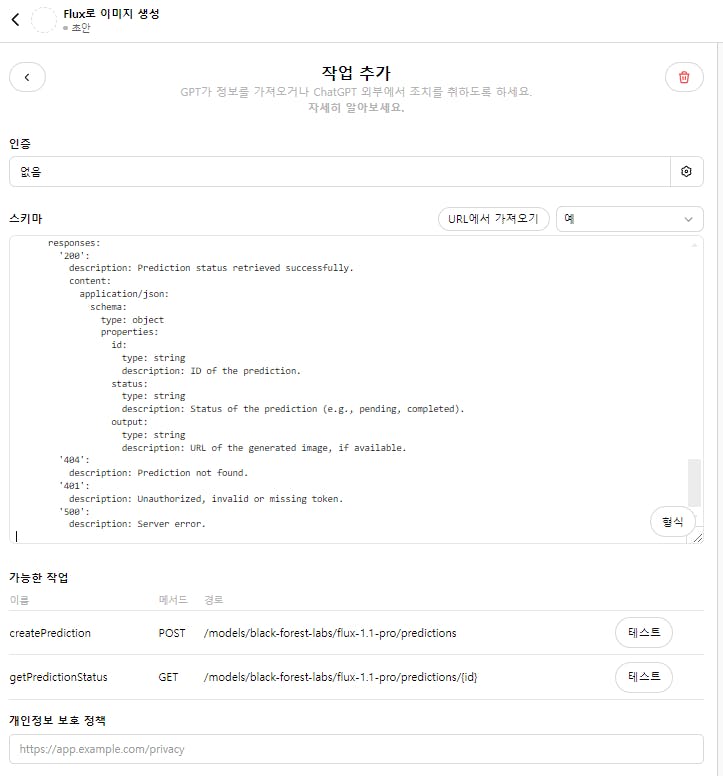
액션 GPT를 선택한 후, 플럭스 1.1 프로에서 복잡한 코드를 복사하여 붙여넣고 프롬프트를 설정한다 . [2-8]
오류가 발생할 경우, 코드를 다시 복사하여 붙여넣어 해결할 수 있으며, 최종적으로 이름과 메소드 경로가 잘 나타나야 성공적인 설정이 된다 . [2-20]
API 키인증을 통해 이미지 생성기의 설정을 완료하고 생성한 API 키를 저장하여 사용한다 . [2-24]
2.1. 🌟 GPT 이미지 생성기 만들기
우측 상단에서 '내 GPT'를 선택하고 ' GPT만들기'를 눌러 새로운 프로젝트를 시작한다 . [2-1]
프로젝트 이름을 '달리 파괴하기'로 설정하고, 지침에 ' 이미지 생성프롬프트 봇'이라고 기록한다 . [2-3]
코드 설정 단계에서는 웹 브라우징과 달리 기능을 모두 비활성화한다 . [2-5]
달리는 사용하지 않을 것이므로, 다른 AI 이미지 생성기를 선택할 필요가 있다 . [2-6]
2.2. 🛠️ 액션 GPT 설정 및 문제 해결
액션 GPT에서 '레플리케이터'를 선택하고, 플럭스 1.1 프로를 누른다 . [2-8]
인풋 아래의 HTTP 버튼을 눌러 복잡한 코드를 복사한 뒤, 액션 GPT로 돌아온다 . [2-12]
붙여넣기 후, 프롬프트와 URL 위치를 지정해 스키마를 신경 써서 완성한다 . [2-15]
완성된 코드를 복사해 스키마에 붙여넣고, 오류가 생기면 문제를 해결한 후 다시 붙여놓는다 . [2-17]
하단에 이름과 메소드 경로가 제대로 나오면 설정이 성공적으로 완료된 것이다 . [2-22]
2.3. 🔑 API 키 인증 및 설정 방법
API 키 인증 유형을 선택하고, 두 번째 옵션을 선택해야 한다 . [2-24]
상단의 레플리 케이로 이동하여 왼쪽 상단의 API 토큰을 눌러야 한다 . [2-26]
API 키를 생성한 후 복사하여 저장하고, 시스템에 붙여 넣는다 . [2-29]
3. 🖼️ 이미지 생성 확인 및 오류 해결 과정
사용자는 고양이를 그려달라는 요청을 하여 작업을 시작하고, 이미지 생성과정에서 확인 버튼을 눌러야 한다. [3-1]
그러나 요청 후 이미지가 생성되지 않을 수 있으며, 이 경우 다시 요청해도 동일한 결과가 나타날 것으로 예상된다. [3-4]
결과 이미지를 복사하고, 새로운 스키마를 만들고 수정하여 올바른 이미지가 표시되도록 해야 한다. [3-6]
고퀄리티 이미지를 생성하는 과정에서 세이프티 로 상황에 따라 검열 문제가 발생할 수 있으며, 이 경우 다시 시도해야 한다. [3-26]
최종적으로, 이러한 단계를 통해 고퀄리티 이미지를 성공적으로 생성할 수 있게 된다. [3-21]
4. 🎨 이미지 생성 방법 안내
첫째, 사용자들은 우측 상단의 만들기 버튼과 업데이트 버튼을 눌러 새로운 Chat GPT로 전환해야 한다. [4-1]
둘째, 사용자들은 '달리'라는 명령어를 사용하여 귀여운 고양이 이미지를 요청할 수 있으며, 요청이 시작되면 확인 버튼을 눌러 진행한다. [4-6]
셋째, 이미지 생성결과가 나타나면, 사용자는 이를 통해 자신의 사업과 생산성을 향상시킬 수 있는 기회를 갖게 된다. [4-11]
결과 및 인사이트
(내용 입력)
여기까지는 성공했는데 API 키 넣고 오류가 나서 해결 중입니다. 처음에 스키마에 URL 부분과 GET 부분이 없어서 다시 요청했습니다. get 부분 생성은 되었는데 URL 부분이 없네요.
openapi: 3.1.0
info:
  title: Replicate Flux Model API
  description: API for generating predictions and retrieving their status using the Black Forest Labs Flux 1.1 Pro model.
  version: 1.0.0
servers:
  - url: https://api.replicatopenapi: 3.1.0
info:
  title: Replicate Flux Model API
  description: API for generating predictions and retrieving their status using the Black Forest Labs Flux 1.1 Pro model.
  version: 1.0.0
servers:
  - url: https://api.replicate.com/v1
    description: Production server for Replicate API
paths:
  /models/black-forest-labs/flux-1.1-pro/predictions:
    post:
      operationId: createPrediction
      summary: Create a prediction using the Flux 1.1 Pro model.
      description: Sends a prompt to generate an image using the Flux 1.1 Pro model with specified settings.
      requestHeaders:
        Authorization:
          description: Bearer token for authorization.
          required: true
          schema:
            type: string
        Content-Type:
          description: Content-Type header.
          required: true
          schema:
            type: string
            default: application/json
        Prefer:
          description: Prefer header to specify waiting for the response.
          required: true
          schema:
            type: string
            enum:
              - wait
      requestBody:
        required: true
        content:
          application/json:
            schema:
              type: object
              properties:
                input:
                  type: object
                  properties:
                    prompt:
                      type: string
                      description: The prompt to generate an image.
                    output_format:
                      type: string
                      description: Format of the output image.
                      enum:
                        - webp
                        - png
                        - jpg
                    output_quality:
                      type: integer
                      description: Quality of the output image (1-100).
                      minimum: 1
                      maximum: 100
                    safety_tolerance:
                      type: integer
                      description: Level of safety filtering (0-3).
                      minimum: 0
                      maximum: 3
                    prompt_upsampling:
                      type: boolean
                      description: Whether to enable upsampling for the prompt.
      responses:
        '200':
          description: Prediction created successfully
          content:
            application/json:
              schema:
                type: object
                properties:
                  id:
                    type: string
                    description: ID of the prediction.
                  status:
                    type: string
                    description: Status of the prediction.
                  output:
                    type: string
                    description: URL of the generated image.
        '400':
          description: Bad request, invalid input.
        '401':
          description: Unauthorized, invalid or missing token.
        '500':
          description: Server error.

  /models/black-forest-labs/flux-1.1-pro/predictions/{id}:
    get:
      operationId: getPredictionStatus
      summary: Retrieve the status of a specific prediction.
      description: Get the current status or result of a prediction using the prediction ID.
      parameters:
        - name: id
          in: path
          required: true
          description: The ID of the prediction to retrieve.
          schema:
            type: string
      responses:
        '200':
          description: Prediction status retrieved successfully.
          content:
            application/json:
              schema:
                type: object
                properties:
                  id:
                    type: string
                    description: ID of the prediction.
                  status:
                    type: string
                    description: Status of the prediction (e.g., pending, completed).
                  output:
                    type: string
                    description: URL of the generated image, if available.
        '404':
          description: Prediction not found.
        '401':
          description: Unauthorized, invalid or missing token.
        '500':
          description: Server error.
e.com/v1
    description: Production server for Replicate API
paths:
  /models/black-forest-labs/flux-1.1-pro/predictions:
    post:
      operationId: createPrediction
      summary: Create a prediction using the Flux 1.1 Pro model.
      description: Sends a prompt to generate an image using the Flux 1.1 Pro model with specified settings.
      requestHeaders:
        Authorization:
          description: Bearer token for authorization.
          required: true
          schema:
            type: string
        Content-Type:
          description: Content-Type header.
          required: true
          schema:
            type: string
            default: application/json
        Prefer:
          description: Prefer header to specify waiting for the response.
          required: true
          schema:
            type: string
            enum:
              - wait
      requestBody:
        required: true
        content:
          application/json:
            schema:
              type: object
              properties:
                input:
                  type: object
                  properties:
                    prompt:
                      type: string
                      description: The prompt to generate an image.
                    output_format:
                      type: string
                      description: Format of the output image.
                      enum:
                        - webp
                        - png
                        - jpg
                    output_quality:
                      type: integer
                      description: Quality of the output image (1-100).
                      minimum: 1
                      maximum: 100
                    safety_tolerance:
                      type: integer
                      description: Level of safety filtering (0-3).
                      minimum: 0
                      maximum: 3
                    prompt_upsampling:
                      type: boolean
                      description: Whether to enable upsampling for the prompt.
      responses:
        '200':
          description: Prediction created successfully
          content:
            application/json:
              schema:
                type: object
                properties:
                  id:
                    type: string
                    description: ID of the prediction.
                  status:
                    type: string
                    description: Status of the prediction.
                  output:
                    type: string
                    description: URL of the generated image.
        '400':
          description: Bad request, invalid input.
        '401':
          description: Unauthorized, invalid or missing token.
        '500':
          description: Server error.

  /models/black-forest-labs/flux-1.1-pro/predictions/{id}:
    get:
      operationId: getPredictionStatus
      summary: Retrieve the status of a specific prediction.
      description: Get the current status or result of a prediction using the prediction ID.
      parameters:
        - name: id
          in: path
          required: true
          description: The ID of the prediction to retrieve.
          schema:
            type: string
      responses:
        '200':
          description: Prediction status retrieved successfully.
          content:
            application/json:
              schema:
                type: object
                properties:
                  id:
                    type: string
                    description: ID of the prediction.
                  status:
                    type: string
                    description: Status of the prediction (e.g., pending, completed).
                  output:
                    type: string
                    description: URL of the generated image, if available.
        '404':
          description: Prediction not found.
        '401':
          description: Unauthorized, invalid or missing token.
        '500':
          description: Server error.
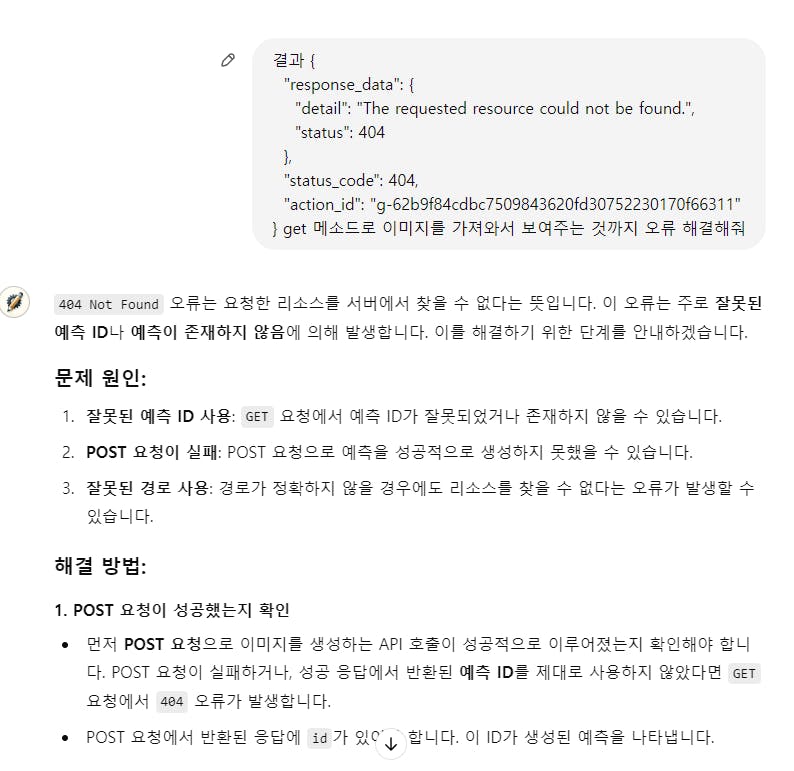
수정하려고 이것 저것 바꿔보고 있는데 replicate API에서 생성한 토큰이 올바르지 않다는 듯 합니다~ 여기서부터 다시 진행해 봐야겠네요~ 테스트 해보면 POST 호출부터 오류인 것 같습니다.
성공은 못했지만 GPT 액션 동작이 어떻게 진행되는지 흐름 정도는 쪼~끔 파악할 수 있었다~가 소득이라면 소득입니다~
다른 분들은 많이 성공하셨다 하니 저도 포기하지 않고 내일은 꼭 성공해 보려고 합니다.😙
로그인하고 댓글을 남겨 주세요
이것도 가능 할것 같은데요. 저도 해보고 있는데 잘안되네요. ㅎㅎ
성공하시면 스키마 공유해 주세요 ㅎㅎ
https://fal.ai/models/fal-ai/flux-pro/v1.1/api

자료 공유 감사드려요~ 오늘 베스트 사례보면서 ID를 지피티가 맘대로 바꿨을 수 있다는 걸 알게 되서 그 부분 살펴보려구요~ 성공하면 빠르게 스키마 공유하겠습니다~ ^^

필요한 AI 정보만
메일함에 쏙쏙 넣어드려요.
지금 핫한 AI 소식부터 직접 해 본 사례까지, 월요일마다 무료로 받아보세요



약속의 아영님! 지금쯤은 성공하셨으려나요 ㅎㅎ 결과 궁금합니다.
앗~ 누리님의 넛지 완벽하다~ 지금 돌리러 갈께요~ 이번 주 강의가 많...많았다는~