


소개
수업시간에 주신 툴로 갈매기 캐릭터 '카이(KAI)' 주인공으로 부산 여행 테마의 AI 이미지 및 영상 제작을 시도했습니다. 스토리텔링 중심의 콘텐츠를 만들고 싶었고, 캐릭터의 일관성 유지와 지역 배경을 활용해 만들어 보고 있습니다.
진행 방법
🍒 어떤 도구를 사용했고, 어떻게 활용하셨나요?
이미지 생성 후 영상 작업
chat gpt(유료)
이미지
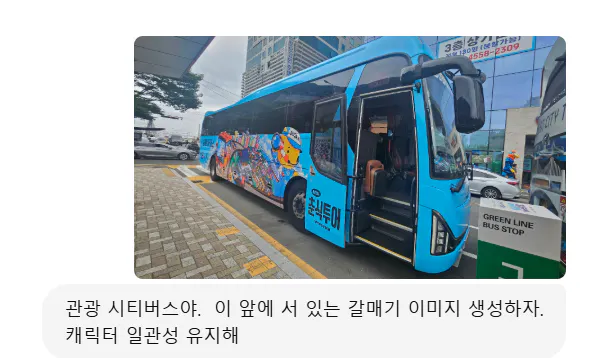
파란색 버스가 건물 앞에 주차되어 있습니다.
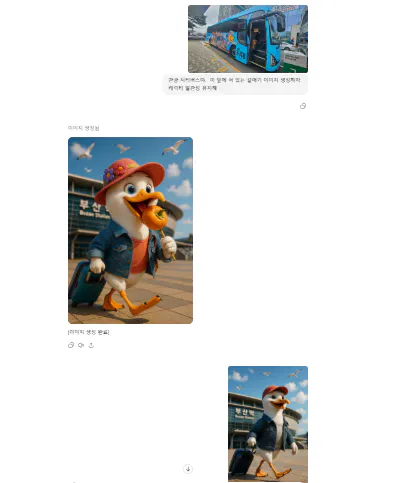
오리와 남자 사이의 대화의 스크린 샷
😆 일관성 유지하는 데는 정말 힘들었답니다.
A 3D-rendered digital image in Pixar-style of an anthropomorphic seagull named KAI, wearing a trendy travel outfit (denim jacket, white T-shirt, red cap), pulling a small navy blue suitcase. The character is standing in front of a blue "Busan City Tour" bus, about to board, smiling brightly at the camera. High realism, warm lighting, vibrant colors, cinematic angle. 16:9 ratio, ultra high resolution 4K.픽사 스타일로 3D 렌더링된 디지털 이미지. 의인화된 갈매기 카이가 트렌디한 여행 복장(데님 재킷, 흰색 티셔츠, 빨간 모자)을 입고 작은 남색 여행 가방을 짊어지고 있습니다. 카이는 파란색 "부산 시티투어" 버스 앞에 서서 탑승을 앞두고 카메라를 향해 환하게 미소 짓고 있습니다. 높은 사실감, 따뜻한 조명, 선명한 색상, 시네마틱한 각도. 16:9 비율, 초고해상도 4K.2.미드저니(유료); 이미지, 영상 생성(기절, 대환장)
https://s.mj.run/pfpG5S9972s A confident and cute anthropomorphic seagull named KAI, wearing a red cap, denim jacket, and white T-shirt, is stepping up into a vibrant blue Busan city tour bus. He is holding a small blue suitcase in one hand. The bus door is open and visible, and the stairs inside the bus can be seen clearly. KAI’s expression is joyful and excited, looking slightly upward as he climbs. Pixar-style 3D, soft cinematic lighting, realistic textures, lively color tone, warm atmosphere, vertical composition, 9:16 ratio, ultra-detailed 4K rendering. --chaos 35 --stylize 550 --weird 1100
chat gpt 가 만들어준 이미지랑은 다릅니다. 차이점이 느껴지실거예요. 저도 조금씩 차이점이 느껴지기 시작했습니다.
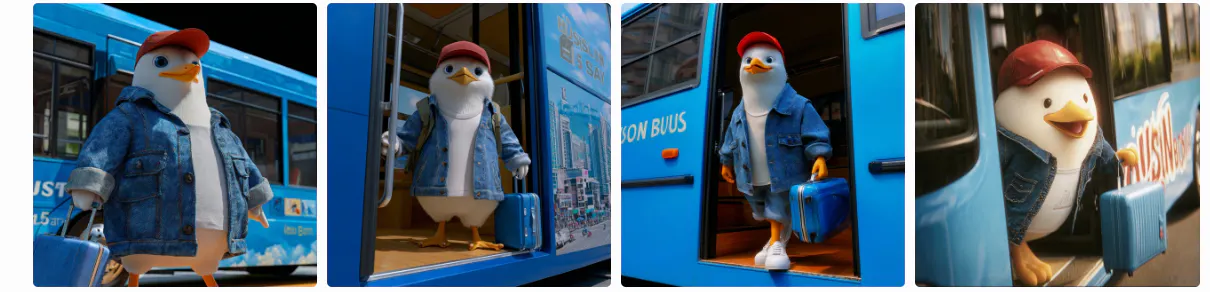
오리가 달린 파란색 버스 4 장
https://s.mj.run/pfpG5S9972s A 3D animated scene of an anthropomorphic seagull named KAI, wearing a red cap, denim jacket, and white T-shirt, confidently stepping up into a bright blue Busan City Tour bus. The open door and stairs are clearly visible. KAI pulls a small blue suitcase with one wing, smiling brightly as he climbs aboard. The warm sunlight gently lights the scene. Pixar-style animation, cinematic camera movement with a slight upward tilt, natural shadows, slow motion walking, vertical 9:16 frame, ultra-detailed textures and vibrant color grading. --ar 171:256 --video 1
😂 영상을 만들었으나 날개가 갑자기 나오고, 가방은 두 개가 됩니다.
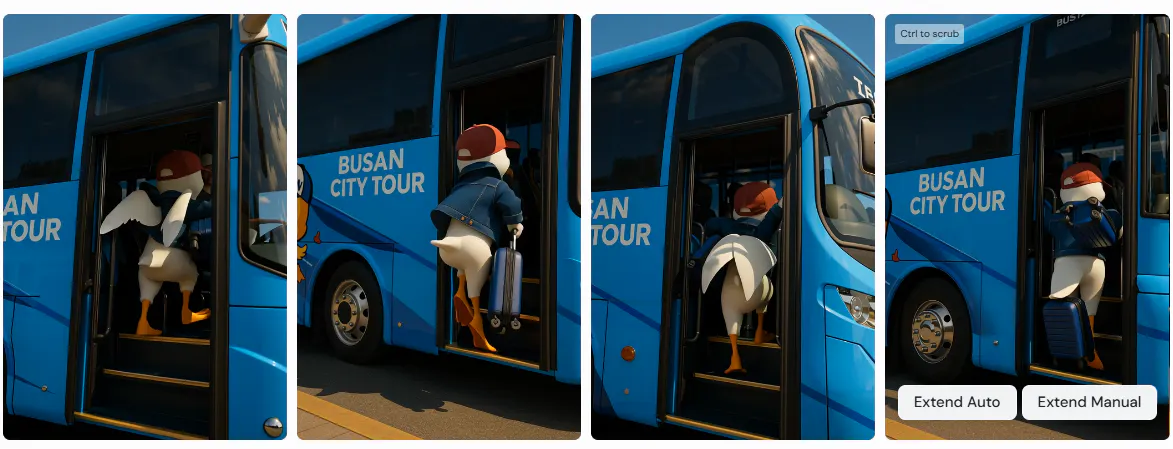
오리가 달린 버스 사진
3.제미나이(무료): veo3(어느 정도 맘에 들었음)
A 3D animated scene of an anthropomorphic seagull named KAI, wearing a red cap, denim jacket, and white T-shirt, confidently stepping up into a bright blue Busan City Tour bus. The open door and stairs are clearly visible. KAI pulls a small blue suitcase with one wing, smiling brightly as he climbs aboard. The warm sunlight gently lights the scene. Pixar-style animation, cinematic camera movement with a slight upward tilt, natural shadows, slow motion walking, 16:9 frame, ultra-detailed textures and vibrant color gradinghttps://files-us-east-1.t-cdn.net/files/c8SzxwGS5l9hJEbexPKaj .
😜 첫번째(9:16)
😅 두번째(16;9)
결과와 배운 점
🍇 배운 점과 나만의 꿀팁을 알려주세요.
다양한 툴의 특성 파악이 중요
캐릭터의 외형, 표정, 소품의 일관성을 유지하는 것이 중요하다는 점을 배움
실제 배경 사진을 참고해 이미지 생성이 가능해서 사실감을 높일 수 있었음
프롬프트의 디테일
현재는 이미지 생성 후 영상 생성을 하는데 원하는 영상을 얻는데 도움이 되고 있음
🍎 과정 중에 어떤 시행착오를 겪었나요?
배경이 어긋나거나 캐릭터가 일관되지 않는 경우가 많아 여러 번 수정 요청이 필요했음.
버스를 타는 장면에서 캐릭터의 방향이나 위치를 자연스럽게 표현하기 위해 포즈와 시점을 수차례 조정함.
🫐 도움이 필요한 부분이 있나요?
영상툴에서 캐릭터의 일관성 유지한 스토리 영상 제작법
🥝 앞으로의 계획이 있다면 들려주세요.
캐릭터 카이의 스토리를 시리즈로 제작 계획
도움 받은 글 (옵션)
참고한 지피터스 글이나 외부 사례를 알려주세요.
물결 님의 프롬프트 가이드
