아침 영어 일기 → 학습지 자동화까지! GPTs + n8n 콜라보 💡
2025.05.31
소개
청강 중이던 홈스쿨링 스터디에서 영감을 받아, 아침에 쓰는 영어 일기를 바탕으로 자동으로 학습지를 만들어보자는 생각이 들었어요. 복잡할 것 같았지만, GPTs와 n8n을 활용하니 꽤 직관적으로 구현할 수 있었습니다 ✨
진행 방법
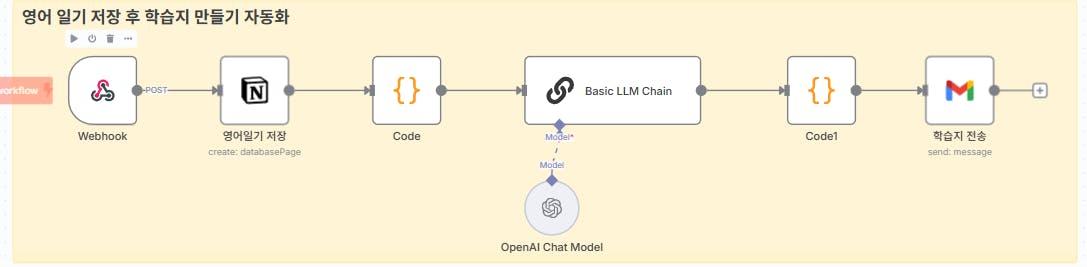
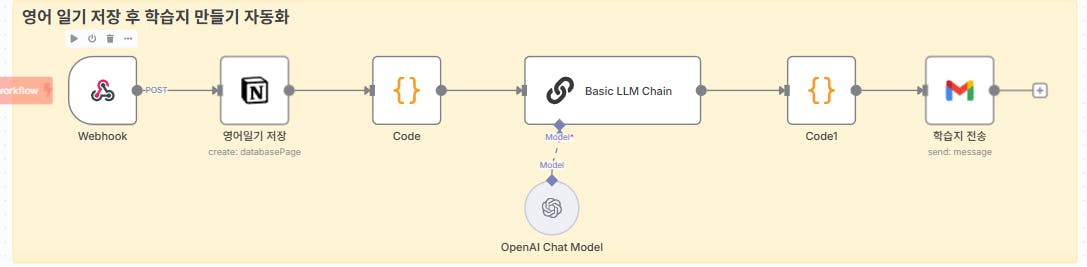
아래는 자동화 흐름이에요:
아침 영어 일기 작성 (GPTs 앱 활용)
GPTs가 다음 정보를 추출 및 구성:
원문
수정문
피드백
단어 정리
간단한 감상
이 데이터를 Webhook으로 n8n에 전송
n8n이 Webhook으로 받은 데이터를 정리 후 Notion에 저장
저장된 노션 페이지를 바탕으로 HTML 형태로 영어 학습지 생성
학습지를 메일로 자동 전송!
사용한 도구 🛠️
GPTs (Custom GPT)
n8n (Railway를 통해 클라우드 호스팅)
Notion API
Gmail API (메일 전송)
webhook 설정 시 겪은 이슈 ⚠️
n8n을 로컬에서 실행할 경우 외부 webhook 수신이 어려움
이를 해결하기 위해 Railway 라는 서비스를 이용해 배포했어요
// 1. 노션에서 전달받은 값들 가져오기
// 제공해주신 Notion 속성값에 맞춰 필드명을 사용합니다.

const title = items[0].json.property_title || "English Study";

// 날짜 처리: items[0].json.property_date 객체에서 start 값을 YYYY-MM-DD 형식으로 가져옵니다.
const dateValue = items[0].json.property_date;
const date = dateValue && dateValue.start ? dateValue.start.substring(0, 10) : "";

// 'topic' 필드는 제공된 Notion 데이터에 없으므로 기본값을 사용합니다.
const topic = "General English"; // 또는 items[0].json.property_topic || "General English"; (만약 필드가 있다면)

// 영어 원문 (사용자가 원래 입력한 문장)
const original_english_sentence = items[0].json.property_original_sentence || "";

const corrected = items[0].json.property_corrected_sentence || "";

// 'vocabulary'는 제공된 데이터에서 단일 문자열 형태입니다.
const vocab = items[0].json.property_vocabulary || "";

// 'grammarPoints' 필드는 제공된 Notion 데이터에 없으므로 빈 문자열을 사용합니다.
const grammarPoints = ""; // 또는 items[0].json.property_grammar || ""; (만약 필드가 있다면)

const feedback = items[0].json.property_feedback || "";
const reflection = items[0].json.property_reflection || "";

// 'originalKorean' (한국어 원문) 필드는 제공된 Notion 데이터에 없으므로 빈 문자열을 사용합니다.
const originalKorean = ""; // 또는 "제공된 한국어 원문 없음" 또는 items[0].json.property_korean_sentence || ""; (만약 필드가 있다면)


// 2. OpenAI(LLM)에 전달될 상세 프롬프트 생성
const prompt = `
Please generate an English learning worksheet in HTML format based on the following information.
Ensure the HTML is clean, readable, and well-structured for printing and web viewing, with a simple, modern design.

**Basic Information:**
- Title: ${title}
- Learning Date: ${date}
- Topic: ${topic}

**Learning Content:**
- Original (Korean): ${originalKorean}
- Original Sentence (English): ${original_english_sentence}
- Corrected English Sentence: ${corrected}
- Key Vocabulary: ${vocab}
- Grammar Points: ${grammarPoints}
- Feedback: ${feedback}
- Reflection: ${reflection}

**Worksheet Section Order and Content Requirements:**
1.  🎯 **Key Vocabulary Practice:**
    * Present vocabulary words clearly (e.g., in a table or list).
    * **For each vocabulary word, include a "Word", "Meaning", and "Example Sentence" column. The example sentence should be original and demonstrate the word's usage effectively.**
    * Include a section for learners to write *their own* example sentences using the vocabulary.
2.  ✍️ **Writing Practice:**
    * Provide prompts for short writing exercises based on the corrected sentence or original context.
    * Include blank lines or an input area for writing.
3.  🎯 **Grammar Focus:**
    * Focus on grammar points identified (e.g., provide fill-in-the-blanks, multiple-choice questions related to the grammar rules).
    * Clearly explain the grammar rule if necessary. (If ${grammarPoints} is empty, this section might be minimal or provide general advice).
4.  💭 **Critical Thinking:**
    * Pose open-ended questions related to the diary's content, encouraging learners to think critically and express opinions.
5.  🌟 **Reflection Corner:**
    * A dedicated section for learners to reflect on their learning experience or the diary content.
    * Include a prompt like "What was the most impressive thing about today's learning?"
6.  📖 **Reading Comprehension:**
    * Present the 'Original Sentence (English)' and 'Corrected English Sentence' for comparative reading. (If ${originalKorean} is empty, the 'Original (Korean)' part will be empty).
    * Include a section for translation practice or comprehension questions.
    * This section should be placed near the end of the worksheet.
7.  ✅ **Answer Key:**
    * Provide concise answers for all objective questions (vocabulary, grammar).
    * For writing/reflection, suggest example answers or guidelines.
    * This section should be clearly distinguishable, possibly at the very end or with a specific style.

**HTML Formatting Requirements:**
* Strictly output only the HTML code. Do NOT include any introductory or concluding remarks, explanations, or markdown fences (like \`\`\`html or \`\`\` anything else).
* Use clear headings (e.g., \`<h1>\`, \`<h2>\`) for sections.
* Utilize \`<div>\` elements with consistent padding and margin for content blocks to structure the layout.
* All CSS must be embedded directly in the \`<head>\` section using a single \`<style>\` tag for maximum compatibility in PDF conversion and email clients.
* Include basic CSS for a clean, A4-printable layout. This could include styles for:
    * A main container (e.g., \`max-width: 800px;\`, \`margin: 20px auto;\`, \`padding: 20px;\`, \`box-shadow: 0 0 10px rgba(0,0,0,0.1);\`).
    * Headings, paragraphs, lists, and tables for good readability.
* Ensure sufficient spacing (margins, padding) and line breaks (\`<br>\` where appropriate, or rely on block element spacing) for overall readability.
* For vocabulary, use a \`<table>\` with clear columns (e.g., Word, Meaning, Example Sentence).
* Provide visual cues for answer spaces (e.g., for fill-in-the-blanks, use underlined spaces or input-like text boxes made with CSS; for multiple choice, use checkbox-like symbols or standard list styling).
* Use clear, readable web-safe fonts (e.g., 'Segoe UI', Arial, sans-serif).
* No external CSS files or external JavaScript (\`<script>\` tags linking to external files). All styles must be embedded in the \`<style>\` tag within the \`<head>\`. No inline JavaScript.
`;

// 3. LLM (Basic LLM Chain)에 보낼 'prompt' 필드에 추가
items[0].json.prompt = prompt;

// 4. 이메일 제목 및 본문 정보 준비
const emailSubject = date
  ? `[영어일기 학습지] ${title} (${date})`
  : `[영어일기 학습지] ${title}`;

const emailBody = `오늘의 영어일기 학습지를 첨부파일로 보내드립니다.<br>PC나 옵시디언에서 열어보세요!`;

// 5. 다음 노드에서 사용할 이메일 정보들을 items[0].json에 추가
items[0].json.emailSubject = emailSubject;
items[0].json.emailBody = emailBody;

return items;
결과와 배운 점
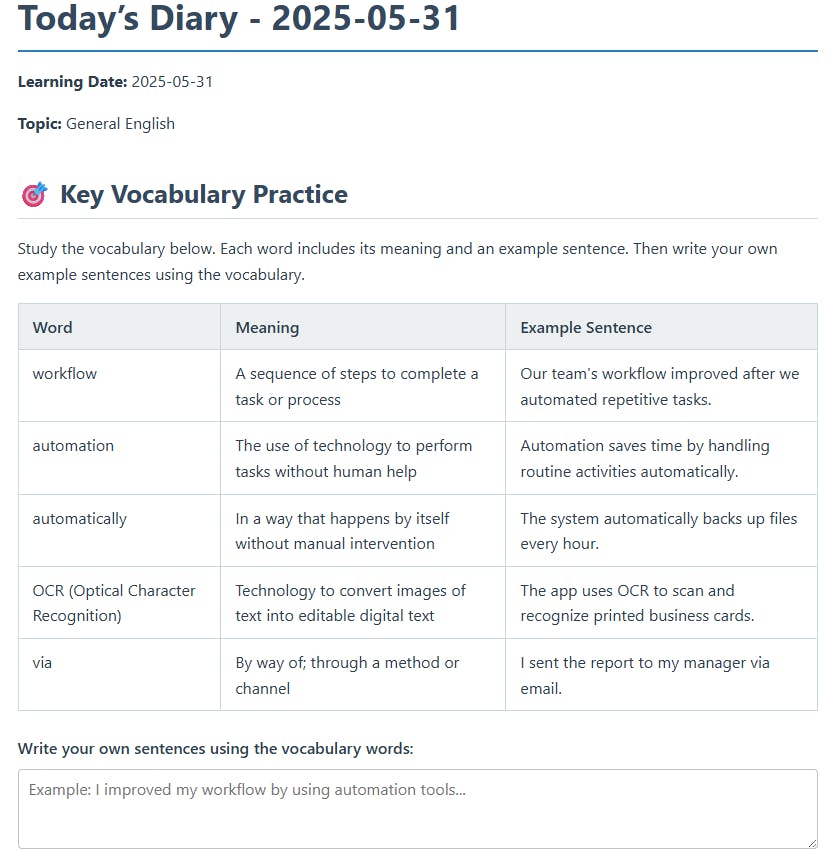
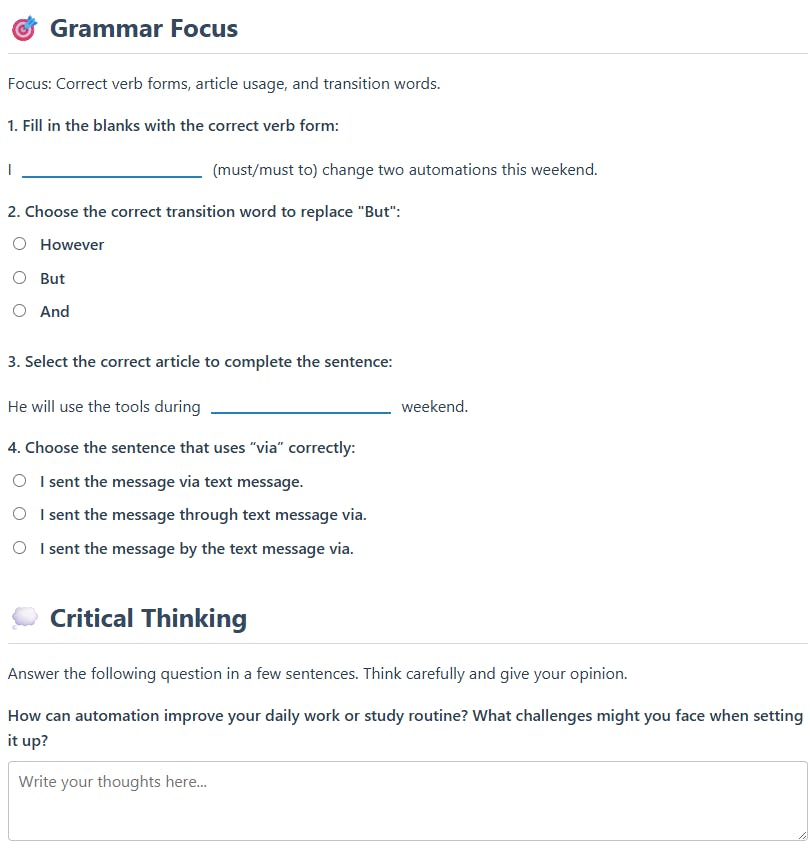
기대 이상으로 GPT가 학습지 형태를 잘 구성해줘서 놀랐어요 😲
자동화의 전체 흐름을 구현해보면서 Webhook, 노션 API 연동, 메일 전송 등 실전 감각도 익힐 수 있었어요
무엇보다 “쉬운 것부터 하나씩” 시작한 게 완성까지 이어질 수 있었던 핵심이었어요!
도움 받은 글 (옵션)
https://youtu.be/DhuaKAW819s?si=X4dpBFyvBSWSBY82
💬 여러분도 단순한 루틴을 자동화로 바꾸면, 매일의 기록이 배움이 되는 도구로 바뀔 수 있어요! 한 걸음씩 천천히 해보세요 :)
로그인하고 댓글을 남겨 주세요

기대 이상으로 GPT가 학습지 형태를 잘 구성해줘서 놀랐어요 😲
자동화의 전체 흐름을 구현해보면서 Webhook, 노션 API 연동, 메일 전송 등 실전 감각도 익힐 수 있었어요
무엇보다 “쉬운 것부터 하나씩” 시작한 게 완성까지 이어질 수 있었던 핵심이었어요!
>>>
마지막 주차가 되니까 좋은 사례가 정말 많이 나오네요
특히 GPTs n8n 연동이 막 엄청 쉽지는 않으실텐데 성공한것도 너무 좋았고, 퀄리티가 높게 나오신것 같아 칭찬드리고 싶습니다!!
수고 많으셨어요!!
청강생 사례까지 챙겨주셔서 감사합니다. 스터디날마다 많이 배우고 있습니다. 감사합니다.


필요한 AI 정보만
메일함에 쏙쏙 넣어드려요.
지금 핫한 AI 소식부터 직접 해 본 사례까지, 월요일마다 무료로 받아보세요
와~ 노션 템플릿도 예쁘네요~