관심 키워드로 조회하는 Youtube top 30 영상

라이언
2025.01.21
소개
내가 관심있는 키워드로 관련 상위 유투브 영상 검색하는 서비스
회사에서 유투브 마케팅을 위해서 벤치마킹 해야 할 영상 찾기 서비스
진행 방법
어떤 도구를 사용했고, 어떻게 활용하셨나요?
YouTube Data API v3
GPT-4o / Claude : 페르소나를 부여하고, 원하는 결과를 간단한 마크다운 형식으로 요청
아래 요청사항 전문
넌 apps script 전문가이고, 자동화 프로그램 경력 20년 차야.
관심 키워드에 대한 youtube 트렌드를 분석하려고 해.

# 구조
## 입력 화면
* 관심 키워드 입력 창
* 검색 일자 조건 입력 창
* 실행 버튼
## 출력 화면
* 입력 조건에 맞는 인기 youtube 영상 10개를 구글 시트에 정리
* 단, 여기서 인기 Youtube 영상이란 조회수/구독자수= 3 이상인 조건의 영상을 의미
* 해상 영상의 주요 정보와 URL  출력
Apps Scirpt
입력 화면 : index.html 로 만들기
<!DOCTYPE html>
<html>
  <head>
    <title>YouTube 트렌드 분석</title>
    <style>
      body {
        font-family: Arial, sans-serif;
        margin: 20px;
        padding: 20px;
        background-color: #f9f9f9;
        border: 1px solid #ddd;
        border-radius: 5px;
        max-width: 400px;
        margin: auto;
      }
      h3 {
        text-align: center;
      }
      input, button {
        margin: 10px 0;
        padding: 10px;
        width: 100%;
        box-sizing: border-box;
      }
      button {
        background-color: #4285f4;
        color: white;
        border: none;
        cursor: pointer;
      }
      button:hover {
        background-color: #357ae8;
      }
    </style>
  </head>
  <body>
    <h3>YouTube 트렌드 분석</h3>
    <label for="keyword">관심 키워드:</label>
    <input type="text" id="keyword" placeholder="키워드를 입력하세요">

    <label for="date">검색 시작 날짜 (YYYY-MM-DD):</label>
    <input type="date" id="date">

    <button onclick="runAnalysis()">실행</button>

    <script>
      function runAnalysis() {
        const keyword = document.getElementById('keyword').value;
        const date = document.getElementById('date').value;

        if (!keyword || !date) {
          alert("모든 필드를 채워주세요.");
          return;
        }

        // 로딩 메시지 표시
        document.querySelector('button').disabled = true;
        document.querySelector('button').textContent = '분석 중...';

        // Google Apps Script로 데이터를 전달
        google.script.run
          .withSuccessHandler(function(url) {
            alert("분석이 완료되었습니다!");
            // 새 탭에서 스프레드시트 열기
            window.open(url, '_blank');
            // 버튼 상태 복구
            document.querySelector('button').disabled = false;
            document.querySelector('button').textContent = '실행';
          })
          .withFailureHandler(function(error) {
            alert("오류가 발생했습니다: " + error.message);
            // 버튼 상태 복구
            document.querySelector('button').disabled = false;
            document.querySelector('button').textContent = '실행';
          })
          .analyzeYouTubeTrends(keyword, date);
      }
    </script>
  </body>
</html>
처리 함수 : code.gs 로 만들기
const YOUTUBE_API_KEY = 'API_key';

function doGet() {
  return HtmlService.createHtmlOutputFromFile('index')
      .setTitle('YouTube 트렌드 분석')
      .setFaviconUrl('https://www.youtube.com/favicon.ico');
}

function analyzeYouTubeTrends(keyword, startDate) {
  try {
    // 현재 활성화된 스프레드시트가 없는 경우 새로 생성
    let ss = SpreadsheetApp.getActiveSpreadsheet();
    if (!ss) {
      ss = SpreadsheetApp.create('YouTube Trends Analysis');
    }

    // 시트 초기화
    const sheet = initializeSheet(ss);

    // YouTube API 검색 실행
    const videos = searchYouTubeVideos(keyword, startDate);

    // 데이터 필터링 및 정렬
    const popularVideos = filterAndSortVideos(videos);

    // 스프레드시트에 데이터 작성
    writeToSheet(sheet, popularVideos);

    // 스프레드시트 URL 반환
    return ss.getUrl();
  } catch (error) {
    Logger.log('Error: ' + error.toString());
    throw new Error('분석 중 오류가 발생했습니다: ' + error.message);
  }
}

function initializeSheet(ss) {
  let sheet = ss.getSheetByName('YouTube Trends');
  if (!sheet) {
    sheet = ss.insertSheet('YouTube Trends');
  } else {
    sheet.clear();
  }

  sheet.getRange('A1:H1').setValues([[
    '순위',
    '제목',
    '채널명',
    '업로드일',
    '조회수',
    '구독자수',
    '조회수/구독자 비율',
    'URL'
  ]]);

  sheet.getRange('A1:H1')
    .setBackground('#f3f3f3')
    .setFontWeight('bold')
    .setHorizontalAlignment('center');

  // 열 너비 설정 (반복문 사용)
  const columnWidths = [50, 300, 150, 100, 100, 100, 150, 250];
  columnWidths.forEach((width, index) => {
    sheet.setColumnWidth(index + 1, width); // index + 1: 1부터 시작하는 열 번호
  });

  return sheet;
}


// 1. YouTube 동영상 검색 함수
function searchYouTubeVideos(keyword, startDate) {
  const searchUrl = `https://www.googleapis.com/youtube/v3/search?part=snippet&type=video&q=${encodeURIComponent(keyword)}&publishedAfter=${startDate}T00:00:00Z&key=${YOUTUBE_API_KEY}&maxResults=50`;

  const response = UrlFetchApp.fetch(searchUrl, { muteHttpExceptions: true });
  const results = JSON.parse(response.getContentText());

  if (results.error) {
    throw new Error(`YouTube API 오류: ${results.error.message}`);
  }

  return results.items.map(item => ({
    videoId: item.id.videoId,
    title: item.snippet.title,
    channelTitle: item.snippet.channelTitle,
    publishedAt: item.snippet.publishedAt,
  }));
}

// 2. 필터링 및 정렬 함수
function filterAndSortVideos(videos) {
  return videos.map(video => {
    const details = getVideoDetails(video.videoId);
    if (!details) return null;

    return {
      ...video,
      views: details.views,
      subscribers: details.subscribers,
      ratio: details.views / details.subscribers,
      url: `https://www.youtube.com/watch?v=${video.videoId}`,
    };
  })
  .filter(video => video && video.ratio >= 3)
  .sort((a, b) => b.ratio - a.ratio);
}

// 3. 동영상 상세 정보 가져오기 함수
function getVideoDetails(videoId) {
  const detailsUrl = `https://www.googleapis.com/youtube/v3/videos?part=statistics&id=${videoId}&key=${YOUTUBE_API_KEY}`;

  const response = UrlFetchApp.fetch(detailsUrl, { muteHttpExceptions: true });
  const result = JSON.parse(response.getContentText());

  if (!result.items || result.items.length === 0) return null;

  const stats = result.items[0].statistics;
  return {
    views: parseInt(stats.viewCount || '0', 10),
    subscribers: parseInt(stats.subscriberCount || '0', 10),
  };
}

// 4. 데이터를 스프레드시트에 기록하는 함수
function writeToSheet(sheet, videos) {
  videos.forEach((video, index) => {
    sheet.appendRow([
      index + 1,
      video.title,
      video.channelTitle,
      video.publishedAt,
      video.views,
      video.subscribers,
      video.ratio.toFixed(2),
      video.url,
    ]);
  });
}
결과와 배운 점
Error와의 무한 반복 싸움의 과정
GPT와 Claude를 번갈아 가면서 상호 Error 대조로 그나마 결과물에 안착
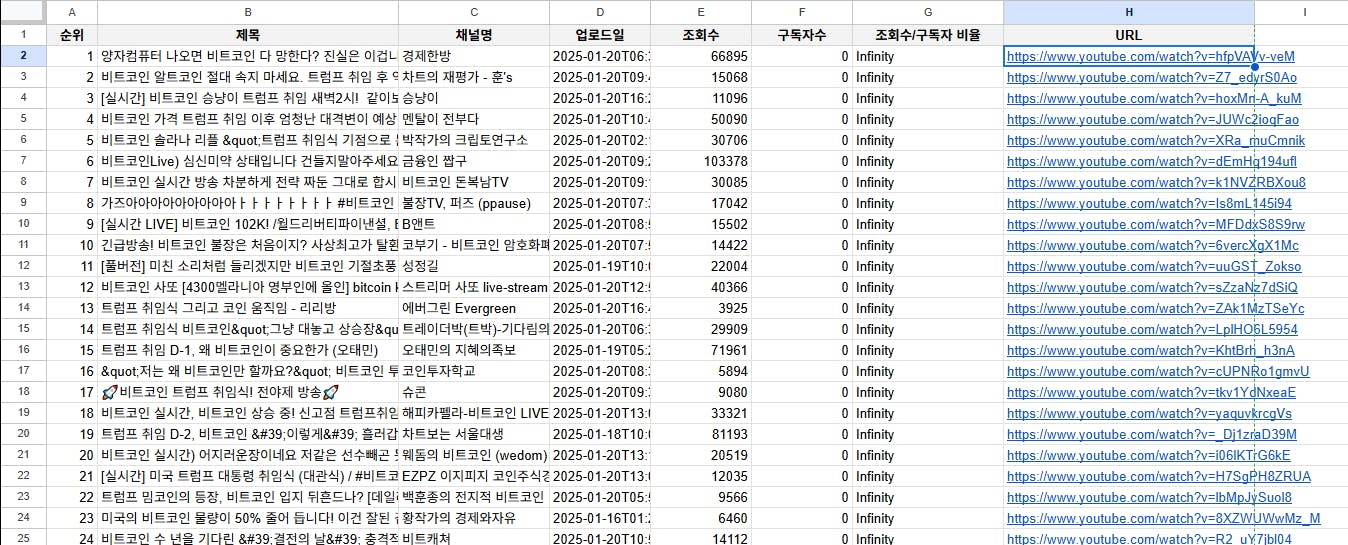
하지만, 구독자수가 null값으로 표시되며, 조회수/구독자수>=3 조건이 반영되지 않은 결과물
요청 조건이 반영되도록 수정하고, 결과 리스트가 내림차순으로 정리할 수 있도록 함
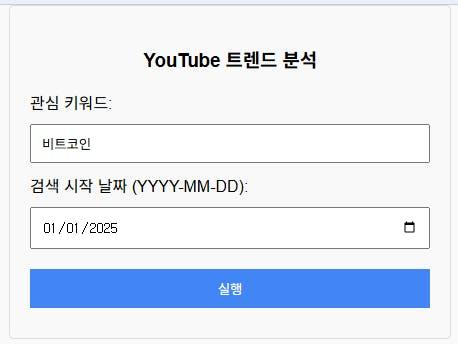
index.html
output sheet
도움 받은 글 (옵션)
유훈_딥쏙님의 "유튜브 채널의 주제 선정 효율화 #2" 케이스를 이후 발견하였고, 이 케이스의 결과값을 참조/보강하여 키워드 / 검색 기간 / 결과 수 등의 입력값과 더 많은 결과값을 받도록 수정할 계획

필요한 AI 정보만
메일함에 쏙쏙 넣어드려요.
지금 핫한 AI 소식부터 직접 해 본 사례까지, 월요일마다 무료로 받아보세요

AI와 코딩을 하더라도 개발의 본질은 끈질김 인 것 같습니다 ㅎㅎ
원하는 결과값중 일부가 안나올때는, '특정 결과값이 안나오는데, 실행 로그에 해당 내용 출력값이 정확히 표시되게 코드 수정해줘' 라고 요청해보세요.
그렇게 코드를 수정하시면 실제 값들이 제대로 수집되는지, 왜 웹앱이나 시트에 안나오는지 원인 파악하기가 조금 더 수월하실 겁니다!