


소개
지난 주 발표에서 중~고등학생들과 앱을 개발하고 싶다고 말씀드렸더니 구글 AI 스튜디오를 이용해 보라고 조언을 해 주셔서 틈을 내 만들어 보았습니다.
웹 페이지보다는 앱에 가까운 형태로 만들고 싶었는데 발전된 모델을 보여드리고 싶었는데 아쉽습니다. 이번 주가 마지막 발표라서 말이죠.
진행 방법
어떤 도구를 사용했고, 어떻게 활용하셨나요?
구글 AI 스튜디오 사용했습니다.
Tip: 사용한 프롬프트 전문을 꼭 포함하고, 내용을 짧게 소개해 주세요.
첫번째 페이지: 타이틀 "버그 마스터" 하단에 start 버튼, 두 번째 페이지: 퀴즈 문제가 나오는데 QA 관련 퀴즈. 예시: 다음의 설명으로 올바른 것은? 장애에서부터 결함, 원인을 찾는 활동을 무엇이라고 하는가? 버튼 총 3개 1. 정적 테스팅 2. 동적 테스팅 3. 탐색적 테스팅 정답은 2, 맞추면 정답입니다! 하고 팡파레가 나오는 교육앱을 개발해줘. html 단일 파일이면 좋겠어.
Tip: 활용 이미지나 캡처 화면을 꼭 남겨주세요.
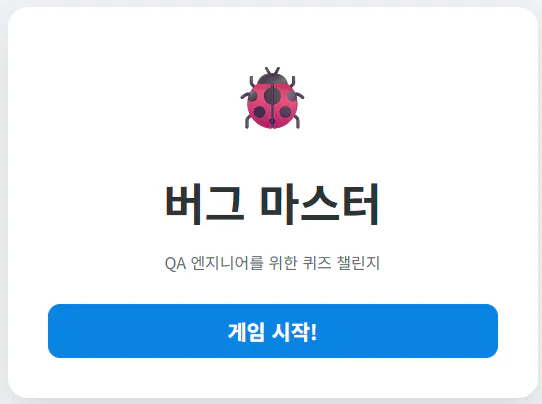
한국어 글자가 적힌 무당벌레
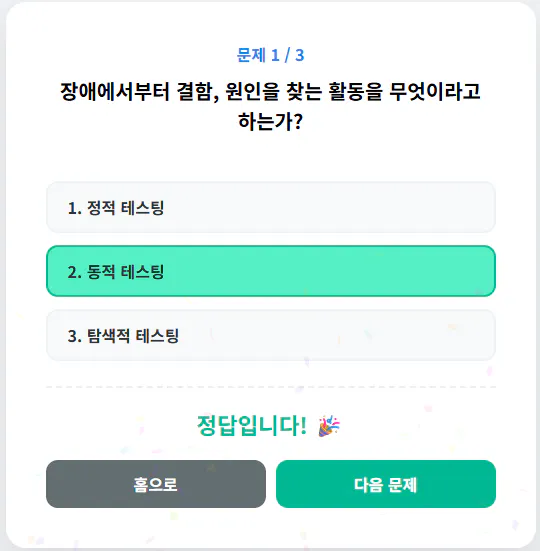
한국어 퀴즈 앱 스크린샷
Tip: 코드 전문은 코드블록에 감싸서 작성해주세요. ( / 을 눌러 '코드 블록'을 선택)
<!DOCTYPE html>
<html lang="ko">
<head>
    <meta charset="UTF-8">
    <meta name="viewport" content="width=device-width, initial-scale=1.0">
    <title>버그 마스터 - QA 교육앱</title>
    <script src="https://cdn.jsdelivr.net/npm/[email protected]/dist/confetti.browser.min.js"></script>
    <style>
        @import url('https://fonts.googleapis.com/css2?family=Noto+Sans+KR:wght@400;700&display=swap');

        :root {
            --primary: #0984e3;
            --success: #00b894;
            --danger: #d63031;
            --gray: #636e72;
            --light: #f0f2f5;
        }

        body {
            font-family: 'Noto Sans KR', sans-serif;
            background-color: var(--light);
            margin: 0;
            display: flex;
            justify-content: center;
            align-items: center;
            height: 100vh;
            overflow: hidden;
        }

        .container {
            background: white;
            padding: 2.5rem;
            border-radius: 20px;
            box-shadow: 0 15px 35px rgba(0,0,0,0.1);
            width: 90%;
            max-width: 450px;
            text-align: center;
            position: relative;
        }

        /* 공통 버튼 스타일 */
        button {
            padding: 12px 20px;
            font-size: 1rem;
            border: none;
            border-radius: 12px;
            cursor: pointer;
            transition: all 0.2s;
            font-family: inherit;
            font-weight: 600;
        }

        button:active {
            transform: scale(0.98);
        }

        /* 시작 페이지 */
        #start-page h1 {
            color: #2d3436;
            font-size: 2.8rem;
            margin-bottom: 10px;
        }
        .subtitle { color: var(--gray); margin-bottom: 30px; }
        .btn-start { background: var(--primary); color: white; width: 100%; font-size: 1.3rem; }

        /* 퀴즈 페이지 */
        #quiz-page { display: none; }
        .question-box {
            min-height: 80px;
            font-size: 1.25rem;
            font-weight: 700;
            margin-bottom: 25px;
            line-height: 1.5;
            word-break: keep-all;
        }

        .choice-container {
            display: flex;
            flex-direction: column;
            gap: 12px;
            margin-bottom: 25px;
        }

        .btn-choice {
            background-color: #f8f9fa;
            color: #2d3436;
            text-align: left;
            border: 2px solid #edf2f7;
        }
        .btn-choice:hover:not(:disabled) {
            background-color: #edf2f7;
            border-color: var(--primary);
        }

        /* 결과 영역 (정답 시 노출) */
        #result-area {
            display: none;
            margin-top: 20px;
            padding-top: 20px;
            border-top: 2px dashed #eee;
            animation: slideUp 0.4s ease-out;
        }

        .correct-text {
            color: var(--success);
            font-size: 1.4rem;
            font-weight: bold;
            margin-bottom: 20px;
            display: block;
        }

        .nav-buttons {
            display: flex;
            gap: 10px;
            justify-content: center;
        }

        .btn-home { background: var(--gray); color: white; flex: 1; }
        .btn-next { background: var(--success); color: white; flex: 1; }

        @keyframes slideUp {
            from { opacity: 0; transform: translateY(20px); }
            to { opacity: 1; transform: translateY(0); }
        }

        .fade-in { animation: fadeIn 0.5s ease; }
        @keyframes fadeIn { from { opacity: 0; } to { opacity: 1; } }
    </style>
</head>
<body>

    <div class="container">
        <!-- 첫 번째 페이지: 홈 -->
        <div id="start-page" class="fade-in">
            <div style="font-size: 4rem;">🐞</div>
            <h1>버그 마스터</h1>
            <p class="subtitle">QA 엔지니어를 위한 퀴즈 챌린지</p>
            <button class="btn-start" onclick="initQuiz()">게임 시작!</button>
        </div>

        <!-- 두 번째 페이지: 퀴즈 -->
        <div id="quiz-page" class="fade-in">
            <div id="question-num" style="color: var(--primary); font-weight: bold; margin-bottom: 10px;">문제 1</div>
            <div class="question-box" id="question-text">
                질문이 여기에 표시됩니다.
            </div>

            <div class="choice-container" id="choice-buttons">
                <!-- 버튼들이 자바스크립트로 생성됩니다 -->
            </div>

            <!-- 정답 시 나타나는 추가 컨트롤 -->
            <div id="result-area">
                <span class="correct-text">정답입니다! 🎉</span>
                <div class="nav-buttons">
                    <button class="btn-home" onclick="goHome()">홈으로</button>
                    <button class="btn-next" onclick="nextQuestion()">다음 문제</button>
                </div>
            </div>
        </div>
    </div>

    <script>
        // 퀴즈 데이터
        const quizData = [
            {
                question: "장애에서부터 결함, 원인을 찾는 활동을 무엇이라고 하는가?",
                choices: ["정적 테스팅", "동적 테스팅", "탐색적 테스팅"],
                answer: 1 // 2번 (인덱스는 1)
            },
            {
                question: "소프트웨어의 변경이 기존의 기능에 영향을 미치지 않았는지 확인하는 테스트는?",
                choices: ["단위 테스트", "리그레션(회귀) 테스트", "연기 테스트"],
                answer: 1
            },
            {
                question: "요구사항 명세서나 설계서 등을 보지 않고 테스터의 경험에 의존하는 테스트는?",
                choices: ["명세 기반 테스트", "구조 기반 테스트", "경험 기반 테스트"],
                answer: 2
            }
        ];

        let currentIdx = 0;

        // 게임 시작
        function initQuiz() {
            currentIdx = 0;
            document.getElementById('start-page').style.display = 'none';
            document.getElementById('quiz-page').style.display = 'block';
            loadQuestion();
        }

        // 홈으로 이동
        function goHome() {
            document.getElementById('quiz-page').style.display = 'none';
            document.getElementById('start-page').style.display = 'block';
            hideResult();
        }

        // 문제 로드
        function loadQuestion() {
            hideResult();
            const q = quizData[currentIdx];
            document.getElementById('question-num').innerText = `문제 ${currentIdx + 1} / ${quizData.length}`;
            document.getElementById('question-text').innerText = q.question;

            const container = document.getElementById('choice-buttons');
            container.innerHTML = ''; // 초기화

            q.choices.forEach((choice, index) => {
                const btn = document.createElement('button');
                btn.className = 'btn-choice';
                btn.innerText = `${index + 1}. ${choice}`;
                btn.onclick = () => checkAnswer(index);
                container.appendChild(btn);
            });
        }

        // 정답 체크
        function checkAnswer(choiceIdx) {
            const q = quizData[currentIdx];
            const buttons = document.querySelectorAll('.btn-choice');

            if (choiceIdx === q.answer) {
                // 정답일 때
                buttons.forEach(btn => btn.disabled = true);
                buttons[choiceIdx].style.backgroundColor = '#55efc4';
                buttons[choiceIdx].style.borderColor = '#00b894';

                document.getElementById('result-area').style.display = 'block';

                // 마지막 문제면 '다음 문제' 버튼을 '결과 보기' 등으로 바꿀 수 있음
                if(currentIdx === quizData.length - 1) {
                    document.querySelector('.btn-next').innerText = '처음부터 다시';
                } else {
                    document.querySelector('.btn-next').innerText = '다음 문제';
                }

                launchConfetti();
            } else {
                // 오답일 때
                const target = event.target;
                target.style.backgroundColor = '#ff7675';
                target.innerText = '❌ 다시 시도해보세요!';
                setTimeout(() => {
                    target.style.backgroundColor = '#f8f9fa';
                    target.innerText = `${choiceIdx + 1}. ${q.choices[choiceIdx]}`;
                }, 1000);
            }
        }

        // 다음 문제로 이동
        function nextQuestion() {
            currentIdx++;
            if (currentIdx < quizData.length) {
                loadQuestion();
            } else {
                // 모든 문제를 다 풀었을 때
                alert('모든 문제를 정복하셨습니다! 당신은 버그 마스터!');
                goHome();
            }
        }

        function hideResult() {
            document.getElementById('result-area').style.display = 'none';
        }

        // 팡파레 효과
        function launchConfetti() {
            confetti({
                particleCount: 100,
                spread: 70,
                origin: { y: 0.6 }
            });
        }
    </script>
</body>
</html>
주요 기능 설명:
단일 파일 구조: HTML, CSS, JavaScript가 하나의 파일에 포함되어 있어 관리가 쉽습니다.
디자인: 깨끗한 카드 타입 UI와 반응형 레이아웃을 적용하여 모바일과 PC에서 모두 잘 보입니다.
퀴즈 로직:
시작 페이지: '버그 마스터' 타이틀과 START 버튼이 노출됩니다.
문제 페이지: 질문과 3개의 보기 버튼이 나옵니다.
정답 판단: 2번(동적 테스팅)을 누르면 "정답입니다!" 메시지와 함께 화면 양옆에서 색종이가 터지는 팡파레 효과가 나타납니다.
오답 처리: 틀린 보기를 누르면 힌트 메시지가 나오며 다시 시도할 수 있습니다.
팡파레 효과: canvas-confetti 라이브러리를 CDN으로 불러와 실제 앱과 같은 화려한 연출을 구현했습니다.
결과와 배운 점
학습 자료 만드는 것 외에도 뭔가 개발을 해보는 실습을 해보려고 했는데 시간이 안 되서 못 하고 있었거든요.
지난 주와 동일한 것을 발표하지 않으려고 나름대로 노력을 했습니다.
처음에 만들고서, 아차... 지난 주 만드신 분들이 홈으로 혹은 다음 문제로 넘어가는 버튼이 있으면 좋겠다고 했던 것이 생각나서 나중에 추가를 했습니다.
정답 화면에 home로 돌아가는 버튼과 다음으로 넘어가는 버튼이 있어야 할 것 같아. 추가해줄 수 있을까?
업데이트된 기능:
동적 퀴즈 시스템: quizData 배열을 만들어 문제를 관리합니다. 이제 정답을 맞추면 다음 문제로 넘어갈 수 있습니다. (예시로 3문제를 넣어두었습니다.)
결과 영역 제어: 평소에는 숨겨져 있다가 정답을 맞추는 순간에만 [홈으로], [다음 문제] 버튼이 애니메이션과 함께 나타납니다.
내비게이션 기능:
홈으로: 언제든지 처음 타이틀 화면으로 돌아가 게임을 초기화합니다.
다음 문제: 다음 배열에 있는 문제를 불러옵니다. 마지막 문제일 경우 알림을 띄우고 다시 처음으로 돌아갑니다.
시각적 피드백: 오답을 클릭하면 버튼이 빨간색으로 변하며 "다시 시도" 메시지가 잠깐 나타나 테스터에게 피드백을 줍니다.
스터디 끝나도 열심히 시도해 보겠습니다.
