개인 카카오톡 대화방 내용을 노션DB로 반자동 기록 관리, 시스템 구축하기 🚀
2025.02.02
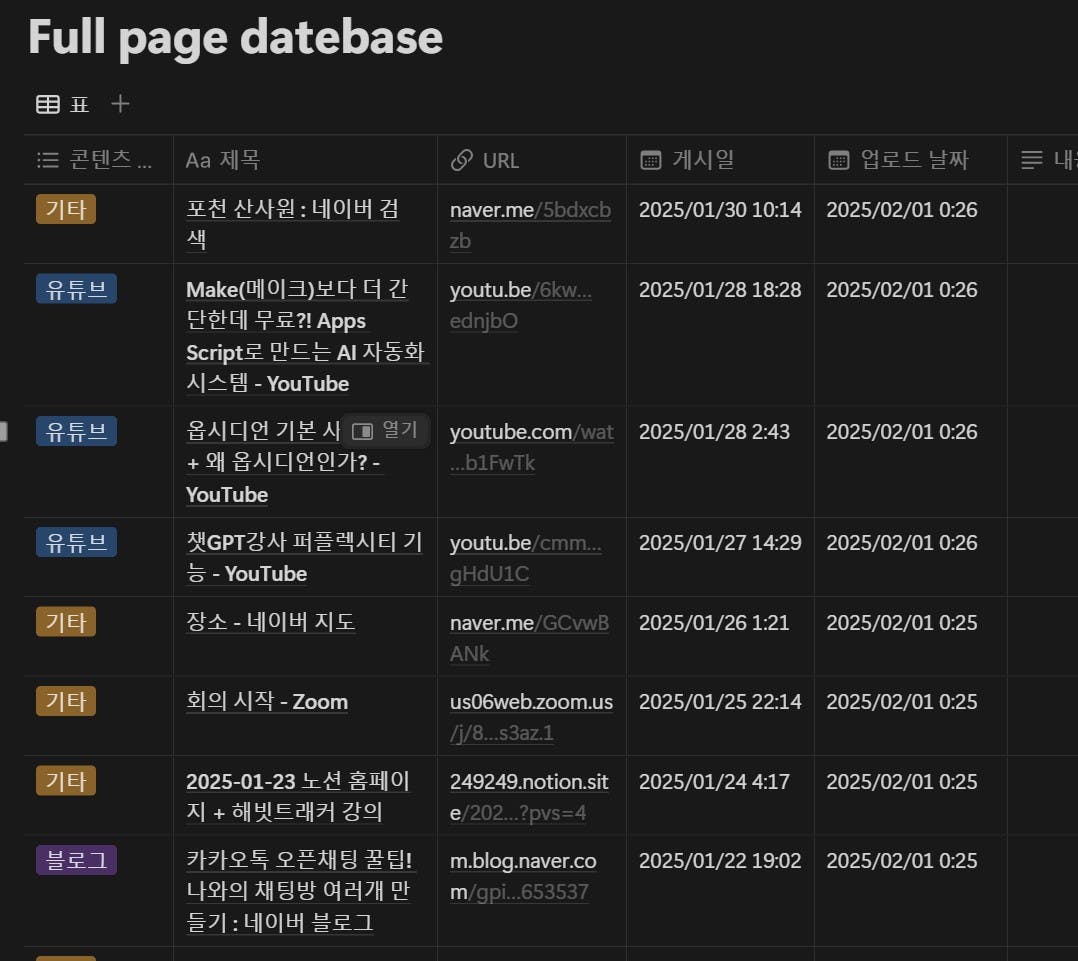
🚀 문제: 놓치는 기록들, 엉망진창 관리 시스템
업무 관련 중요 정보들이나 개인적으로 관심을 가지고 있는 정보들... 저는 이것들을 개인 카카오톡 방에 저장해두는 습관이 있었습니다. "이따가 정리해야지~"라고 생각했지만, 현실은?
중요한 정보가 어디에 있는지 모름
중복 저장, 뒤죽박죽 기록 관리 실패
결국 놓치는 정보 투성이
그래서! **카카오톡 대화 내용을 노션 DB로 정리하면 어떨까?**라는 아이디어를 떠올렸습니다. 하지만 문제는... 카카오톡과 노션을 자동으로 연결하는 게 쉽지 않다! 😭
🌟 해결책: 반자동 방식의 노션 DB 구축
완전 자동화가 어렵다면? 반자동 시스템을 만들면 되죠!
✅ 해결 방법
카카오톡 대화 내보내기 기능 활용
파이썬을 이용해 대화 내용에서 URL 자동 추출
Notion API를 이용해 자동으로 DB에 업로드
이렇게 하면?
중요한 정보만 골라 정리 가능
AI를 활용해 콘텐츠 요약 및 관리 가능(추후 업데이트 예정)
더 이상 정보가 흩어지는 일 없음!
🛠️ 어떻게 만들었나?
1. 클로드(Claude)에게 물어보기 🧐
처음에는 어떤 방법이 가장 효율적인지 고민이 많았어요. 그래서 AI 친구 클로드에게 질문!
"카카오톡 대화 내용을 노션 DB로 정리하는 최적의 방법이 뭐야?"
클로드의 답변을 참고해, 파이썬을 이용한 자동화 코드를 만들기로 결정! 이후에도 여러 번 질문하며 코드를 다듬어 나갔습니다. (AI와 협업하는 세상, 참 신기하죠? 😆)
2. 카카오톡 대화에서 URL 자동 추출 🕵️♂️
카카오톡 대화 파일(.eml)에서 URL만 뽑아내는 코드를 작성했습니다.
3. 노션 API로 자동 업로드 ✨
추출한 URL을 노션 DB에 등록하려면? 노션 API를 사용하면 됩니다! 먼저 API 키를 발급 받고, 데이터베이스 ID를 연결한 후 실행하면 업로드 끝!
import re
import requests
import logging
from datetime import datetime
from notion_client import Client
from dateutil import parser
from urllib.parse import urlparse
import time
from typing import Dict, List, Optional
import pytz
from bs4 import BeautifulSoup
from selenium import webdriver
from selenium.webdriver.chrome.options import Options
from selenium.webdriver.common.by import By

NOTION_TOKEN = " 노션 API 연결 "
DATABASE_ID = " 노션 DB ID 연결 "

CONTENT_TYPE_PATTERNS = {
   'youtube.com': '유튜브',
   'youtu.be': '유튜브',
   'blog.naver.com': '블로그',
   'post.naver.com': '블로그',
   'news.naver.com': '뉴스',
   '.com': '기타',
   '.kr': '기타'
}

class URLProcessor:
   def __init__(self):
       chrome_options = Options()
       chrome_options.add_argument('--headless')
       chrome_options.add_argument('--no-sandbox')
       chrome_options.add_argument('--disable-dev-shm-usage')
       self.driver = webdriver.Chrome(options=chrome_options)

   def __del__(self):
       self.driver.quit()

   def get_page_title(self, url: str) -> str:
       try:
           self.driver.get(url)
           time.sleep(2)
           title = self.driver.title
           if not title:
               title_meta = self.driver.find_elements(By.CSS_SELECTOR, 'meta[property="og:title"]')
               if title_meta:
                   title = title_meta[0].get_attribute('content')
           return title or "제목 없음"
       except Exception as e:
           logging.error(f"제목 추출 실패: {str(e)}")
           return "제목 추출 실패"

   def get_publish_date(self, url: str) -> Optional[datetime]:
       try:
           self.driver.get(url)
           time.sleep(2)

           date_selectors = [
               'meta[property="article:published_time"]',
               'meta[property="og:updated_time"]',
               'meta[name="date"]',
               'meta[name="pubdate"]',
               'time[datetime]'
           ]

           for selector in date_selectors:
               elements = self.driver.find_elements(By.CSS_SELECTOR, selector)
               for element in elements:
                   date_str = element.get_attribute('content') or element.get_attribute('datetime')
                   if date_str:
                       try:
                           return parser.parse(date_str)
                       except:
                           continue
           return None
       except Exception as e:
           logging.error(f"게시일 추출 실패: {str(e)}")
           return None

   def determine_content_type(self, url: str) -> str:
       domain = urlparse(url).netloc.lower()
       for pattern, content_type in CONTENT_TYPE_PATTERNS.items():
           if pattern in domain:
               return content_type
       return "기타"

class NotionManager:
   def __init__(self, token: str, database_id: str):
       self.notion = Client(auth=token)
       self.database_id = database_id
       self.url_processor = URLProcessor()

   def create_page(self, url: str, chat_date: datetime) -> bool:
       try:
           title = self.url_processor.get_page_title(url)
           content_type = self.url_processor.determine_content_type(url)
           publish_date = self.url_processor.get_publish_date(url)
           current_time = datetime.now(pytz.UTC)

           self.notion.pages.create(
               parent={"database_id": self.database_id},
               properties={
                   "콘텐츠 타입": {"multi_select": [{"name": content_type}]},
                   "제목": {"title": [{"text": {"content": title}}]},
                   "URL": {"url": url},
                   "게시일": {"date": {"start": (publish_date or chat_date).isoformat()}},
                   "업로드 날짜": {"date": {"start": current_time.isoformat()}},
                   "상태": {"multi_select": [{"name": "미확인"}]},
                   "주제별 태깅": {"multi_select": []},
                   "내용 요약(AI)": {"rich_text": [{"text": {"content": ""}}]},
                   "메모": {"rich_text": [{"text": {"content": ""}}]}
               }
           )
           return True
       except Exception as e:
           logging.error(f"페이지 생성 실패: {str(e)}")
           return False

class KakaoTalkProcessor:
   def __init__(self, file_path: str):
       self.file_path = file_path

   def extract_messages(self) -> List[Dict]:
       with open(self.file_path, 'r', encoding='utf-8') as f:
           content = f.read()

       pattern = r'(\d{4}년\s*\d{1,2}월\s*\d{1,2}일\s*(?:오전|오후)\s*\d{1,2}:\d{1,2})[^\n]*\n[^\n]*?(https?://\S+)'
       matches = re.finditer(pattern, content)

       messages = []
       for match in matches:
           date_str = match.group(1)
           url = match.group(2).strip()

           try:
               date_str = date_str.replace('년 ', '-').replace('월 ', '-').replace('일 ', ' ')

               if '오후' in date_str:
                   time_part = date_str.split('오후 ')[1]
                   hour = int(time_part.split(':')[0])
                   if hour < 12:
                       hour += 12
                   date_str = date_str.replace(f'오후 {time_part}', f'{hour}:{time_part.split(":")[1]}')
               elif '오전' in date_str:
                   time_part = date_str.split('오전 ')[1]
                   hour = int(time_part.split(':')[0])
                   if hour == 12:
                       hour = 0
                   date_str = date_str.replace(f'오전 {time_part}', f'{hour:02d}:{time_part.split(":")[1]}')

               date = datetime.strptime(date_str, '%Y-%m-%d %H:%M')
               messages.append({
                   'date': date,
                   'url': url
               })
           except Exception as e:
               logging.error(f"날짜 파싱 오류: {date_str} - {str(e)}")
               continue

       return messages

def main():
   logging.basicConfig(
       level=logging.INFO,
       format='%(asctime)s - %(levelname)s - %(message)s',
       filename='notion_upload.log'
   )

   try:
       kakao_processor = KakaoTalkProcessor('카카오톡 대화.eml')
       notion_manager = NotionManager(NOTION_TOKEN, DATABASE_ID)

       messages = kakao_processor.extract_messages()
       logging.info(f"총 {len(messages)}개의 URL 발견")

       success_count = 0
       for message in messages:
           time.sleep(1)

           if notion_manager.create_page(message['url'], message['date']):
               success_count += 1
               logging.info(f"업로드 성공: {message['url']}")
           else:
               logging.error(f"업로드 실패: {message['url']}")

       logging.info(f"작업 완료. 성공: {success_count}, 실패: {len(messages) - success_count}")

   except Exception as e:
       logging.error(f"프로그램 실행 중 오류 발생: {str(e)}")
       raise

if __name__ == "__main__":
   main()
💡 배운 점
완전 자동화가 어려운 경우, 반자동 방식도 좋은 대안
AI와 협업하면 빠르게 문제 해결 가능, 코딩을 몰라도 할 수 있다는 자신감 생성
🎉 앞으로의 계획
AI 요약 기능 추가 → 노션 DB 활용, AI가 자동으로 핵심 내용 정리
로그인하고 댓글을 남겨 주세요



필요한 AI 정보만
메일함에 쏙쏙 넣어드려요.
지금 핫한 AI 소식부터 직접 해 본 사례까지, 월요일마다 무료로 받아보세요



좋은 방법인 것 같은데 제가 잘 몰라서 묻습니다. 저 코드를 어디에다가 실행하면 되나요? 저렇게 하면 좋다는 것은 알겠는데 어디서부터 해야될지 감이 안잡힙니다.