LlamaIndex의 Agent에 대한 기본 스터디

2024.09.03
배경 및 목적
LlamaIndex 공식 문서에 있는 "Building an agent" 이해
Tools(Tavily Search, YahooFinance 등)을 적용한 챗봇 개발
참고 자료
LlamaIndex 공식 문서 : Learn > Building an agent
활용 툴
Visual studio code
실행 과정
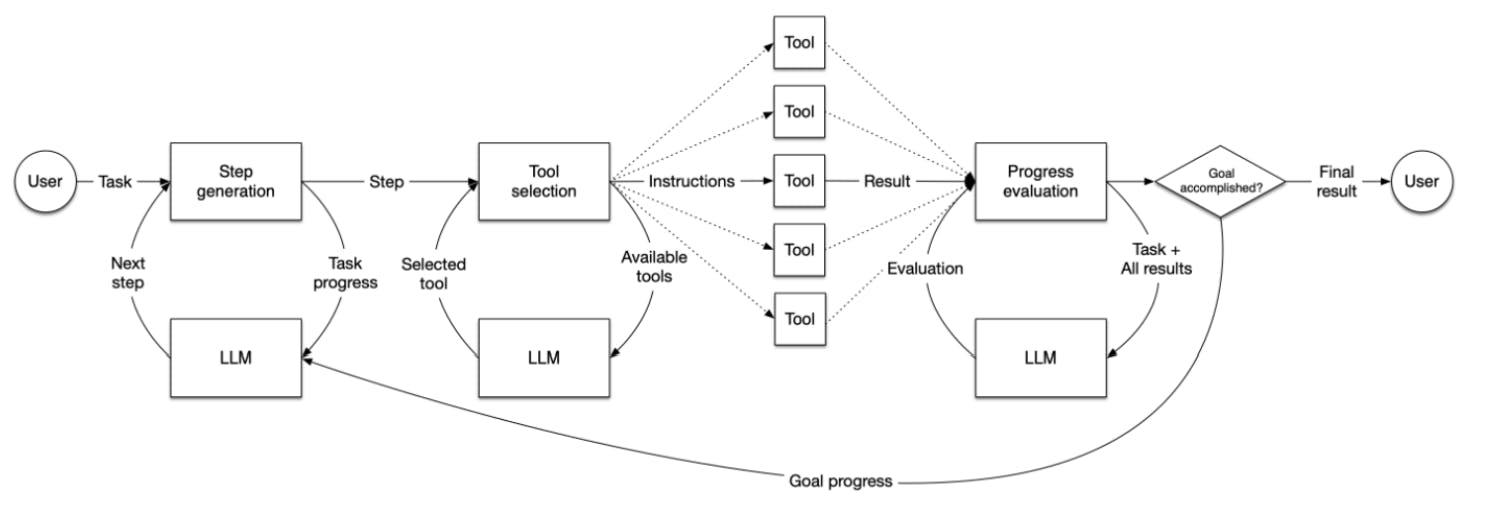
기본 프로세스
[User] 사용자가 agent에게 작업(Task)를 제공한다.

[Step Generation] LLM을 활용하여 주어진 작업을 해결하기 위한 STEP을 생성한다.
                  작업의 성격에 따라 적절한 STEP을 결정.

[Tool Selection] 생성된 단계에 따라 도구의 기능과 목적에 맞는 최적의 도구를 선택,
                 선택된 도구에 대한 Instructions(지시사항) 생성

[Tool Execution] 선택된 도구를 사용, STEP을 수행하고 Result(결과)를 획득

[Progress Evaluation] 실행 결과를 바탕으로 현재 작업의 진행 상황 평가 / 완료 여부 판단

					-> 미 완료 시 처음 단계로 돌아가 추가 작업 수행

[Iteration] 작업이 완료될 때까지 위의 과정을 반복 실행

[Final Result] 작업 완료 후 최종 결과를 사용자에게 전달
기본 Tools 예제
기본 함수(multiply, add)를 생성하고, FunctionTool 객체로 변환함.
FunctionTool 객체의 리스트로 ReActAgent(Reasining and Action) 객체를 생성함.
사용자가 입력한 query를 step별로 분석, 적절한 Tool을 선택 / 적용하여 결과를 생성해 냄.
from dotenv import load_dotenv
from llama_index.core.agent import ReActAgent
from llama_index.llms.openai import OpenAI
from llama_index.core.tools import FunctionTool

# Openai api key 로드
load_dotenv()

# create basic tools
def multiply(a: float, b: float) -> float:
    """Multiply two numbers and returns the product"""
    return a * b
multiply_tool = FunctionTool.from_defaults(fn=multiply)

def add(a: float, b: float) -> float:
    """Add two numbers and returns the sum"""
    return a + b
add_tool = FunctionTool.from_defaults(fn=add)

llm = OpenAI(model="gpt-4o-mini", temperature=0)

# initialize the agent
agent = ReActAgent.from_tools([multiply_tool,add_tool], llm=llm, verbose=True)

# ask a question
response = agent.chat("What is 20+(2*4)? use a tool to calculate every step.")
print(response)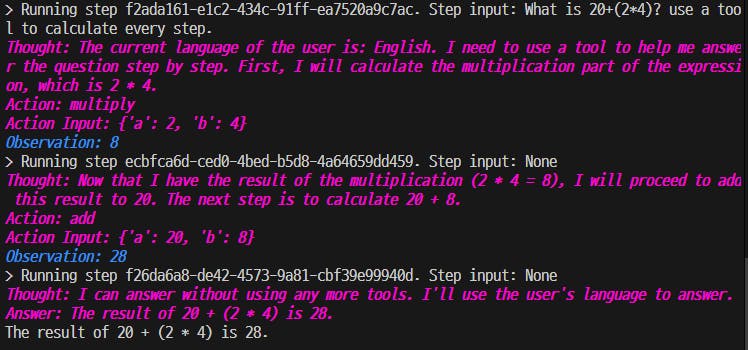
※ Output Template
venv\Lib\site-packages\llama_index\core\agent\react\templates\system_header_template.md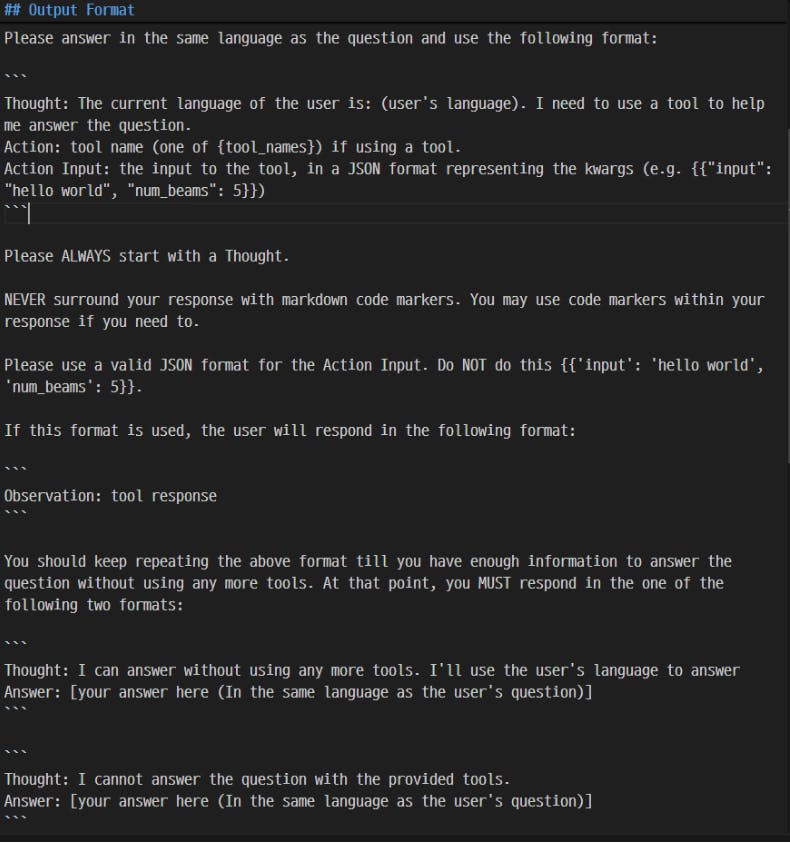
Adding RAG to an agent
활용 자료 : Wikipedia page about the 2023 Canadian federal budget
기존 RAG의 1) Data Load, 2) Indexing, 3) query_engine 과정은 동일.
생성된 query_engine를 활용하여 QueryEngineTool 객체를 생성함.
budget_tool = QueryEngineTool.from_defaults(
    query_engine,
    name="canadian_budget_2023",
    description="A RAG engine with some basic facts about the 2023 Canadian federal budget.",
)
ReActAgent에 budget_tool 추가
agent = ReActAgent.from_tools(
    [multiply_tool, add_tool, budget_tool], verbose=True
)
query 실행
response = agent.chat(
    "What is the total amount of the 2023 Canadian federal budget multiplied by 3? Go step by step, using a tool to do any math."
)
print(response)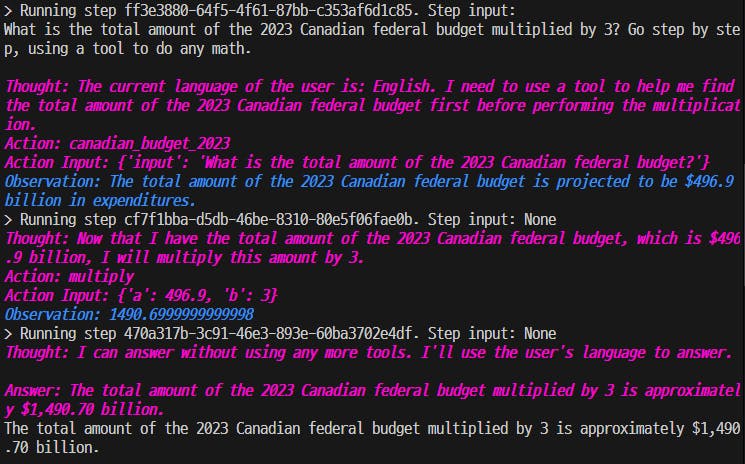
Memory
LlamaIndex에서 agents는 기본적으로 memory 기능이 포함되어 있음.
Yahoo Finance Tool form LlamaHub
설치
pip install llama-index-tools-yahoo-finance전체 코드
# 필요한 라이브러리 Import & 환경 변수 Loading
from dotenv import load_dotenv
load_dotenv()

from llama_index.core.agent import ReActAgent
from llama_index.llms.openai import OpenAI
from llama_index.core.tools import FunctionTool
from llama_index.core import Settings
from llama_index.tools.yahoo_finance import YahooFinanceToolSpec

# settings
Settings.llm = OpenAI(model="gpt-4o-mini", temperature=0)

# function tools(multiply, add)
def multiply(a:float, b:float) -> float:
    """Multiply two numbers and returns the product"""
    return a * b

multiply_tool = FunctionTool.from_defaults(fn=multiply)

def add(a:float, b:float) -> float:
    """Add two numbers and returns the sum"""
    return a + b

add_tool = FunctionTool.from_defaults(fn=add)

# YahooFinanceTool 객체 생성 -> list of Tools로 변환
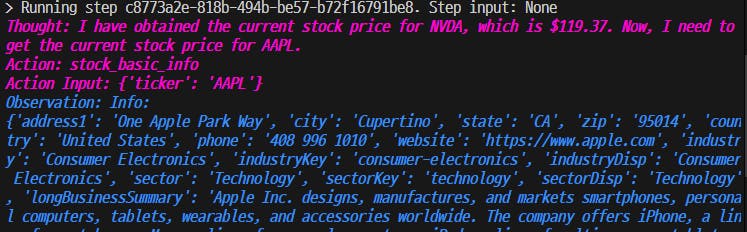
finance_tools = YahooFinanceToolSpec().to_tool_list()

# Tools list에 multiply, add tool을 추가.
finance_tools.extend([multiply_tool, add_tool])

# ReActAgent 객체 생성
agent = ReActAgent.from_tools(finance_tools, verbose=True)

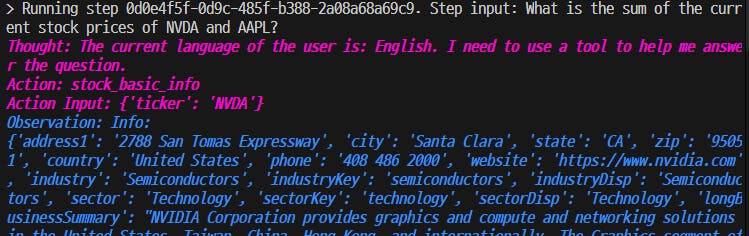
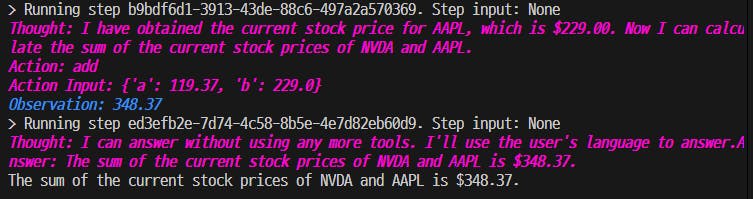
# query 실행 : Nvidia와 Apple의 현재 주가의 합 ???
response = agent.chat("What is the sum of the current stock prices of NVDA and AAPL?")

print(response)
Tavily Search Tool
Tavily API Key 필요 : TavilySearchAPI를 이용한 Retriever(v.1) 참고
# 필요한 라이브러리 Import & 환경 변수 Loading
from dotenv import load_dotenv
load_dotenv() # OPENAI_API_KEY, TAVILY_API_KEY

from llama_index.core import Settings
from llama_index.llms.openai import OpenAI
from llama_index.tools.tavily_research import TavilyToolSpec
from llama_index.core.agent import ReActAgent
import os

# LlamaIndex Settings
Settings.llm = OpenAI(model="gpt-4o-mini", temperature=0)

# tavily api key 저장
tavily_api_key = os.environ["TAVILY_API_KEY"]

# TavilyTool 객체 생성 -> list of Tools로 변환
tavily_tools = TavilyToolSpec(api_key=tavily_api_key).to_tool_list()

# ReActAgent 객체 생성
agent = ReActAgent.from_tools(tavily_tools, verbose=False)

# query 실행 : OpenAI에 대한 뉴스
query2 = "Show me three latest news about OpenAI. Write in Korean."

response = agent.stream_chat(query2)

# LLM 답변을 streaming 방식으로 출력
content = ""
for res in response.response_gen:
    content += res
    print(res, end="", flush=True)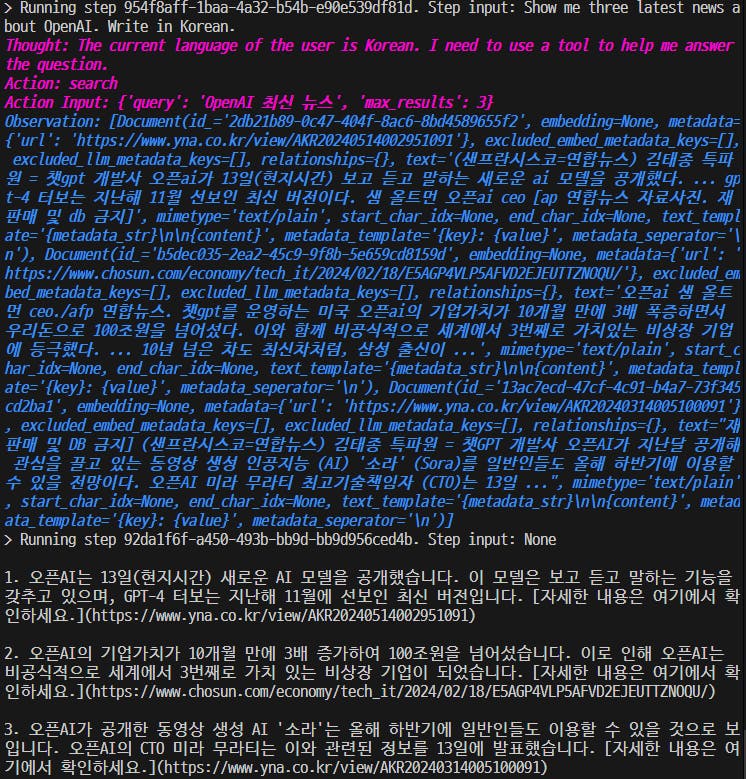
결과 및 인사이트
랭체인의 경우 처럼 LlamaIndex에 관해 Chatgpt, Claude를 통해 얻을 수 있는 게 별로 없음.
LlamaIndex 공식 문서 API Reference > Tools 에 다양한 Tool들이 소개 되어 있음.
Tools 적용 streamlit chatbot은 향후 시도 예정...

필요한 AI 정보만
메일함에 쏙쏙 넣어드려요.
지금 핫한 AI 소식부터 직접 해 본 사례까지, 월요일마다 무료로 받아보세요
안녕하세요 이른아침에 님 RAG Agent 관련하여 글을 써주셨군요,
Tavily Search Tool 를 활용해서 클로드3.5, GPT의 한계인 외부 검색을 이용한 RAG를 구축해보셨네요.
라마인덱스의 Agent를 직접 실습해보시고 그에 느낀점들에 대한 사례를 작성해주셔서 감사합니다! 많이 배워갑니다!!