지피터스 사례 게시글 크롤링(1차 작성)
2024.08.22
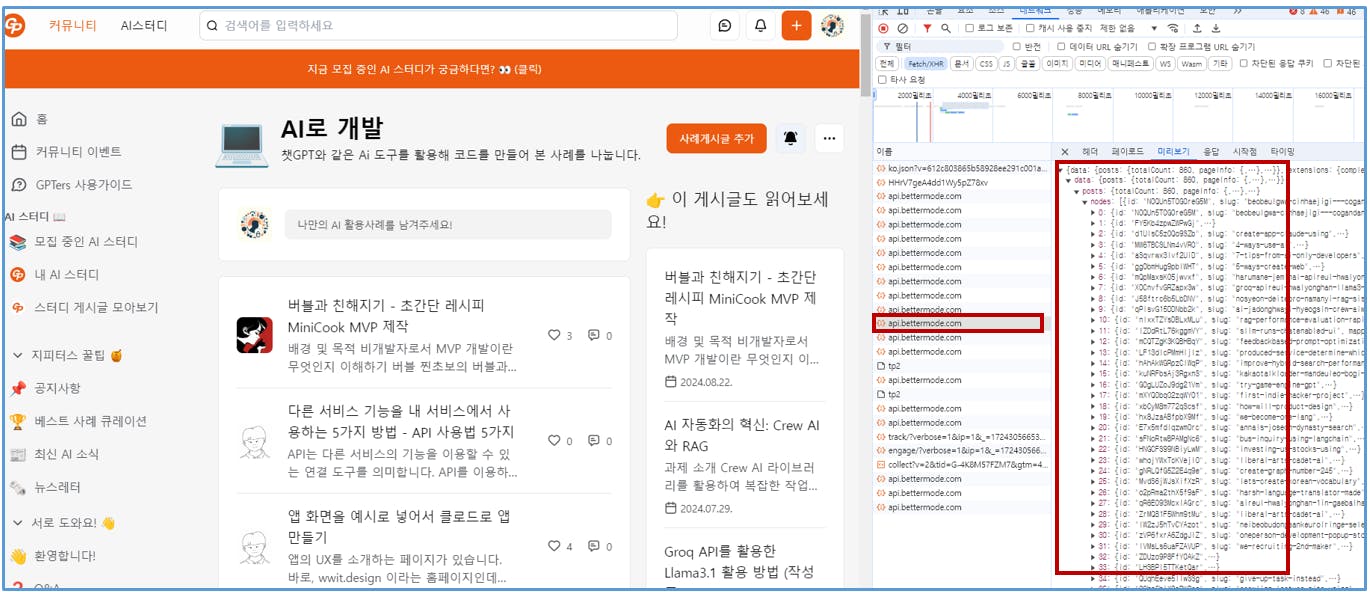
배경 및 목적
빅라마 스터디장님의 스터디 목표에 나와 있는 "지피터스 사례 게시글"에 대한 크롤링 시도
개발자 도구(F12) > 네트워크 정보를 활용.
참고 자료
(내용 입력)
활용 툴
크롬 > 개발자 도구
클로드 & ChatGPT
python & Visual studio code
실행 과정
일단은 "AI로 개발하기" 게시판의 글에 대해 크롤링을 시도해 보았습니다.
크롬 브라우저에서 지피터스 > AI로 개발하기 게시판으로 이동.
개발자 도구(F12)를 열고, 네트워크 > Fetch/XHR 항목을 선택.
"이름"에 있는 항목을 하나씩 클릭하고, "미리보기" 탭에서 게시글 리스트에 대한 정보가 나온 항목 선택.
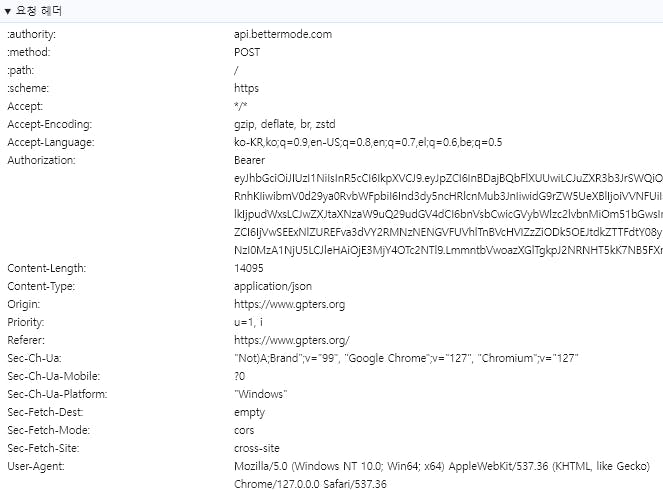
"헤더"에 있는 내용 확인
요청 URL : https://api.bettermode.com/
요청 메서드 : POST
요청 헤더
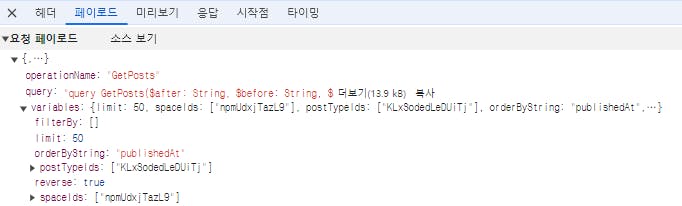
5. "페이로드"에 있는 내용 확인
operationName: "GetPosts"
query: query
{
  "limit": 50,
  "spaceIds": [
    "npmUdxjTazL9" # "AI로 개발하기" 게시판 ID
  ],
  "postTypeIds": [
    "KLxSodedLeDUiTj"
  ],
  "orderByString": "publishedAt",
  "reverse": true,
  "filterBy": []
}
여기서 spaceIds 값이 "AI로 개발하기" 게시판의 ID 값임.
실제로는 "query"에 있는 내용이 길고 복잡한데, 이 부분은 그냥 query 변수로 일단은 대체.
이렇게 확인된 정보를 클로드에 넣고 코드 작성 요청.
[클로드 입력 프롬프트]
다음의 정보를 활용해서 크롤링하는 파이썬 코드를 작성해 줘.
---
# 요청 URL : https://api.bettermode.com
# 요청 메서드 : POST
# 요청 헤더
   {4번의 헤더 내용을 복사해서 입력}
# 요청 페이로드
   {5번의 페이로드 내용을 복사해서 입력}
클로드가 작성해 준 1차 코드
import requests
import json

def crawl_bettermode_api():
    url = "https://api.bettermode.com/"

    headers = {
        "authority": "api.bettermode.com",
        "accept": "*/*",
        "accept-language": "ko-KR,ko;q=0.9,en-US;q=0.8,en;q=0.7,el;q=0.6,be;q=0.5",
        "authorization": "Bearer eyJhbGciOiJIUzI1NiIsInR5cCI6IkpXVCJ9.eyJpZCI6InBDajBQbFlXUUwiLCJuZXR3b3JrSWQiOiJzRGx5OExLRnhKIiwibmV0d29ya0RvbWFpbiI6Ind3dy5ncHRlcnMub3JnIiwidG9rZW5UeXBlIjoiVVNFUiIsImVudGl0eUlkIjpudWxsLCJwZXJtaXNzaW9uQ29udGV4dCI6bnVsbCwicGVybWlzc2lvbnMiOm51bGwsInNlc3Npb25JZCI6IjVwSEExNlZUREFva3dVY2RMNzNENGVFUVhlTnBVcHVIZzZiODk5OEJtdkZTTFdtY08yIiwiaWF0IjoxNzI0Mjg1NTA4LCJleHAiOjE3MjY4Nzc1MDh9.uL9Nm6NDDsIL1AV5NFIGWy_G-DGB6HfZynpwo-ud5MU",
        "content-type": "application/json",
        "origin": "https://www.gpters.org",
        "referer": "https://www.gpters.org/",
        "sec-ch-ua": '"Not)A;Brand";v="99", "Google Chrome";v="127", "Chromium";v="127"',
        "sec-ch-ua-mobile": "?0",
        "sec-ch-ua-platform": '"Windows"',
        "sec-fetch-dest": "empty",
        "sec-fetch-mode": "cors",
        "sec-fetch-site": "cross-site",
        "user-agent": "Mozilla/5.0 (Windows NT 10.0; Win64; x64) AppleWebKit/537.36 (KHTML, like Gecko) Chrome/127.0.0.0 Safari/537.36"
    }

    # GraphQL 쿼리 정의
    query = """
    query GetPosts($limit: Int, $spaceIds: [ID!], $postTypeIds: [ID!], $orderByString: String, $reverse: Boolean, $filterBy: [PostFilterInput!]) {
      posts(limit: $limit, spaceIds: $spaceIds, postTypeIds: $postTypeIds, orderByString: $orderByString, reverse: $reverse, filterBy: $filterBy) {
        edges {
          node {
            id
            title
            content
            publishedAt
            # 필요한 다른 필드들을 여기에 추가하세요
          }
        }
      }
    }
    """

    variables = {
        "limit": 50,
        "spaceIds": ["npmUdxjTazL9"],
        "postTypeIds": ["KLxSodedLeDUiTj"],
        "orderByString": "publishedAt",
        "reverse": True,
        "filterBy": []
    }

    payload = {
        "operationName": "GetPosts",
        "query": query,
        "variables": variables
    }

    response = requests.post(url, headers=headers, json=payload)

    if response.status_code == 200:
        data = response.json()
        return data
    else:
        print(f"Error: {response.status_code}")
        print(response.text)
        return None

# 크롤링 함수 실행
result = crawl_bettermode_api()

# 결과 출력
if result:
    print(json.dumps(result, indent=2))
else:
    print("크롤링에 실패했습니다.")
이 코드를 visual studio code에 넣고 실행을 시키면 에러가 발생함.
"페이로드"의 "소스 보기"에 있는 query 내용을 복사해서 클로드에 넣고, title, url에 대한 정보만 가져 오는 코드를 작성하라고 요청.
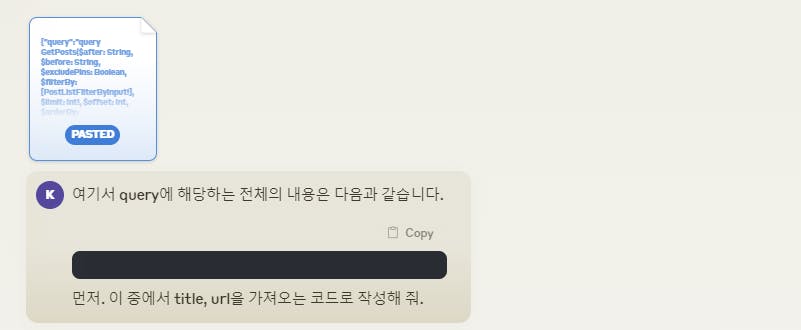
클로드 작성 2차 코드.
import requests
import json

def crawl_bettermode_api():
    url = "https://api.bettermode.com/"

    headers = {
        "authority": "api.bettermode.com",
        "accept": "*/*",
        "accept-language": "ko-KR,ko;q=0.9,en-US;q=0.8,en;q=0.7,el;q=0.6,be;q=0.5",
        "authorization": "Bearer eyJhbGciOiJIUzI1NiIsInR5cCI6IkpXVCJ9.eyJpZCI6InBDajBQbFlXUUwiLCJuZXR3b3JrSWQiOiJzRGx5OExLRnhKIiwibmV0d29ya0RvbWFpbiI6Ind3dy5ncHRlcnMub3JnIiwidG9rZW5UeXBlIjoiVVNFUiIsImVudGl0eUlkIjpudWxsLCJwZXJtaXNzaW9uQ29udGV4dCI6bnVsbCwicGVybWlzc2lvbnMiOm51bGwsInNlc3Npb25JZCI6IjVwSEExNlZUREFva3dVY2RMNzNENGVFUVhlTnBVcHVIZzZiODk5OEJtdkZTTFdtY08yIiwiaWF0IjoxNzI0Mjg1NTA4LCJleHAiOjE3MjY4Nzc1MDh9.uL9Nm6NDDsIL1AV5NFIGWy_G-DGB6HfZynpwo-ud5MU",
        "content-type": "application/json",
        "origin": "https://www.gpters.org",
        "referer": "https://www.gpters.org/",
        "user-agent": "Mozilla/5.0 (Windows NT 10.0; Win64; x64) AppleWebKit/537.36 (KHTML, like Gecko) Chrome/127.0.0.0 Safari/537.36"
    }

    query = """
    query GetPosts($limit: Int!, $spaceIds: [ID!], $postTypeIds: [String!], $orderByString: String, $reverse: Boolean, $filterBy: [PostListFilterByInput!]) {
      posts(limit: $limit, spaceIds: $spaceIds, postTypeIds: $postTypeIds, orderByString: $orderByString, reverse: $reverse, filterBy: $filterBy) {
        nodes {
          title
          url
        }
      }
    }
    """

    variables = {
        "limit": 50,
        "spaceIds": ["npmUdxjTazL9"],
        "postTypeIds": ["KLxSodedLeDUiTj"],
        "orderByString": "publishedAt",
        "reverse": True,
        "filterBy": []
    }

    payload = {
        "operationName": "GetPosts",
        "query": query,
        "variables": variables
    }

    response = requests.post(url, headers=headers, json=payload)

    if response.status_code == 200:
        data = response.json()
        return data['data']['posts']['nodes']
    else:
        print(f"Error: {response.status_code}")
        print(response.text)
        return None

# 크롤링 함수 실행
result = crawl_bettermode_api()

# 결과 출력
if result:
    for post in result:
        print(f"Title: {post['title']}")
        print(f"URL: {post['url']}")
        print("---")
else:
    print("크롤링에 실패했습니다.")
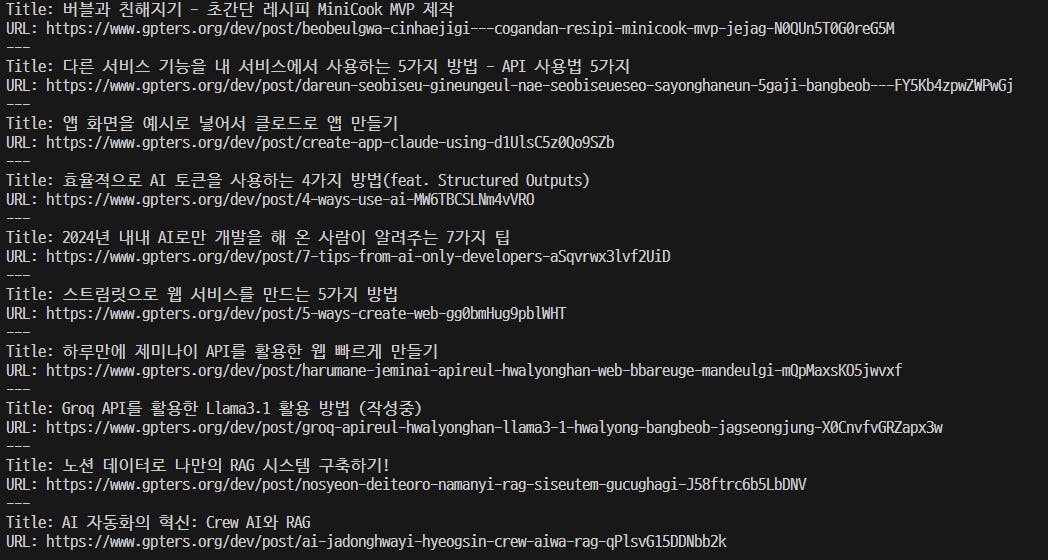
실행 결과
"미리보기" 탭에서 게시글의 여러 가지 세부 정보를 확인 가능.
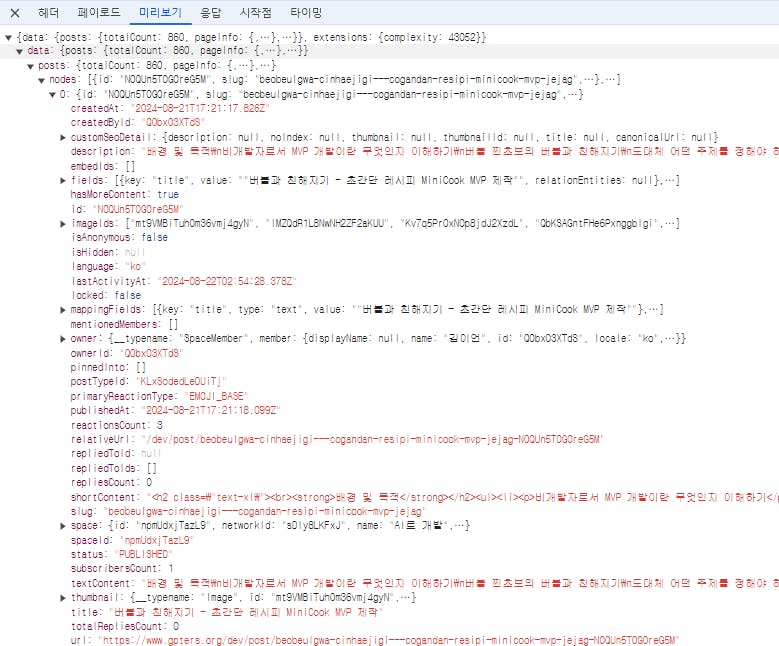
이 정보 중에서 다음의 항목을 추출하고, 결과를 .json 파일로 저장하도록 코드 수정.
[추출 항목]
- 제목
- 작성자
- 생성일
- 반응 수
- 답글 수
- 스페이스 # 게시판 제목
- 링크
- 내용 # 작성 글 텍스트
- 이미지
import requests
import json
from datetime import datetime
# API 엔드포인트 URL
url = "https://api.bettermode.com/"
# 요청 헤더
headers = {
"authority": "api.bettermode.com",
"accept": "*/*",
"accept-language": "ko-KR,ko;q=0.9,en-US;q=0.8,en;q=0.7,el;q=0.6,be;q=0.5",
"authorization": "Bearer eyJhbGciOiJIUzI1NiIsInR5cCI6IkpXVCJ9.eyJpZCI6InBDajBQbFlXUUwiLCJuZXR3b3JrSWQiOiJzRGx5OExLRnhKIiwibmV0d29ya0RvbWFpbiI6Ind3dy5ncHRlcnMub3JnIiwidG9rZW5UeXBlIjoiVVNFUiIsImVudGl0eUlkIjpudWxsLCJwZXJtaXNzaW9uQ29udGV4dCI6bnVsbCwicGVybWlzc2lvbnMiOm51bGwsInNlc3Npb25JZCI6IjVwSEExNlZUREFva3dVY2RMNzNENGVFUVhlTnBVcHVIZzZiODk5OEJtdkZTTFdtY08yIiwiaWF0IjoxNzI0Mjg1NTA4LCJleHAiOjE3MjY4Nzc1MDh9.uL9Nm6NDDsIL1AV5NFIGWy_G-DGB6HfZynpwo-ud5MU",
"content-type": "application/json",
"origin": "https://www.gpters.org",
"referer": "https://www.gpters.org/",
"sec-ch-ua": '"Not/A)Brand";v="8", "Chromium";v="126", "Google Chrome";v="126"',
"sec-ch-ua-mobile": "?0",
"sec-ch-ua-platform": '"Windows"',
"sec-fetch-dest": "empty",
"sec-fetch-mode": "cors",
"sec-fetch-site": "cross-site",
"user-agent": "Mozilla/5.0 (Windows NT 10.0; Win64; x64) AppleWebKit/537.36 (KHTML, like Gecko) Chrome/126.0.0.0 Safari/537.36"
}
# GraphQL 쿼리
query = """
query GetPosts($after: String, $before: String, $limit: Int!, $orderByString: String, $postTypeIds: [String!], $reverse: Boolean, $spaceIds: [ID!]) {
posts(
after: $after
before: $before
limit: $limit
orderByString: $orderByString
postTypeIds: $postTypeIds
reverse: $reverse
spaceIds: $spaceIds
) {
totalCount
pageInfo {
endCursor
hasNextPage
}
edges {
node {
id
title
relativeUrl
createdAt
reactionsCount
repliesCount
textContent
imageIds
owner {
member {
name
}
}
space {
id
name
slug
url
}
}
}
}
}
"""
def fetch_posts(after=None, limit=10):
# 요청 페이로드
payload = {
"operationName": "GetPosts",
"query": query,
"variables": {
"limit": limit,
"spaceIds": ["npmUdxjTazL9"],
"postTypeIds": ["KLxSodedLeDUiTj"],
"orderByString": "publishedAt",
"reverse": True,
# "after": after
}
}
# POST 요청 보내기
response = requests.post(url, headers=headers, json=payload)
# 응답 확인
if response.status_code == 200:
return response.json()
else:
print(f"Error: {response.status_code}")
print(response.text)
return None
def fetch_and_parse_response():
all_posts = []
after = None
# 첫 번째 요청으로 전체 게시물 수 확인
initial_data = fetch_posts(limit=1)
if not initial_data:
return
total_count = initial_data['data']['posts']['totalCount']
print(f"전체 게시물 수: {total_count}")
# 사용자로부터 추출할 게시물 수 입력 받기
while True:
try:
requested_posts = int(input(f"추출할 게시물 수를 입력하세요 (1-{total_count}): "))
if 1 <= requested_posts <= total_count:
break
else:
print(f"1에서 {total_count} 사이의 숫자를 입력해주세요.")
except ValueError:
print("올바른 숫자를 입력해주세요.")
print(f"가져올 게시물 수: {requested_posts}")
while len(all_posts) < requested_posts:
data = fetch_posts(after, min(10, requested_posts - len(all_posts)))
if not data:
break
posts = data['data']['posts']
for edge in posts['edges']:
node = edge['node']
all_posts.append({
'id': node['id'],
'title': node['title'],
'relativeUrl': node['relativeUrl'],
'createdAt': node['createdAt'],
'reactionsCount': node['reactionsCount'],
'repliesCount': node['repliesCount'],
'owner_name': node['owner']['member']['name'],
'space_id': node['space']['id'],
'space_name': node['space']['name'],
'space_url': node['space']['url'],
'textContent': node['textContent'],
'imageIds': node['imageIds']
})
if not posts['pageInfo']['hasNextPage']:
break
after = posts['pageInfo']['endCursor']
# 추출된 데이터를 JSON 파일로 저장
with open('extracted_post_data.json', 'w', encoding='utf-8') as f:
json.dump(all_posts, f, ensure_ascii=False, indent=2)
print(f"추출된 데이터 {len(all_posts)}개가 'extracted_post_data.json' 파일로 저장되었습니다.")
# 추출된 데이터 출력
for post in all_posts:
print(f"제목: {post['title']}")
print(f"작성자: {post['owner_name']}")
print(f"생성일: {post['createdAt']}")
print(f"반응 수: {post['reactionsCount']}")
print(f"답글 수: {post['repliesCount']}")
print(f"스페이스: {post['space_name']} (ID: {post['space_id']})")
print(f"링크: {post['space_url'][:22]}{post['relativeUrl']}")
print(f"내용: {post['textContent'][:1000]}")
print(f"이미지: {post['imageIds']}")
print("-" * 50)
if __name__ == "__main__":
fetch_and_parse_response()결과 및 인사이트
다소 복잡할 수 있지만, 경우에 따라서는 개발자 도구 > 네트워크 정보를 활용해서 웹 크롤링을 해 보는 것도 괜찮을 듯 함.
요청 헤더에 있는 정보를 더 넣을 필요는 없지만, Authorization 정보는 꼭 있어야 할 정보 중에 하나인 듯. (자신의 브라우저에서의 정보를 활용해야 함)
이 토큰 정보를 클로드에게 물어 보니, 다음의 정보를 담고 있다고 함.
이 중에서 iat는 생성일시, exp는 만료일시인데, 생성일로부터 30일 유효.
{
  "id": "pCj0PlYWQL",
  "networkId": "sDly8LKFxJ",
  "networkDomain": "www.gpters.org",
  "tokenType": "USER",
  "entityId": null,
  "permissionContext": null,
  "permissions": null,
  "sessionId": "5pHA16VTDAokwUcdL73D4eEQXeNpUpuHg6b8998BmvFSLWmcO2",
  "iat": 1724298120,
  "exp": 1726890120
}
이 크롤링을 통해서 수집된 게시글의 텍스트 정보를 파일로 저장해서 빅라마님이 목표로 하고 있는 "라마인덱스로 지피터스 사례글 DB를 기반으로 한 RAG" 구축에 활용할 수 있을 듯 합니다.
로그인하고 댓글을 남겨 주세요

** 사례 게시판별 ID는 다음의 정보에서 확인 가능.
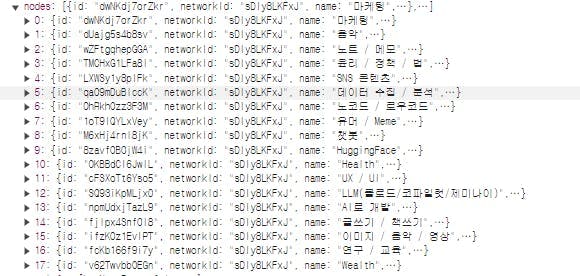
[
  {
    "name": "마케팅",
    "id": "dwNKdj7orZkr"
  },
  {
    "name": "음악",
    "id": "dUajg5s4b8sv"
  },
  {
    "name": "노트 / 메모",
    "id": "wZFtgqhepGGA"
  },
  {
    "name": "윤리 / 정책 / 법",
    "id": "TMCHxG1LFa8I"
  },
  {
    "name": "SNS 콘텐츠",
    "id": "LXWSy1y8plFk"
  },
  {
    "name": "데이터 수집 / 분석",
    "id": "qa09mDuBlccK"
  },
  {
    "name": "노코드 / 로우코드",
    "id": "0hRkhOzz3F3M"
  },
  {
    "name": "유머 /  Meme",
    "id": "1oT9IQYLxVey"
  },
  {
    "name": "챗봇",
    "id": "M6xHj4rnI8jK"
  },
  {
    "name": "HuggingFace",
    "id": "8zavfOBOjW4i"
  },
  {
    "name": "Health",
    "id": "OKBBdCl6JwIL"
  },
  {
    "name": "UX / UI",
    "id": "cFSXoTt6Yso5"
  },
  {
    "name": "LLM(클로드/코파일럿/제미나이)",
    "id": "SQ93iKpMLjx0"
  },
  {
    "name": "AI로 개발",
    "id": "npmUdxjTazL9"
  },
  {
    "name": "글쓰기 / 책쓰기",
    "id": "fjIpx4SnfOI8"
  },
  {
    "name": "이미지 / 음악 / 영상",
    "id": "ifzK0z1EvlPT"
  },
  {
    "name": "연구 / 교육",
    "id": "fcKb166f9i7y"
  },
  {
    "name": "Wealth",
    "id": "v62Twvbb0EGn"
  }
]
필요한 AI 정보만
메일함에 쏙쏙 넣어드려요.
지금 핫한 AI 소식부터 직접 해 본 사례까지, 월요일마다 무료로 받아보세요


안녕하세요 이른아침에님 제가 할일을 하시다니! 정말 감사드립니
이번에 GraphQL에 대해서 학습이 되셨을 것 같아요!
저도 처음엔 Bettermode 관련해서 데이터 가져오고 그럴때 GraphQL이라 많이 다른점이 있어서 애먹었는데 이젠 조금 적응한 상태입니다.
이른아침에님의 프로젝트 궁금합니다! 화이팅이에요 🙂