"라마의 모든것" 노션 데이터로 스터디장의 업무를 자동화!

2024.08.26
배경 및 목적
노션에 라마 스터디에 필요한 모든 데이터를 넣었어요. 이 데이터를 가지고 저를 대신해서 답변이 가능한 챗봇을 Llamaindex를 활용하여 구축하려고 했습니다.
참고 자료
https://colab.research.google.com/github/run-llama/llama_index/blob/main/docs/docs/examples/data_connectors/NotionDemo.ipynb
-> 코랩에서 직접 라마인덱스를 활용해서 RAG를 구축해보는 코드를 볼 수 있고, 실행도 해볼 수 있었어요
https://docs.llamaindex.ai/en/stable/examples/data_connectors/NotionDemo/?h=notion
-> 라마 인덱스 공식 문서 안에 있는 example 중 하나에요!
https://developers.notion.com/docs/authorization
-> 노션 데이터를 활용하기 위해 노션 DOC를 참고했어요
https://colab.research.google.com/drive/1iDLah_yoVKmx6EOqi14RWOVAJ7Tt-EwK?usp=sharing
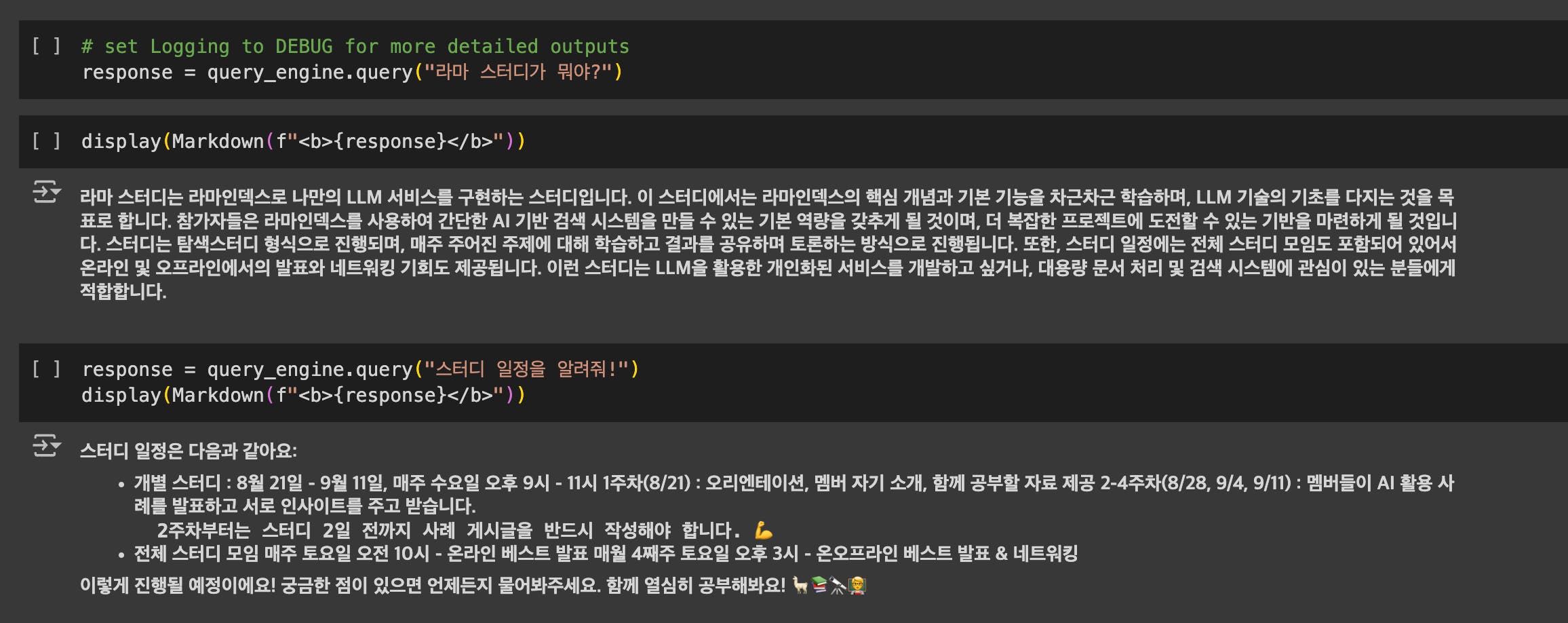
-> 제가 만든 코랩이에요. 참고하시면 노션 데이터를 바탕으로 RAG POC구축이 가능합니다.
활용 툴
POC : 코랩
추후 진행될 툴 : VSCODE에서 Streamlit으로 로컬에서 채팅이 가능하도록 구현
- Python, Llamaindex, Notion DB, Vscode, Streamlit
실행 과정
먼저 라마인덱스 DOC을 처음부터 차근차근 읽었어요. 그리고 Example 항목에서 지금 내가 가장 빠르게 구현할 수 있는 방법을 알려주는 자료를 찾았어요.
https://docs.llamaindex.ai/en/stable/examples/
코랩 코드를 학습하고, 코랩 코드를 바탕으로 "클로드 3.5 소넷" 에게 질문을 해가면서 RAG 프롬프트도 "빅라마"에 맞게 변경해주고, 채팅 형태의 구현이 가능하도록 코드를 함께 짜고 디버깅 했습니다!
    custom_prompt_template = PromptTemplate(
        "당신은 이름은 빅라마 입니다. 라마인덱스 스터디의 스터디장이고, "
        "항상 친절하고 공손한 어조로 질문에 마크다운 형식으로 답변합니다."
        "스터디에 열심히 참여하도록 스터디원들을 응원합니다."
        "다음 정보를 바탕으로 질문에 답변해주세요:\n"
        "만약 답을 모른다면 \"빅라마가 답변하기 힘든 질문입니다. [email protected] 로 연락을 주시면 빠른 답변을 드릴게요! \" 라고 해줘 ."
        "---------------------\n"
        "{context_str}\n"
        "---------------------\n"
        "질문: {query_str}\n"
        "답변: "
    )
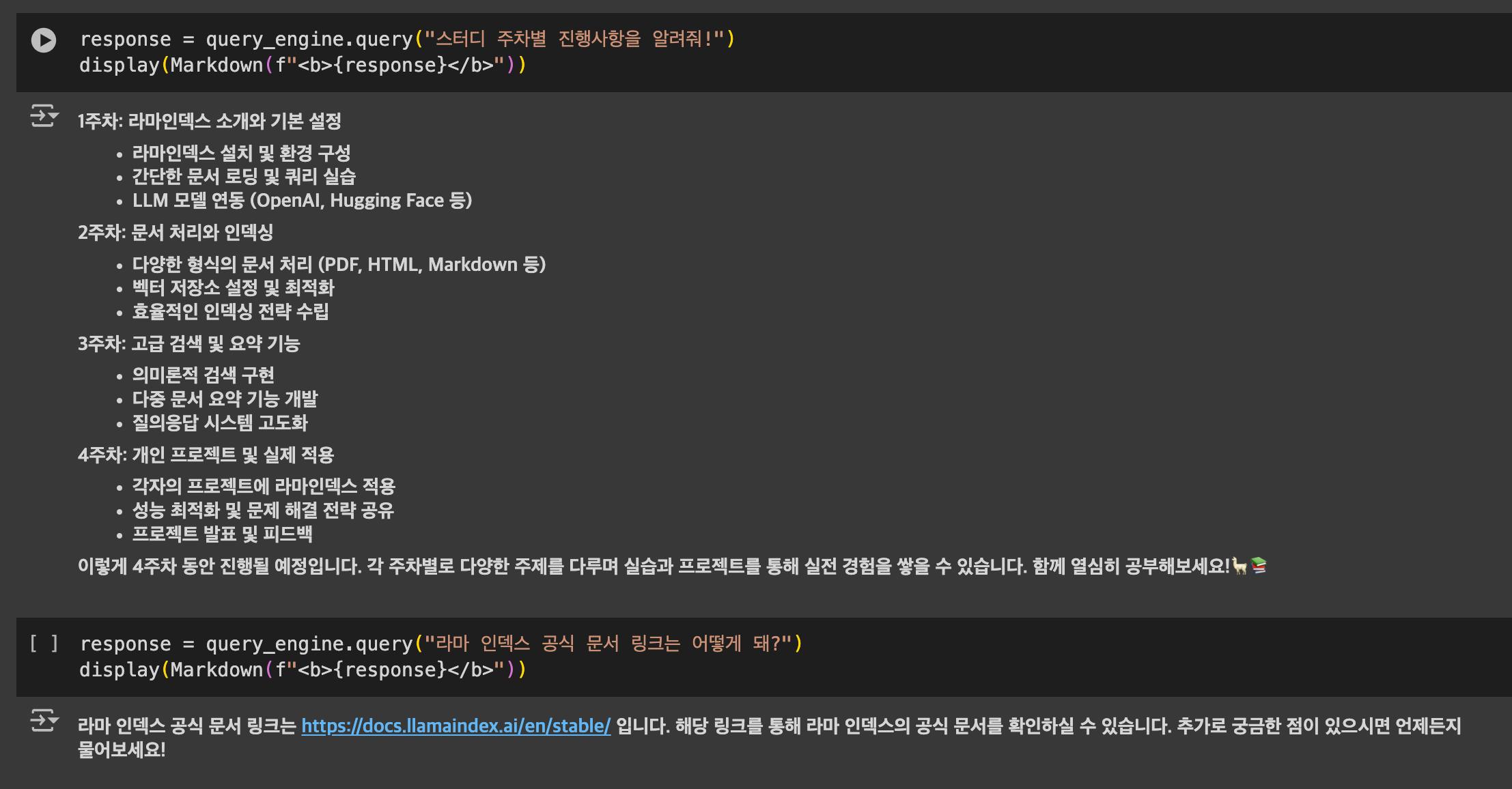
1. 코랩으로 RAG 구축 가능 여부 확인하기
https://colab.research.google.com/drive/1iDLah_yoVKmx6EOqi14RWOVAJ7Tt-EwK?usp=sharing
2. Vscode 환경에서 구축하기
"""
Notion Reader Script

This script demonstrates the use of Notion data connector with LlamaIndex.
It retrieves data from a Notion page, creates an index, and saves documents to files.
"""

import os
import json
import logging
from typing import List

from llama_index.core import SummaryIndex, Document
from llama_index.readers.notion import NotionPageReader
from llama_index.core.prompts import PromptTemplate
from llama_index.core.query_engine import RetrieverQueryEngine
from llama_index.core import Settings

# Configure logging
logging.basicConfig(level=logging.DEBUG)  # Changed to DEBUG for more detailed logs
logger = logging.getLogger(__name__)

# Set up environment variables
os.environ['OPENAI_API_KEY'] = '키를 입력해주세요'
NOTION_INTEGRATION_TOKEN = "키를 입력해주세요"
PAGE_IDS = ["페이지 아이디1", "페이지 아이디2"]

def load_notion_documents(integration_token: str, page_ids: List[str]) -> List[Document]:
    """Load documents from Notion pages."""
    reader = NotionPageReader(integration_token=integration_token)
    documents = reader.load_data(page_ids=page_ids)
    logger.debug(f"Loaded {len(documents)} documents from Notion")
    return documents

def create_index(documents: List[Document]) -> SummaryIndex:
    """Create a SummaryIndex from documents."""
    return SummaryIndex.from_documents(documents)

def create_query_engine(index: SummaryIndex) -> RetrieverQueryEngine:
    """Create a custom query engine with a defined prompt template."""
    custom_prompt_template = PromptTemplate(
        "당신은 이름은 빅라마 입니다. 라마인덱스 스터디의 스터디장이고, "
        "항상 친절하고 공손한 어조로 질문에 답변합니다. "
        "스터디에 열심히 참여하도록 스터디원들을 응원합니다."
        "다음 정보를 바탕으로 질문에 답변해주세요:\n"
        "---------------------\n"
        "{context_str}\n"
        "---------------------\n"
        "질문: {query_str}\n"
        "답변: "
    )

    retriever = index.as_retriever()
    Settings.llm = Settings.llm or Settings.llm_defaults
    return RetrieverQueryEngine.from_args(
        retriever,
        text_qa_template=custom_prompt_template
    )

def perform_query(query_engine: RetrieverQueryEngine, query: str) -> str:
    """Perform a query and return the response."""
    response = query_engine.query(query)
    return response

def save_documents(documents: List[Document]):
    """Save each document to a separate file and its metadata to a JSON file."""
    for i, doc in enumerate(documents, 1):
        # Save document content
        content_filename = f"document_{i}_content.txt"
        try:
            with open(content_filename, "w", encoding="utf-8") as f:
                f.write(doc.text)
            logger.info(f"Saved document content to {content_filename}")
            logger.debug(f"Document {i} length: {len(doc.text)} characters")
        except Exception as e:
            logger.error(f"Error saving document {i} content: {str(e)}")

        # Save document metadata
        metadata_filename = f"document_{i}_metadata.json"
        try:
            with open(metadata_filename, "w", encoding="utf-8") as f:
                json.dump(doc.metadata, f, ensure_ascii=False, indent=2)
            logger.info(f"Saved document metadata to {metadata_filename}")
        except Exception as e:
            logger.error(f"Error saving document {i} metadata: {str(e)}")

def main():
    """Main function to run the Notion Reader script."""
    documents = load_notion_documents(NOTION_INTEGRATION_TOKEN, PAGE_IDS)

    # Log document details before saving
    for i, doc in enumerate(documents, 1):
        logger.debug(f"Document {i} details:")
        logger.debug(f"  Length: {len(doc.text)} characters")
        logger.debug(f"  Metadata: {doc.metadata}")

    # Save the loaded documents
    save_documents(documents)

    # Verify saved content
    for i, doc in enumerate(documents, 1):
        content_filename = f"document_{i}_content.txt"
        try:
            with open(content_filename, "r", encoding="utf-8") as f:
                saved_content = f.read()
            if len(saved_content) != len(doc.text):
                logger.warning(f"Document {i} content length mismatch: "
                               f"Original {len(doc.text)}, Saved {len(saved_content)}")
        except Exception as e:
            logger.error(f"Error verifying saved content for document {i}: {str(e)}")

    index = create_index(documents)
    query_engine = create_query_engine(index)

    queries = [
        "라마 스터디가 뭐야?",
        "스터디 일정을 알려줘!",
        "스터디 주차별 진행사항을 알려줘!",
        "라마 인덱스 공식 문서 링크는 어떻게 돼?"
    ]

    # Uncomment the following lines to perform queries
    for query in queries:
        response = perform_query(query_engine, query)
        print(f"질문: {query}")
        print(f"답변: {response}\n")

if __name__ == "__main__":
    main()
-> VScode 환경에서도 돌아가게 만듬
3. Streamlit 코드 구현하기
import streamlit as st
import os
import json
import logging
from typing import List

from llama_index.core import SummaryIndex, Document
from llama_index.readers.notion import NotionPageReader
from llama_index.core.prompts import PromptTemplate
from llama_index.core.query_engine import RetrieverQueryEngine
from llama_index.core import Settings

# Configure logging
logging.basicConfig(level=logging.INFO)
logger = logging.getLogger(__name__)

# Set up environment variables
os.environ['OPENAI_API_KEY'] = '키를 입력해주세요'
NOTION_INTEGRATION_TOKEN = "키를 입력해주세요"
PAGE_IDS = ["페이지 아이디 1", "페이지 아이디 2", "페이지 아이디 3"]

@st.cache_resource
def load_notion_documents():
    """Load documents from Notion pages."""
    reader = NotionPageReader(integration_token=NOTION_INTEGRATION_TOKEN)
    documents = reader.load_data(page_ids=PAGE_IDS)
    logger.info(f"Loaded {len(documents)} documents from Notion")
    return documents

@st.cache_resource
def create_index_and_query_engine():
    """Create a SummaryIndex from documents and a query engine."""
    documents = load_notion_documents()
    index = SummaryIndex.from_documents(documents)

    custom_prompt_template = PromptTemplate(
        "당신은 이름은 빅라마 입니다. 라마인덱스 스터디의 스터디장이고, "
        "항상 친절하고 공손한 어조로 질문에 답변합니다."
        "스터디에 열심히 참여하도록 스터디원들을 응원합니다."
        "다음 정보를 바탕으로 질문에 답변해주세요:\n"
        "만약 답을 모른다면 \"빅라마가 답변하기 힘든 질문입니다. [email protected] 로 연락을 주시면 빠른 답변을 드릴게요! \" 라고 해줘 ."
        "---------------------\n"
        "{context_str}\n"
        "---------------------\n"
        "질문: {query_str}\n"
        "답변: "
    )

    retriever = index.as_retriever()
    Settings.llm = Settings.llm or Settings.llm_defaults
    query_engine = RetrieverQueryEngine.from_args(
        retriever,
        text_qa_template=custom_prompt_template
    )

    return query_engine

def perform_query(query_engine: RetrieverQueryEngine, query: str) -> str:
    """Perform a query and return the response."""
    response = query_engine.query(query)
    return str(response)

def main():
    st.title("라마인덱스 스터디 채팅봇")

    # Initialize session state for chat history
    if "messages" not in st.session_state:
        st.session_state.messages = []

    # Load documents and create query engine
    query_engine = create_index_and_query_engine()

    # Display chat messages
    for message in st.session_state.messages:
        with st.chat_message(message["role"]):
            st.markdown(message["content"])

    # Chat input
    if prompt := st.chat_input("무엇이든 물어보세요!"):
        st.session_state.messages.append({"role": "user", "content": prompt})
        with st.chat_message("user"):
            st.markdown(prompt)

        with st.chat_message("assistant"):
            response = perform_query(query_engine, prompt)
            st.markdown(response)
        st.session_state.messages.append({"role": "assistant", "content": response})

if __name__ == "__main__":
    main()결과 및 인사이트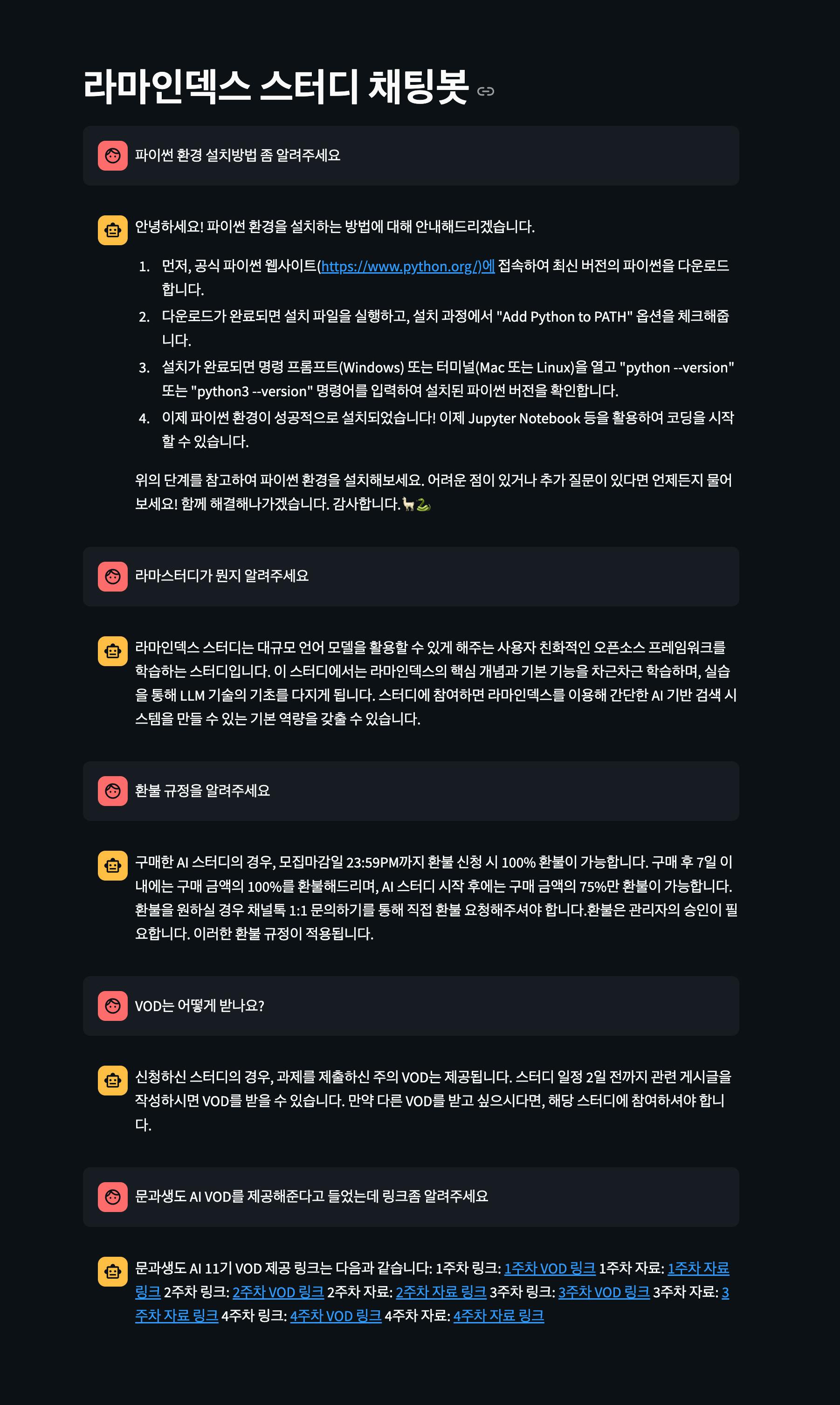
-> 저를 대신할 챗봇이 생겼습니다.
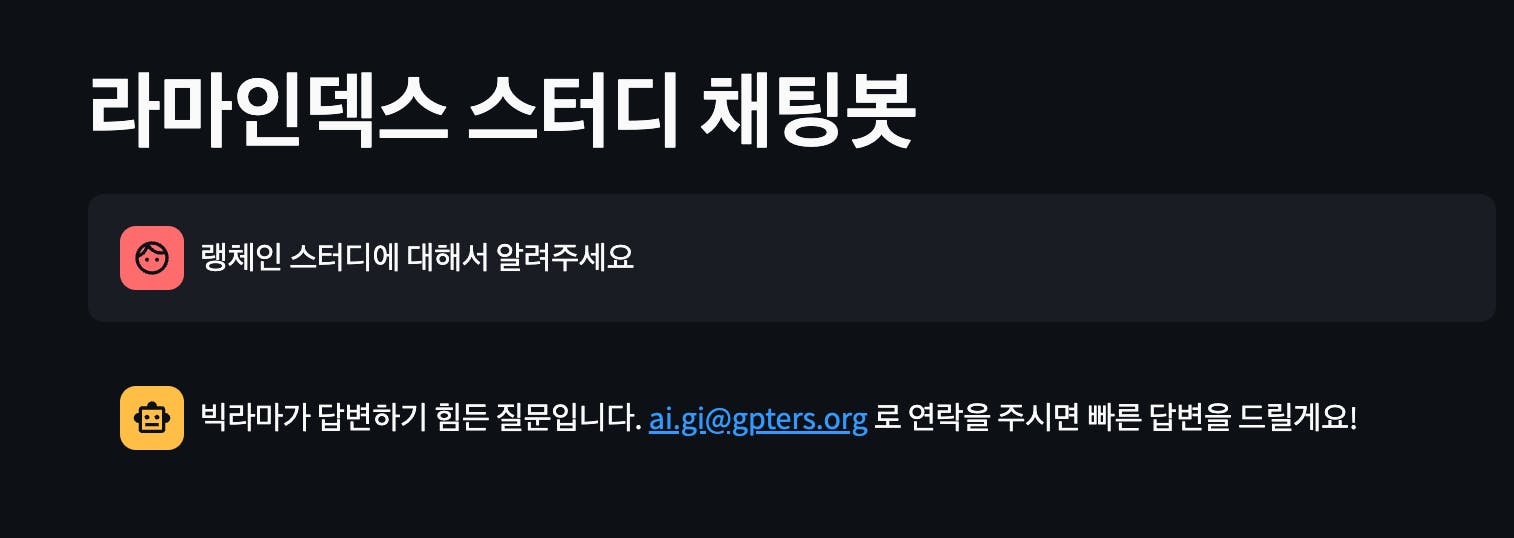
-> 문서에 없는 내용을 물어보면 제 메일로 연락을 달라고 하도록 수정했습니다.
노션DB를 활용해서 저를 대신할 챗봇을 구현할 수 있었어요. 라마인덱스 스터디에 관심이 있거나, 라마인덱스 스터디 진행중에 나왔던 참고할만한 데이터들을 한 곳에 모아두고 질문시 답변할 수 있도록 구축했어요.
추후 진행할 내용
RAG에서 일어나고 있는 것들을 tracing
https://docs.llamaindex.ai/en/stable/module_guides/observability/
라마클라우드-트레이싱 코랩 예제 돌려보고 적용해보기
로그인하고 댓글을 남겨 주세요

쿼리를 전혀 관련이 1도 없는것으로 하면 아래와 같이 모른다고 하네요
I'm sorry, but there is no information provided in the context about the sales performance of Hyundai Motor Company in the year 2023.
그런데, 노션 컨텐츠에 존재하는 단어가 있는 유효한 쿼리를 변형해서 답변이 존재할수 없는 질의를 하니까 할루시네이션이 발생하고 있습니다.
앞으로 이런 llm evaluation 작업이 중요한 포지션이 될것 같네요.

필요한 AI 정보만
메일함에 쏙쏙 넣어드려요.
지금 핫한 AI 소식부터 직접 해 본 사례까지, 월요일마다 무료로 받아보세요


노션 RAG 서치 코드 돌려봤습니다. 이렇게 컴팩트하게 접근할수 있다니, 얼마나 좋습니까.
개인 노션의 컨텐츠 일관성이 그닥 좋치 않아서 인지 검색결과는 갸우뚱입니다. 인명과 인명 아닌것을 구분못한다던지 동일인물의 표기법을 달리하면 전혀 다른 결과가 나온다든지 하는 상태라서 역시 내맘같지 않음을 확인했습니다.
참고로 database_id는 배열로 해야 하더군요.
저는 라마인덱스 0.11.1 버전입니다.
Name: llama-index Version: 0.11.1