


소개
저는 이미지 기반 가상 아바타 시스템을 만들고 싶었습니다.
그 과정에서 구글 AI studio를 프론트엔드로, comfyUI를 백엔드로 하여 그 사이에 이미지를 보내거나, 수정된 이미지를 받는 과정은 API를 통해 구축하는 워크플로우를 구현하는 연습을 하고자 했습니다.
진행 방법
어떤 도구를 사용했고, 어떻게 활용하셨나요?
Tip: 사용한 프롬프트 전문을 꼭 포함하고, 내용을 짧게 소개해 주세요.
Tip: 활용 이미지나 캡처 화면을 꼭 남겨주세요.
Tip: 코드 전문은 코드블록에 감싸서 작성해주세요. ( / 을 눌러 '코드 블록'을 선택)
아이디어 디벨롭 및 오류 수정은 전부 chatGPT 5.2 에서 시행했습니다.
사용 환경은 맥북, ComfyUI(SDXL Base 1.0 체크포인트)를 사용했습니다.
사실, 처음 만들고 싶었던 것은 육성 시뮬레이션이었습니다. 그래서 던졌던 프롬프팅은 '육성 시뮬레이션을 바이브 코딩으로 할 수 있게 만들어 줘.' 였습니다. 이후 몇 번의 논의를 거친 결과 해결해야 하는 근본적인 문제는 캐릭터는 한 번 만들어진 이후에 나이를 먹고, 이벤트를 겪으면서 상태가 바뀌지만, 연속성을 가지는 존재이고, 이미지와, 말투, 사용 언어 등의 연속성을 유지하면서도 일정 방향의 변화를, 통제 가능한 방향으로 일어나게끔 하는 것이 구현해야 할 내용이라는 결론을 내렸습니다.
첫주차는 그 시작으로, 이미지를 image to image 방식으로 전체적인 강건성을 유지한 채 일부 파라미터에 의해 바뀌는 워크플로우를 간단하게 구현하는 것을 목표로 삼았습니다.
ComfyUI
나노바나나나 GPT에서 만들어 주는 단발성의 이미지 생성 이외에 이렇게 본격적인 이미지 생성 툴은 처음 사용해 보았는데, 사용할수록 세밀하고 다양한 작업이 가능하다라는 인상을 받았습니다.
chatgpt가 이전 버전을 기준으로 설명을 해주긴 하였으나 대략적인 틀에서 변화는 없어서 먼저 추천해 준 img to img 구조를 따라 모델 체크포인트 등을 넣고 이미지를 넣으면 약간의 변화를 주는 워크플로우를 구성했고, 이것을 파일-내보내기(API)를 통해 json 파일로 내보내고, 이것을 다시 GPT에게 던져 주면서 이것을 참조한 FASTAPI server 용 코딩을 짜달라 했습니다.
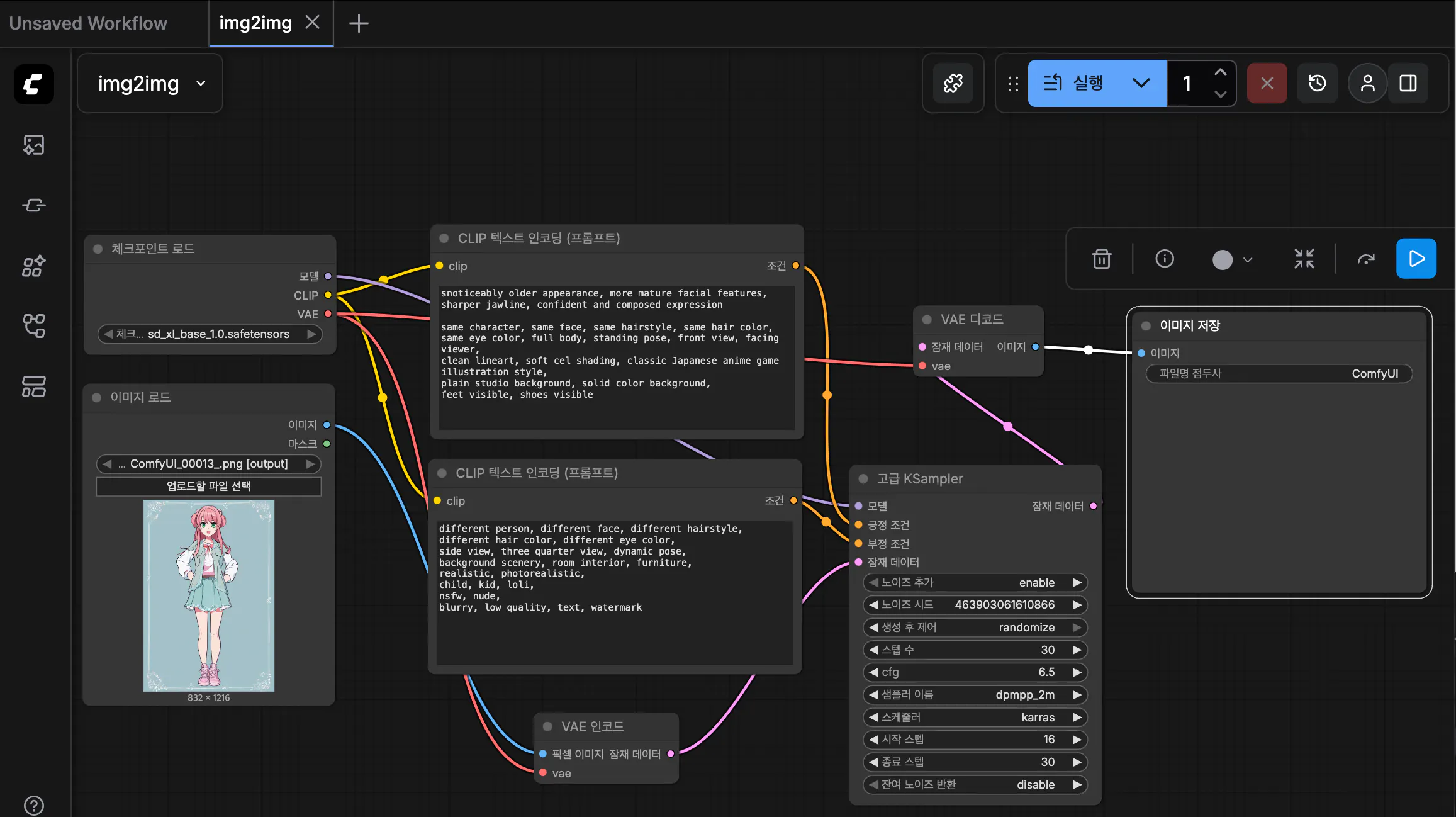
다이어그램을 보여주는 컴퓨터 화면의 스크린샷
comfyUI는 http://127.0.0.1:8000 포트를 통해 접근할 수도 있어서, 이 쪽으로 바로 API를 연결하면 어떨까 하는 생각도 했습니다만, FASTAPI를 거치는 것이 보안이나 유지보수 편의성이 좋다는 chatGPT의 의견을 따라. FASTAPI 서버까지 터미널로 설치 및 열어서 http://127.0.0.1:9001 에 열리도록 했습니다.
FASTAPI
엔드포인트
POST /img2img이미지 업로드
프롬프트 / 파라미터 수신
ComfyUI 워크플로우 실행
prompt_id반환
GET /result/{prompt_id}상태 확인 (queued / running / done)
완료 시:
base64 이미지 반환
JPEG 지원 (속도/용량 최적화)
이러한 구성으로 gpt에 코딩을 부탁했고. server.py를 comfyUI 폴더에 저장 후 실행했습니다.
import base64
import io
import json
import time
from pathlib import Path
from typing import Optional, Dict, Any

import httpx
from fastapi import FastAPI, HTTPException, Response, Header
from fastapi.middleware.cors import CORSMiddleware
from pydantic import BaseModel, Field
from PIL import Image

COMFY_URL = "http://127.0.0.1:8000"
WORKFLOW_PATH = Path("./img2img.json")

API_KEY = "a1s2d3f4"  # 실험용. 나중에 바꾸면 됨.

MAX_IMAGE_BYTES = 16 * 1024 * 1024  # input base64 업로드 제한(16MB)
DEFAULT_JPEG_QUALITY = 85
DEFAULT_MAX_EDGE = 1024  # JPEG로 받을 때 큰 이미지면 리사이즈(전송/속도 개선)

app = FastAPI(title="ComfyUI img2img API (async + JPEG result)")

app.add_middleware(
    CORSMiddleware,
    allow_origins=["*"],
    allow_credentials=False,
    allow_methods=["GET", "POST", "OPTIONS"],
    allow_headers=["*"],
)


class Img2ImgRequest(BaseModel):
    # 입력(둘 중 하나)
    input_filename: Optional[str] = None
    input_image_base64: Optional[str] = None

    # 프롬프트 수정
    positive_text: Optional[str] = None
    positive_add: str = ""
    negative_text: Optional[str] = None
    negative_add: str = ""

    # 샘플링 파라미터
    steps: int = Field(30, ge=1, le=80)
    cfg: float = Field(6.5, ge=1.0, le=15.0)
    start_at_step: int = Field(16, ge=0, le=79)
    end_at_step: int = Field(30, ge=1, le=80)
    seed: int = Field(-1, description="-1=random, >=0 fixed")

    filename_prefix: str = "ComfyUI_API"


def _auth(x_api_key: Optional[str]) -> None:
    if x_api_key != API_KEY:
        raise HTTPException(status_code=401, detail="Invalid API key")


def _load_workflow() -> Dict[str, Any]:
    if not WORKFLOW_PATH.exists():
        raise HTTPException(
            status_code=500,
            detail=f"Workflow JSON not found: {WORKFLOW_PATH.resolve()}",
        )
    return json.loads(WORKFLOW_PATH.read_text(encoding="utf-8"))


async def _upload_to_comfy_input(client: httpx.AsyncClient, img_b64: str, filename: str = "input.png") -> str:
    try:
        img_bytes = base64.b64decode(img_b64)
    except Exception:
        raise HTTPException(status_code=400, detail="input_image_base64 is not valid base64")

    if len(img_bytes) > MAX_IMAGE_BYTES:
        raise HTTPException(status_code=413, detail=f"Image too large (>{MAX_IMAGE_BYTES} bytes).")

    files = {"image": (filename, img_bytes, "application/octet-stream")}
    data = {"type": "input"}  # ComfyUI input 폴더에 업로드
    r = await client.post(f"{COMFY_URL}/upload/image", data=data, files=files, timeout=120)
    r.raise_for_status()
    resp = r.json()
    return resp.get("name", filename)


def _patch_workflow(wf: Dict[str, Any], req: Img2ImgRequest, input_filename: str) -> Dict[str, Any]:
    """
    이 patch는 네가 준 워크플로우 JSON(node id)에 맞춰서 수정됨.
    필요하면 node id만 바꿔주면 됨.
    """
    NODE_SAVE = "6"
    NODE_LOAD = "11"
    NODE_POS = "13"
    NODE_NEG = "14"
    NODE_SAMPLER = "10"

    # LoadImage 노드에 입력 파일명 설정
    wf[NODE_LOAD]["inputs"]["image"] = input_filename

    # Positive prompt
    if req.positive_text is not None:
        wf[NODE_POS]["inputs"]["text"] = req.positive_text
    elif req.positive_add.strip():
        wf[NODE_POS]["inputs"]["text"] = wf[NODE_POS]["inputs"]["text"].rstrip() + "\n" + req.positive_add.strip() + "\n"

    # Negative prompt
    if req.negative_text is not None:
        wf[NODE_NEG]["inputs"]["text"] = req.negative_text
    elif req.negative_add.strip():
        wf[NODE_NEG]["inputs"]["text"] = wf[NODE_NEG]["inputs"]["text"].rstrip() + "\n" + req.negative_add.strip() + "\n"

    # Sampler params
    s = wf[NODE_SAMPLER]["inputs"]
    s["steps"] = int(req.steps)
    s["cfg"] = float(req.cfg)
    s["start_at_step"] = int(req.start_at_step)
    s["end_at_step"] = int(req.end_at_step)

    # seed
    if req.seed < 0:
        s["add_noise"] = "enable"
        s["noise_seed"] = int(time.time() * 1000) % 2_147_483_647
    else:
        s["add_noise"] = "enable"
        s["noise_seed"] = int(req.seed)

    if "return_with_leftover_noise" in s:
        s["return_with_leftover_noise"] = "disable"

    # filename prefix
    wf[NODE_SAVE]["inputs"]["filename_prefix"] = req.filename_prefix
    return wf


async def _comfy_enqueue(client: httpx.AsyncClient, wf: Dict[str, Any]) -> str:
    r = await client.post(f"{COMFY_URL}/prompt", json={"prompt": wf}, timeout=120)
    r.raise_for_status()
    return r.json()["prompt_id"]


async def _get_history_item(client: httpx.AsyncClient, prompt_id: str) -> Optional[Dict[str, Any]]:
    r = await client.get(f"{COMFY_URL}/history/{prompt_id}", timeout=30)
    r.raise_for_status()
    hist = r.json()
    return hist.get(prompt_id)


def _extract_first_image_meta(history_item: Dict[str, Any]) -> Optional[Dict[str, Any]]:
    outputs = history_item.get("outputs", {})
    for _, out in outputs.items():
        images = out.get("images")
        if images:
            return images[0]
    return None


async def _fetch_image_bytes(client: httpx.AsyncClient, meta: Dict[str, Any]) -> bytes:
    filename = meta.get("filename")
    subfolder = meta.get("subfolder", "")
    img_type = meta.get("type", "output")
    if not filename:
        raise HTTPException(status_code=500, detail="No filename in ComfyUI image metadata")

    vr = await client.get(
        f"{COMFY_URL}/view",
        params={"filename": filename, "subfolder": subfolder, "type": img_type},
        timeout=120,
    )
    vr.raise_for_status()
    return vr.content


def _png_bytes_to_jpeg_bytes(png_bytes: bytes, quality: int = DEFAULT_JPEG_QUALITY, max_edge: int = DEFAULT_MAX_EDGE) -> bytes:
    img = Image.open(io.BytesIO(png_bytes)).convert("RGB")

    if max_edge and max(img.size) > max_edge:
        w, h = img.size
        if w >= h:
            new_w = max_edge
            new_h = int(h * (max_edge / w))
        else:
            new_h = max_edge
            new_w = int(w * (max_edge / h))
        img = img.resize((new_w, new_h), Image.Resampling.LANCZOS)

    buf = io.BytesIO()
    img.save(buf, format="JPEG", quality=int(quality), optimize=True)
    return buf.getvalue()


@app.get("/")
def root():
    return {"ok": True, "endpoints": ["/docs", "POST /img2img", "GET /result/{prompt_id}"]}


@app.post("/img2img")
async def img2img_enqueue(req: Img2ImgRequest, x_api_key: Optional[str] = Header(None)):
    """
    비동기 enqueue: 바로 prompt_id만 반환 (Cloudflare 524 회피)
    """
    _auth(x_api_key)
    wf = _load_workflow()

    async with httpx.AsyncClient() as client:
        # 입력 결정
        if req.input_image_base64:
            input_name = await _upload_to_comfy_input(client, req.input_image_base64, filename="input.png")
        elif req.input_filename:
            input_name = req.input_filename
        else:
            raise HTTPException(status_code=400, detail="Provide either input_filename or input_image_base64")

        wf = _patch_workflow(wf, req, input_name)
        prompt_id = await _comfy_enqueue(client, wf)

    return {"prompt_id": prompt_id, "status": "queued"}


@app.get("/result/{prompt_id}")
async def result(
    prompt_id: str,
    x_api_key: Optional[str] = Header(None),
    base64_out: bool = False,
    jpeg: bool = True,
    quality: int = DEFAULT_JPEG_QUALITY,
    max_edge: int = DEFAULT_MAX_EDGE,
):
    """
    폴링:
    - running이면 {"status":"running"}
    - done이면 기본은 JPEG 바이너리(image/jpeg)로 반환
    - base64_out=true면 JSON으로 base64 반환 (jpeg=true면 JPEG base64)
    """
    _auth(x_api_key)

    async with httpx.AsyncClient() as client:
        item = await _get_history_item(client, prompt_id)
        if not item:
            return {"prompt_id": prompt_id, "status": "running"}

        meta = _extract_first_image_meta(item)
        if not meta:
            return {"prompt_id": prompt_id, "status": "running"}

        png_bytes = await _fetch_image_bytes(client, meta)

    out_bytes = png_bytes
    out_media = "image/png"
    out_format = "png"

    if jpeg:
        out_bytes = _png_bytes_to_jpeg_bytes(png_bytes, quality=quality, max_edge=max_edge)
        out_media = "image/jpeg"
        out_format = "jpeg"

    if base64_out:
        return {
            "prompt_id": prompt_id,
            "status": "done",
            "format": out_format,
            "image_base64": base64.b64encode(out_bytes).decode("utf-8"),
        }

    return Response(content=out_bytes, media_type=out_media)
curl → base64 → JPEG 파일 저장 성공
img2img 결과가 실제로 바뀌는 것 확인
Cloudflare Tunnel
이유
로컬 FastAPI 서버를
Google AI Studio에서 접근 가능하게 하기 위해
방식
cloudflared tunnel --url <http://127.0.0.1:9001>
임시 URL (https://xxxxx.trycloudflare.com) 생성, FastAPI 서버 외부 노출 성공
Google AI Studio
핵심 UI 구성
Settings 패널:
Base URL 입력
API Key 입력
Save / Test Connection 버튼
localStorage에 저장
모든 API 호출은 이 Base URL을 prefix로 사용
앱 흐름
사용자:
Cloudflare 주소 붙여넣기
이미지 업로드
img2img 요청
prompt_id 수신
결과 폴링
JPEG 결과 표시
이것을 구글 AI 스튜디오에서 빌드하는 프롬프팅을 짜달라고 요청했습니다.
You are building a lightweight image transformation client app.

This app does NOT generate images by itself.
Instead, it acts as a frontend client that communicates with an external image processing API.

The external backend is:
- A FastAPI server
- Running locally with ComfyUI
- Exposed via a Cloudflare Tunnel
- The base URL of the backend CHANGES every time the tunnel restarts

Your job is to build a frontend app with the following requirements.

---

[1] Settings Panel (Important)

The app must provide a settings section where the user can manually input:

- Backend Base URL (example: https://xxxx.trycloudflare.com)
- API Key (string)

These values must:
- Be editable by the user
- Be stored in local state (or localStorage)
- Be used dynamically for all API calls
- NOT be hardcoded

Include a simple “Test Connection” button that sends a GET request to:
{BaseURL}/docs
and shows success or failure.

---

[2] Main Workflow: Image-to-Image

The app workflow is:

1. User uploads an image (JPEG or PNG)
2. User optionally enters a text prompt describing how the image should be modified
3. When the user clicks “Transform”:
   - Send a POST request to:
     {BaseURL}/img2img
   - Include:
     - the uploaded image
     - prompt text
     - any parameters as JSON
   - Include header:
     X-API-Key: {API Key}

4. The server returns:
   {
     "prompt_id": "string",
     "status": "queued"
   }

5. The app must then poll:
   GET {BaseURL}/result/{prompt_id}?base64_out=true&jpeg=true

6. Poll until status == "done"

7. When done:
   - Receive a JSON response with:
     {
       "format": "jpeg",
       "image_base64": "..."
     }
   - Decode and display the resulting image

---

[3] UI Expectations

- Simple, minimal UI
- Left or top area: settings (Base URL, API Key)
- Main area:
  - Image upload
  - Prompt input
  - Transform button
  - Result image preview
- Show basic status:
  - queued
  - processing
  - done
  - error / timeout

---

[4] Important Constraints

- Do NOT assume the backend URL is stable
- Do NOT embed backend logic
- Do NOT generate images locally
- The app is only a client

The purpose of this app is to allow rapid experimentation with ComfyUI image-to-image workflows running on a local machine, accessed remotely via Cloudflare Tunnel.

Build the app accordingly.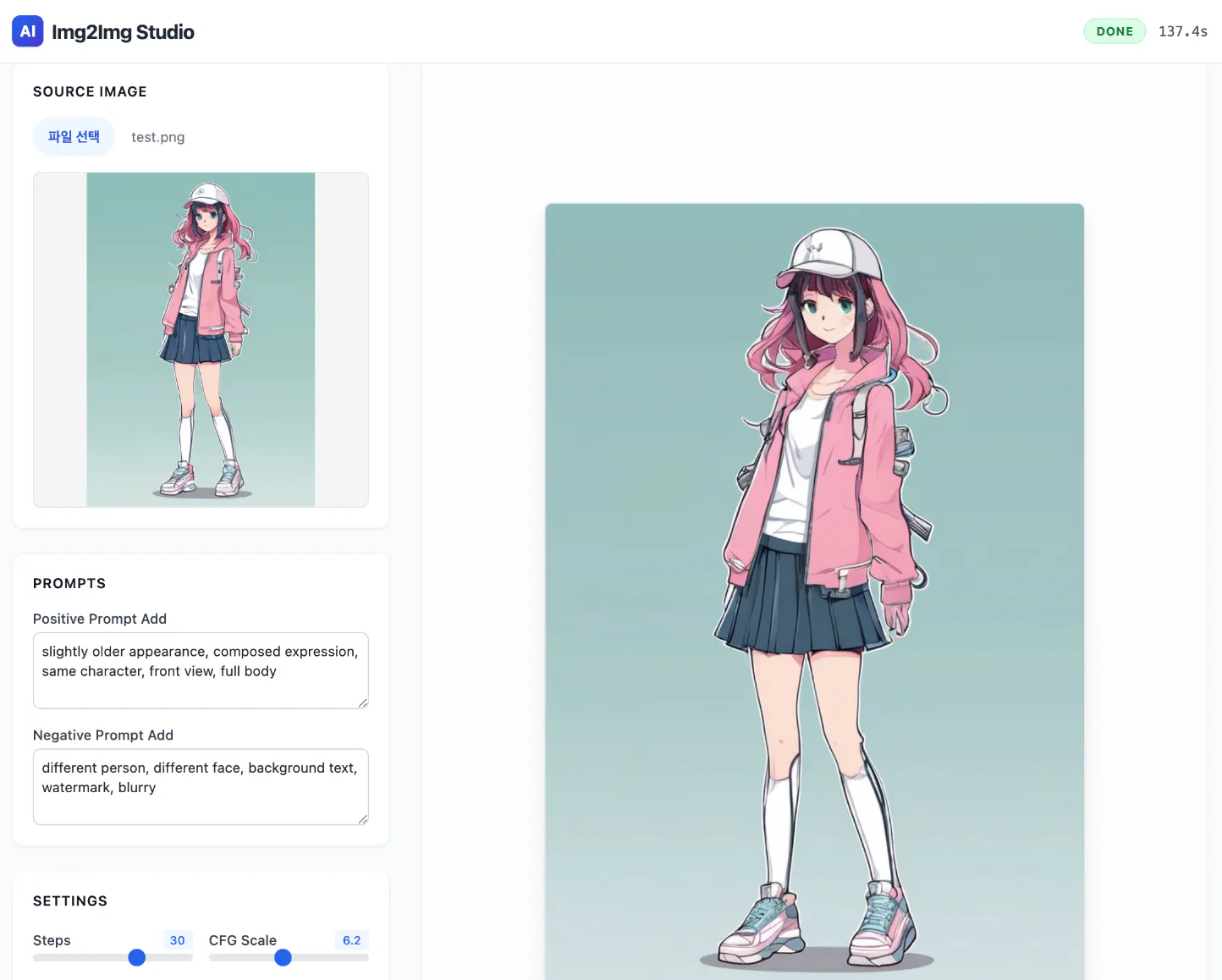
분홍색 재킷을 입은 소녀의 이미지
결과적으로 다음과 같은 레이아웃으로 어플리케이션이 만들어 졌습니다.
이 뒤에 게시 가이드글 양식이 있었는데, 쓰다보니 지워져서 흐지부지되어버린 것 같습니다.
보충 사항 확인해서 수정하도록 하겠습니다.
