


소개
시도하고자 했던 것과 그 이유
초등학생들이 코딩의 기초 개념(순차, 반복, 조건, 함수)을 게임처럼 재미있게 배울 수 있는 웹 기반 애플리케이션을 제작하고자 했습니다. 아이들이 로봇(자동차)의 시점에서 방향을 판단하고 알고리즘을 설계하며 논리적 사고력을 키울 수 있는 환경을 제공하는 것이 목표였습니다.
진행 방법
사용 도구 및 활용 방식
도구: Google Gemini (AI 모델), 단일 HTML 파일 (HTML5, Tailwind CSS, JavaScript)
활용 방식: * 아이들의 눈높이에 맞춘 '귀엽고 세련된' 디자인 가이드 제시.
로봇 시점(Orientation)의 이동 로직을 구현하기 위해 각도($0^{\circ}, 90^{\circ}$ 등) 기반의 좌표 계산 방식 도입.
복잡한 루프(Loop)와 조건문(If)을 시뮬레이션하기 위해 JavaScript 기반의 인터프리터 엔진 설계.
주요 프롬프트 전략
"코딩을 처음 배우는 아이들이 쉽게 이용할 수 있는 웹앱을 만들어줘. 자동차의 앞쪽 화살표 방향이 기준이 되는 시점 이동 방식이어야 해. 순차, 반복, 조건, 함수 챕터를 만들고 각 미션은 랜덤으로 생성해줘. 특히 미션은 2회 연속 성공해야 다음으로 넘어가는 시스템과 무한 루프 방지 코드를 포함해줘."
<!DOCTYPE html>
<html lang="ko">
<head>
<meta charset="UTF-8">
<meta name="viewport" content="width=device-width, initial-scale=1.0">
<title>코딩 탐험대 - 자동차 시점 대모험</title>
<script src="https://cdn.tailwindcss.com"></script>
<link href="https://cdnjs.cloudflare.com/ajax/libs/font-awesome/6.0.0/css/all.min.css" rel="stylesheet">
<link href="https://fonts.googleapis.com/css2?family=Gaegu:wght@400;700&family=Nanum+Gothic:wght@400;700;800&display=swap" rel="stylesheet">
<style>
body { font-family: 'Nanum Gothic', sans-serif; background-color: #f8fbff; user-select: none; }
.kids-font { font-family: 'Gaegu', cursive; }
.block-item { cursor: pointer; transition: all 0.2s cubic-bezier(0.175, 0.885, 0.32, 1.275); }
.block-item:hover { transform: translateY(-2px); filter: brightness(1.05); }
.block-item:active { transform: scale(0.95); }
@keyframes float { 0%, 100% { transform: translateY(0px); } 50% { transform: translateY(-8px); } }
.floating { animation: float 4s ease-in-out infinite; }
@keyframes shake { 0%, 100% { transform: translateX(0); } 25% { transform: translateX(-8px); } 75% { transform: translateX(8px); } }
.animate-shake { animation: shake 0.4s ease-in-out; }
::-webkit-scrollbar { width: 8px; }
::-webkit-scrollbar-track { background: #f1f1f1; border-radius: 10px; }
::-webkit-scrollbar-thumb { background: #cbd5e1; border-radius: 10px; }
.obstacle {
background-color: #ef4444; border: 3px solid #b91c1c;
display: flex; align-items: center; justify-content: center; color: white;
border-radius: 12px; box-shadow: inset 0 0 10px rgba(0,0,0,0.2);
}
</style>
</head>
<body class="overflow-hidden h-screen flex flex-col">
<!-- 상단 헤더 -->
<header class="bg-white border-b-4 border-blue-100 p-4 px-8 flex justify-between items-center shadow-md z-20 shrink-0">
<div class="flex items-center gap-4">
<div class="bg-gradient-to-br from-blue-400 to-indigo-500 w-12 h-12 rounded-2xl flex items-center justify-center text-white text-2xl shadow-lg floating">
<i class="fas fa-rocket"></i>
</div>
<div>
<h1 class="text-xl font-black text-blue-600 leading-none">코딩 탐험대</h1>
<span class="text-xs font-bold text-blue-300 uppercase tracking-widest italic">Smart Explorer v5.5</span>
</div>
</div>
<div class="flex items-center gap-6">
<div class="flex items-center gap-3 bg-yellow-50 px-4 py-2 rounded-full border-2 border-yellow-200 shadow-sm">
<i class="fas fa-star text-yellow-400"></i>
<span id="star-count" class="text-lg font-black text-yellow-700">1,250</span>
</div>
<div class="flex items-center gap-2 bg-indigo-50 px-3 py-1.5 rounded-full border border-indigo-100">
<div class="w-8 h-8 rounded-full bg-white border-2 border-indigo-200 overflow-hidden">
<img src="https://api.dicebear.com/7.x/bottts/svg?seed=Jack" alt="Profile">
</div>
<span class="font-bold text-indigo-600 text-sm">대원 잭</span>
</div>
</div>
</header>
<div class="flex flex-1 overflow-hidden">
<!-- 왼쪽 사이드바 (챕터 선택) -->
<nav id="sidebar" class="w-72 bg-white border-r-4 border-gray-50 p-6 flex flex-col shadow-inner shrink-0">
<h2 class="text-xl font-black mb-6 text-gray-800 flex items-center gap-2">
<i class="fas fa-map-location-dot text-blue-400 text-lg"></i> 탐험 지도
</h2>
<div id="chapter-list" class="space-y-4 flex-1 overflow-y-auto pr-2"></div>
</nav>
<!-- 메인 콘텐츠 영역 -->
<main class="flex-1 flex flex-col p-6 overflow-hidden bg-[#f0f7ff]">
<div class="flex justify-between items-end mb-4 shrink-0">
<div id="mission-info">
<nav class="flex gap-2 text-xs font-bold text-blue-400 mb-1">
<span id="display-chapter-name">챕터 1</span> <i class="fas fa-chevron-right text-[8px] self-center"></i> <span id="display-mission-num">미션 1-1</span>
</nav>
<div class="flex items-center gap-3">
<h3 id="display-mission-desc" class="text-3xl font-black text-gray-800 tracking-tight italic">자동차를 움직여보세요!</h3>
<span id="mission-success-badge" class="bg-blue-500 text-white text-[10px] font-black px-3 py-1 rounded-full shadow-sm">성공 0/2</span>
</div>
</div>
<div class="flex gap-2 text-sm">
<button onclick="loadMission()" class="bg-blue-500 hover:bg-blue-600 text-white font-bold px-4 py-2.5 rounded-xl shadow-sm transition-all active:scale-95">
<i class="fas fa-random mr-1"></i>미션 새로고침
</button>
<button onclick="resetPositionOnly()" class="bg-white hover:bg-gray-50 text-gray-600 font-bold px-4 py-2.5 rounded-xl border-2 border-gray-100 shadow-sm transition-all active:scale-95">
<i class="fas fa-rotate-left mr-1"></i>위치만 초기화
</button>
</div>
</div>
<div class="flex-1 grid grid-cols-12 gap-6 min-h-0">
<!-- 게임 화면 -->
<div class="col-span-12 lg:col-span-7 bg-white rounded-[32px] border-4 border-blue-50 shadow-xl overflow-hidden relative flex items-center justify-center">
<div class="absolute inset-0 opacity-[0.03]" style="background-image: radial-gradient(#000 2px, transparent 2px); background-size: 40px 40px;"></div>
<div id="game-board" class="relative w-[400px] h-[400px] bg-indigo-50/20 rounded-2xl border-2 border-blue-100 shadow-inner">
<div class="absolute inset-0 grid grid-cols-5 grid-rows-5 pointer-events-none opacity-20">
<script>for(let i=0; i<25; i++) document.write('<div class="border border-blue-400"></div>');</script>
</div>
<div id="obstacles-container" class="absolute inset-0"></div>
<!-- 자동차 -->
<div id="robot" class="absolute w-16 h-16 transition-all duration-300 z-20 flex items-center justify-center">
<div class="relative w-14 h-14">
<svg viewBox="0 0 100 100" class="w-full h-full drop-shadow-xl">
<rect x="25" y="10" width="50" height="80" rx="15" fill="#3B82F6" />
<rect x="30" y="25" width="40" height="25" rx="5" fill="#E0F2FE" opacity="0.8" />
<rect x="30" y="60" width="40" height="15" rx="3" fill="#E0F2FE" opacity="0.5" />
<circle cx="35" cy="15" r="5" fill="white" />
<circle cx="65" cy="15" r="5" fill="white" />
<rect x="18" y="20" width="8" height="15" rx="2" fill="#1E293B" />
<rect x="74" y="20" width="8" height="15" rx="2" fill="#1E293B" />
<rect x="18" y="65" width="8" height="15" rx="2" fill="#1E293B" />
<rect x="74" y="65" width="8" height="15" rx="2" fill="#1E293B" />
</svg>
<div class="absolute -top-6 left-1/2 -translate-x-1/2 text-red-500 text-xl animate-pulse"><i class="fas fa-caret-up"></i></div>
</div>
</div>
<!-- 목적지 깃발 -->
<div id="target-flag" class="absolute w-20 h-20 flex flex-col items-center justify-center z-10 transition-all duration-500">
<div class="text-yellow-400 text-5xl drop-shadow-lg animate-bounce"><i class="fas fa-flag-checkered"></i></div>
</div>
</div>
<div class="absolute bottom-4 left-4 flex items-end gap-3 scale-90 origin-bottom-left">
<img src="https://api.dicebear.com/7.x/adventurer/svg?seed=Maya" class="w-20 h-20 bg-gradient-to-b from-blue-100 to-white rounded-full border-4 border-white shadow-lg" alt="Guide">
<div class="bg-white p-4 rounded-[24px] rounded-bl-none shadow-lg border-2 border-blue-50 max-w-[240px]">
<p class="text-xs font-black text-blue-600 mb-1">가이드 마야</p>
<p id="guide-text" class="text-gray-700 leading-tight font-bold text-sm italic font-kids"></p>
</div>
</div>
</div>
<!-- 우측 명령어 블록 영역 -->
<div class="col-span-12 lg:col-span-5 flex flex-col gap-4 h-full">
<div class="bg-indigo-600 p-6 rounded-[32px] shadow-2xl flex-1 flex flex-col border-b-8 border-indigo-800 overflow-hidden">
<h4 class="text-white font-black text-lg mb-4 flex items-center gap-2 shrink-0">
<i class="fas fa-puzzle-piece text-yellow-300"></i> 명령어 상자
</h4>
<div id="command-container" class="space-y-3 mb-6 shrink-0"></div>
<div class="flex-1 flex flex-col min-h-0">
<div class="flex justify-between items-center mb-2 shrink-0">
<h5 class="text-indigo-200 text-[10px] font-black uppercase tracking-widest italic">나의 운전 계획</h5>
<div class="flex gap-2">
<button onclick="popStep()" class="text-indigo-300 hover:text-white text-[10px] font-bold underline transition-colors">취소</button>
<button onclick="clearSteps()" class="text-indigo-300 hover:text-white text-[10px] font-bold underline transition-colors">삭제</button>
</div>
</div>
<div id="my-code" class="flex-1 flex flex-col gap-2 p-4 bg-indigo-900/40 rounded-2xl border-2 border-indigo-400 border-dashed overflow-y-auto">
<div class="flex flex-col items-center justify-center h-full text-indigo-300 opacity-60 italic py-4" id="empty-msg">
<p class="font-bold text-xs text-center">블록을 클릭해서<br>계획을 세우세요!</p>
</div>
</div>
</div>
<button id="run-btn" onclick="runCode()" class="mt-4 w-full bg-yellow-400 hover:bg-yellow-500 text-yellow-950 font-black text-xl py-5 rounded-[24px] shadow-[0_6px_0_0_#d97706] active:translate-y-[4px] active:shadow-none transition-all flex items-center justify-center gap-3 shrink-0">
<i class="fas fa-play"></i> 드라이브 시작!
</button>
</div>
</div>
</div>
</main>
</div>
<!-- 성공 안내 모달 -->
<div id="success-modal" class="fixed inset-0 bg-indigo-900/90 hidden z-50 flex items-center justify-center p-6 backdrop-blur-sm">
<div class="bg-white rounded-[48px] p-10 max-w-sm w-full text-center border-[10px] border-yellow-300 shadow-2xl relative">
<div class="text-8xl mb-4 inline-block floating">⭐</div>
<h2 id="modal-title" class="text-3xl font-black text-gray-800 mb-2">미션 성공!</h2>
<p id="success-msg" class="text-gray-600 font-bold mb-8 leading-relaxed font-kids"></p>
<button id="modal-btn" onclick="handleNextMission()" class="w-full bg-blue-500 text-white font-black text-xl py-5 rounded-2xl hover:bg-blue-600 shadow-[0_6px_0_0_#1e40af] transition-all">계속하기</button>
</div>
</div>
<script>
const chapterNames = ["순차 구조의 이해", "반복문의 마법", "조건문의 선택", "함수 대모험"];
const gridPoints = [20, 100, 180, 260, 340];
let currentChapterIdx = 0, currentMissionIdx = 0, currentMissionWins = 0;
let steps = [], isRunning = false;
let missionData, currentX, currentY, currentRotation;
const blockData = {
'forward': { label: '앞으로 이동', icon: 'fa-arrow-up', color: 'border-blue-500', text: 'text-blue-600' },
'backward': { label: '뒤로 이동', icon: 'fa-arrow-down', color: 'border-red-500', text: 'text-red-600' },
'turnRight': { label: '오른쪽 회전', icon: 'fa-rotate-right', color: 'border-orange-500', text: 'text-orange-600' },
'turnLeft': { label: '왼쪽 회전', icon: 'fa-rotate-left', color: 'border-purple-500', text: 'text-purple-600' },
'loop2': { label: '2회 반복 시작', icon: 'fa-sync-alt', color: 'border-yellow-400', text: 'text-yellow-700', val: 2 },
'loop3': { label: '3회 반복 시작', icon: 'fa-sync-alt', color: 'border-yellow-400', text: 'text-yellow-700', val: 3 },
'loop4': { label: '4회 반복 시작', icon: 'fa-sync-alt', color: 'border-yellow-400', text: 'text-yellow-700', val: 4 },
'loopInfinite': { label: '도착까지 무한 반복', icon: 'fa-infinity', color: 'border-yellow-500', text: 'text-yellow-800' },
'ifObstacle': { label: '만약 앞에 벽이 있다면?', icon: 'fa-question-circle', color: 'border-pink-400', text: 'text-pink-600' },
'endControl': { label: '명령 끝내기 (반복/조건 끝)', icon: 'fa-stop-circle', color: 'border-gray-400', text: 'text-gray-600' },
'funcDefine': { label: '함수 만들기 시작', icon: 'fa-book', color: 'border-indigo-400', text: 'text-indigo-600' },
'funcCall': { label: '내 함수 실행하기!', icon: 'fa-bolt', color: 'border-indigo-500', text: 'text-indigo-700' }
};
function initGame() { renderSidebar(); loadMission(); renderBlockLibrary(); }
function renderSidebar() {
const list = document.getElementById('chapter-list');
list.innerHTML = chapterNames.map((name, idx) => {
const isActive = idx === currentChapterIdx;
const progress = isActive ? ((currentMissionIdx * 2 + currentMissionWins) / 4) * 100 : (idx < currentChapterIdx ? 100 : 0);
return `<div onclick="selectChapter(${idx})" class="p-4 ${isActive ? 'bg-blue-50 border-blue-200 border-2' : 'border-transparent opacity-50'} rounded-2xl transition-all cursor-pointer hover:bg-blue-100">
<p class="text-[10px] font-bold ${isActive ? 'text-blue-500' : 'text-gray-400'} uppercase mb-1">CHAPTER ${idx + 1}</p>
<p class="font-black ${isActive ? 'text-gray-800' : 'text-gray-400'} text-sm mb-2">${name}</p>
<div class="h-1.5 bg-gray-200 rounded-full overflow-hidden">
<div class="h-full bg-blue-500 rounded-full transition-all" style="width:${progress}%"></div>
</div>
</div>`;
}).join('');
}
function selectChapter(idx) {
if(isRunning) return;
currentChapterIdx = idx; currentMissionIdx = 0; currentMissionWins = 0;
clearSteps(); initGame();
}
function renderBlockLibrary() {
const container = document.getElementById('command-container');
const movePart = `<div class="grid grid-cols-2 gap-2">
<button onclick="addStep('forward')" class="block-item bg-white p-2 rounded-xl border-b-4 border-gray-200 flex items-center gap-2"><i class="fas fa-arrow-up text-blue-500 text-xs"></i><span class="font-bold text-gray-700 text-[10px]">앞으로</span></button>
<button onclick="addStep('backward')" class="block-item bg-white p-2 rounded-xl border-b-4 border-gray-200 flex items-center gap-2"><i class="fas fa-arrow-down text-red-500 text-xs"></i><span class="font-bold text-gray-700 text-[10px]">뒤로</span></button>
<button onclick="addStep('turnRight')" class="block-item bg-white p-2 rounded-xl border-b-4 border-gray-200 flex items-center gap-2"><i class="fas fa-rotate-right text-orange-500 text-xs"></i><span class="font-bold text-gray-700 text-[10px]">우회전</span></button>
<button onclick="addStep('turnLeft')" class="block-item bg-white p-2 rounded-xl border-b-4 border-gray-200 flex items-center gap-2"><i class="fas fa-rotate-left text-purple-500 text-xs"></i><span class="font-bold text-gray-700 text-[10px]">좌회전</span></button>
</div>`;
if (currentChapterIdx === 0) container.innerHTML = movePart;
else if (currentChapterIdx === 1) container.innerHTML = movePart + `<div class="grid grid-cols-3 gap-2"><button onclick="addStep('loop2')" class="bg-yellow-400 p-2 rounded-xl border-b-4 border-yellow-600 font-bold text-[10px]">2회 반복</button><button onclick="addStep('loop3')" class="bg-yellow-400 p-2 rounded-xl border-b-4 border-yellow-600 font-bold text-[10px]">3회 반복</button><button onclick="addStep('loop4')" class="bg-yellow-400 p-2 rounded-xl border-b-4 border-yellow-600 font-bold text-[10px]">4회 반복</button></div><button onclick="addStep('endControl')" class="bg-gray-400 p-2 rounded-xl border-b-4 border-gray-600 text-white font-bold text-[10px] w-full">반복 종료</button>`;
else if (currentChapterIdx === 2) container.innerHTML = movePart + `<button onclick="addStep('loopInfinite')" class="bg-yellow-400 p-2 rounded-xl border-b-4 border-yellow-600 font-bold text-[10px] w-full">무한 반복 시작</button><button onclick="addStep('ifObstacle')" class="bg-pink-400 p-2 rounded-xl border-b-4 border-pink-600 text-white font-bold text-[10px] w-full">장애물이 있다면?</button><button onclick="addStep('endControl')" class="bg-gray-400 p-2 rounded-xl border-b-4 border-gray-600 text-white font-bold text-[10px] w-full">명령 끝내기</button>`;
else container.innerHTML = movePart + `<button onclick="addStep('funcDefine')" class="bg-indigo-400 p-2 rounded-xl border-b-4 border-indigo-600 text-white font-bold text-[10px] w-full">함수 만들기 시작</button><button onclick="addStep('endControl')" class="bg-gray-400 p-2 rounded-xl border-b-4 border-gray-600 text-white font-bold text-[10px] w-full">정의 완료</button><button onclick="addStep('funcCall')" class="bg-indigo-600 p-2 rounded-xl border-b-4 border-indigo-800 text-white font-bold text-[10px] w-full">내 함수 실행하기!</button>`;
}
function loadMission() {
let sx, sy, ex, ey;
do { sx = Math.floor(Math.random()*5); sy = Math.floor(Math.random()*5); ex = Math.floor(Math.random()*5); ey = Math.floor(Math.random()*5); }
while (Math.abs(sx - ex) + Math.abs(sy - ey) < 2);
const obs = [];
const count = currentChapterIdx === 0 ? 0 : (currentChapterIdx === 1 ? 1 : 3);
while(obs.length < count) {
let ox = Math.floor(Math.random()*5), oy = Math.floor(Math.random()*5);
if(!(ox===sx && oy===sy) && !(ox===ex && oy===ey) && !obs.some(o => o[0]===gridPoints[ox] && o[1]===gridPoints[oy])) obs.push([gridPoints[ox], gridPoints[oy]]);
}
missionData = { start: [gridPoints[sx], gridPoints[sy], [0,90,180,270][Math.floor(Math.random()*4)]], end: [gridPoints[ex], gridPoints[ey]], obstacles: obs };
document.getElementById('display-chapter-name').innerText = `챕터 ${currentChapterIdx+1}: ${chapterNames[currentChapterIdx]}`;
document.getElementById('display-mission-num').innerText = `미션 ${currentChapterIdx+1}-${currentMissionIdx+1}`;
document.getElementById('mission-success-badge').innerText = `성공 ${currentMissionWins}/2 완료`;
document.getElementById('guide-text').innerText = "빨간 화살표 방향이 앞이야! 차근차근 계획을 세워보자.";
currentX = missionData.start[0]; currentY = missionData.start[1]; currentRotation = missionData.start[2];
document.getElementById('target-flag').style.left = missionData.end[0]+'px'; document.getElementById('target-flag').style.top = missionData.end[1]+'px';
document.getElementById('obstacles-container').innerHTML = missionData.obstacles.map(o => `<div class="absolute obstacle w-16 h-16"><i class="fas fa-hand-paper opacity-30"></i></div>`).map((el, i) => {
const div = document.createElement('div'); div.innerHTML = el;
const inner = div.firstChild; inner.style.left = missionData.obstacles[i][0]+'px'; inner.style.top = missionData.obstacles[i][1]+'px';
return inner.outerHTML;
}).join('');
updateRobotDisplay();
}
function addStep(type) { if(!isRunning) { steps.push({type}); updateWorkspace(); } }
function popStep() { if(!isRunning) { steps.pop(); updateWorkspace(); } }
function clearSteps() { if(!isRunning) { steps = []; updateWorkspace(); } }
function removeStep(i) { if(!isRunning) { steps.splice(i, 1); updateWorkspace(); } }
function updateWorkspace() {
const el = document.getElementById('my-code');
if(!steps.length) { el.innerHTML = `<div class="flex flex-col items-center justify-center h-full text-indigo-300 opacity-60 italic py-4" id="empty-msg"><p class="font-bold text-xs text-center">블록을 클릭하면<br>계획이 쌓여요!</p></div>`; return; }
let lvl = 0;
el.innerHTML = steps.map((s, i) => {
if(s.type === 'endControl' && lvl > 0) lvl--;
const b = blockData[s.type];
const h = `<div class="bg-white p-2.5 rounded-xl flex items-center justify-between border-l-8 ${b.color} shadow-sm transition-all" style="margin-left:${lvl*20}px">
<div class="flex items-center gap-2 font-black text-gray-700 text-[10px]"><i class="fas ${b.icon} ${b.text} text-xs"></i><span>${b.label}</span></div>
<button onclick="removeStep(${i})" class="text-gray-300 hover:text-red-500 p-1"><i class="fas fa-times-circle"></i></button></div>`;
if(['loop2','loop3','loop4','loopInfinite','ifObstacle','funcDefine'].includes(s.type)) lvl++;
return h;
}).join('');
el.scrollTop = el.scrollHeight;
}
async function runCode() {
if(!steps.length || isRunning) return;
isRunning = true; const btn = document.getElementById('run-btn'); btn.disabled = true; btn.style.opacity = "0.5";
currentX = missionData.start[0]; currentY = missionData.start[1]; currentRotation = missionData.start[2];
updateRobotDisplay();
let sequence = [], myFunc = [], inFunc = false;
for(let i=0; i<steps.length; i++) {
const s = steps[i];
if(s.type === 'funcDefine') { inFunc = true; sequence.push(s); continue; }
if(s.type === 'endControl' && inFunc) { inFunc = false; sequence.push(s); continue; }
if(inFunc) { myFunc.push(s); continue; }
if(s.type === 'funcCall') { sequence = sequence.concat(myFunc); continue; }
if(['loop2','loop3','loop4'].includes(s.type)) {
const count = blockData[s.type].val; let sub = [], j = i + 1, d = 1;
while(j < steps.length && d > 0) {
if(['loop2','loop3','loop4','loopInfinite','ifObstacle'].includes(steps[j].type)) d++;
if(steps[j].type === 'endControl') d--;
if(d > 0) sub.push(steps[j]); j++;
}
for(let n=0; n<count; n++) sequence = sequence.concat(sub);
i = j - 1;
} else sequence.push(s);
}
let ptr = 0, safety = 0, hasInf = sequence.some(e => e.type === 'loopInfinite');
while(safety < 100) {
if(ptr >= sequence.length) { if(hasInf && !isAtGoal()) { ptr = 0; safety++; continue; } else break; }
const e = sequence[ptr];
if(e.type === 'forward') { if(checkObs()) { crash(); break; } move(); }
else if(e.type === 'backward') { currentRotation += 180; move(); currentRotation -= 180; }
else if(e.type === 'turnRight') currentRotation += 90;
else if(e.type === 'turnLeft') currentRotation -= 90;
else if(e.type === 'ifObstacle') {
if(!checkObs()) {
let j = ptr + 1, d = 1;
while(j < sequence.length && d > 0) {
if(['loopInfinite','ifObstacle'].includes(sequence[j].type)) d++;
if(sequence[j].type === 'endControl') d--; j++;
}
ptr = j - 1;
}
}
updateRobotDisplay(); await new Promise(r => setTimeout(r, 500));
if(isAtGoal()) break; ptr++; safety++;
}
setTimeout(() => {
if(isAtGoal()) {
currentMissionWins++;
if(currentMissionWins < 2) {
document.getElementById('modal-title').innerText = "한 번 더! (1/2)";
document.getElementById('success-msg').innerText = "정확한 실력인지 확인하기 위해 한 번 더 성공해봐!";
} else {
document.getElementById('modal-title').innerText = "미션 클리어! (2/2)";
document.getElementById('success-msg').innerText = "정말 대단해! 다음 단계로 가보자.";
}
document.getElementById('success-modal').classList.remove('hidden');
} else if(safety >= 100) { alert("에너지가 부족해요! 코드가 무한 루프에 빠진 것 같아요."); resetPositionOnly(); }
isRunning = false; btn.disabled = false; btn.style.opacity = "1";
}, 500);
}
function move() {
let a = ((currentRotation % 360) + 360) % 360;
if(a === 0) currentY -= 80; else if(a === 90) currentX += 80; else if(a === 180) currentY += 80; else if(a === 270) currentX -= 80;
currentX = Math.max(20, Math.min(340, currentX)); currentY = Math.max(20, Math.min(340, currentY));
}
function checkObs() {
let nx = currentX, ny = currentY, a = ((currentRotation % 360) + 360) % 360;
if(a === 0) ny -= 80; else if(a === 90) nx += 80; else if(a === 180) ny += 80; else if(a === 270) nx -= 80;
if(isAtGoal(nx, ny)) return false;
return missionData.obstacles.some(o => o[0] === nx && o[1] === ny) || nx < 0 || nx > 340 || ny < 0 || ny > 340;
}
function crash() { document.getElementById('robot').classList.add('animate-shake'); setTimeout(() => { document.getElementById('robot').classList.remove('animate-shake'); resetPositionOnly(); }, 500); }
function isAtGoal(x=currentX, y=currentY) { return Math.abs(x - missionData.end[0]) < 10 && Math.abs(y - missionData.end[1]) < 10; }
function updateRobotDisplay() { const r = document.getElementById('robot'); r.style.left = currentX + 'px'; r.style.top = currentY + 'px'; r.style.transform = `rotate(${currentRotation}deg)`; }
function handleNextMission() {
document.getElementById('success-modal').classList.add('hidden');
clearSteps(); // 미션 성공 시 무조건 코드 초기화
if(currentMissionWins >= 2) {
currentMissionWins = 0; currentMissionIdx++;
if(currentMissionIdx >= 2) {
currentMissionIdx = 0; currentChapterIdx++;
if(currentChapterIdx >= 4) { alert("축하합니다! 모든 탐험을 마쳤습니다."); currentChapterIdx = 0; }
}
}
initGame();
}
function resetPositionOnly() { if(!isRunning) { currentX = missionData.start[0]; currentY = missionData.start[1]; currentRotation = missionData.start[2]; updateRobotDisplay(); } }
window.onload = initGame;
</script>
</body>
</html>활용 이미지 및 인터페이스 구성
좌측 메뉴: 챕터별 진행도를 한눈에 볼 수 있는 '탐험 지도'.
중앙 화면: 랜덤하게 생성되는 맵과 장애물, 그리고 깃발(목표 지점).
우측 영역: 드래그 앤 클릭 방식의 블록 라이브러리와 실행 계획 대시보드.
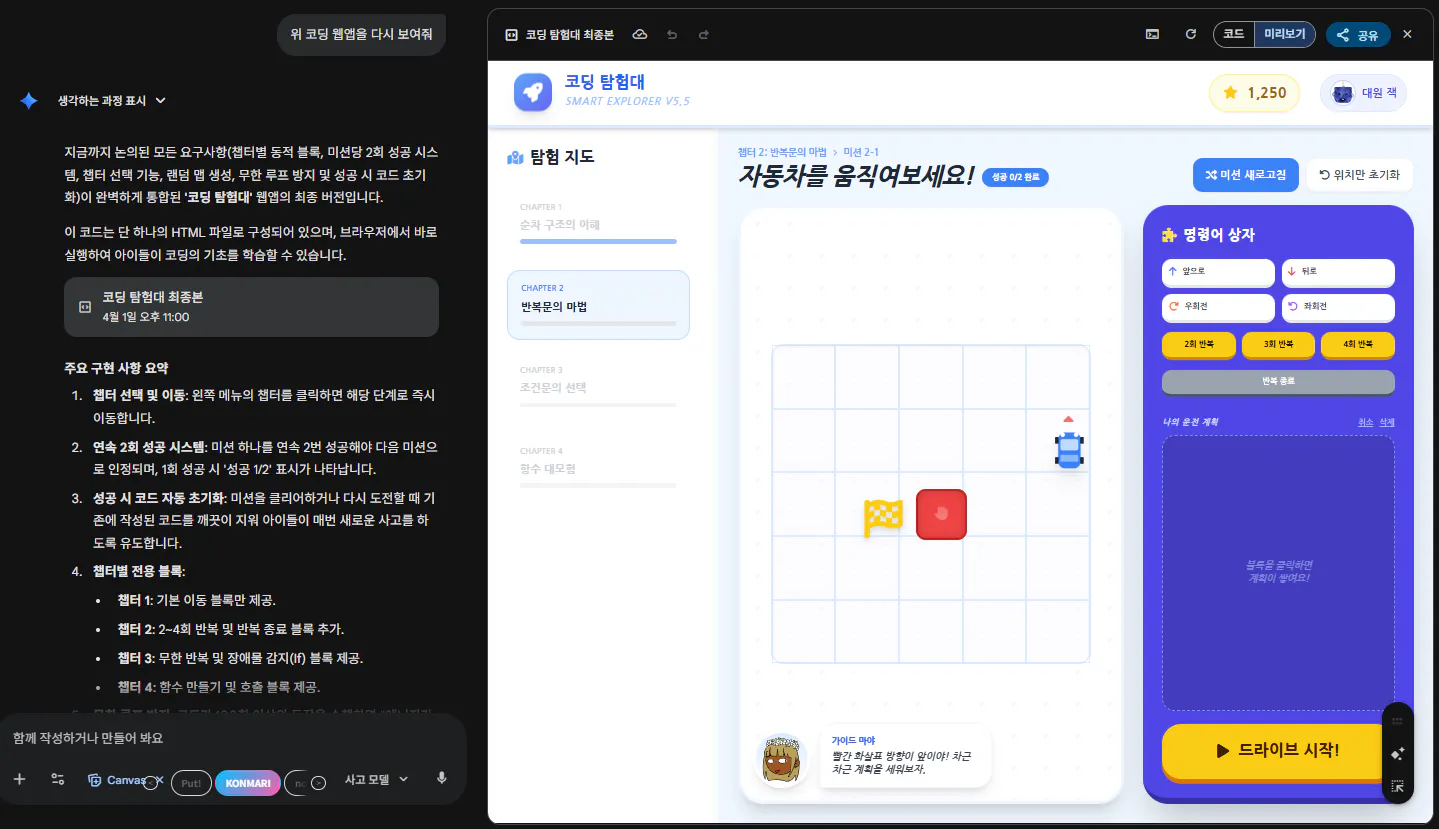
한국 앱 스크린샷
<결과물 바로가기 링크>
https://gemini.google.com/share/08a8ead30a33
결과와 배운 점
결과물 주요 기능
동적 블록 라이브러리: 챕터별 학습 목표에 맞는 블록만 노출하여 인지 부하 감소.
스마트 실행 엔진: '무한 반복' 내부에 '조건문'이 들어간 복잡한 중첩 구조도 정확히 해석.
2회 승리 시스템: 단순 우연이 아닌 정확한 논리 설계를 유도하기 위해 미션당 2회 성공 조건 부여.
안전 장치: 잘못된 코드로 인한 브라우저 멈춤을 방지하기 위한 실행 횟수 제한(100회) 적용.
시행착오 및 해결 방법
문제점: 무한 반복문 안에서 조건문이 끝나는 지점을 찾지 못해 자동차가 한 번만 움직이고 멈추는 현상 발생.
해결: '명령 끝내기' 블록을 실행 시퀀스에 포함시키고, 현재 실행 위치(Pointer)를 관리하는 스택 로직을 보완하여 루프가 정상적으로 순환하도록 수정함.
문제점: 자동차와 깃발이 너무 가깝게 생성되어 변별력이 떨어짐.
해결: 랜덤 생성 시 최소 2칸(160px) 이상의 거리를 유지하도록 맨해튼 거리(Manhattan Distance) 계산법 적용.
배운 점과 나만의 꿀팁
가시성: 아이들 대상 서비스는 텍스트보다 아이콘과 색상 구분이 훨씬 중요하다는 것을 깨달았습니다.
상대적 관점: '앞으로 가기'가 화면 위쪽이 아닌 '자동차의 헤드라이트 방향'임을 명시하는 가이드 화살표가 UX를 크게 개선했습니다.
앞으로의 계획
사용자의 미션 성공 기록을 브라우저에 저장하는 기능 추가.
함수(Function) 챕터에서 매개변수를 활용한 더 고차원적인 미션 설계.
도움 받은 글 (옵션)
Lucide Icons & FontAwesome: 직관적인 블록 아이콘 라이브러리 활용.
