


소개
초등학생이나 중학생들이 게임 개발을 시작할 때 가장 어려워하는 부분이 바로 '기획' 단계입니다. 빈 도화지에 무언가를 적으라고 하면 막막해하는 학생들을 위해, 친숙한 슈퍼 마리오 테마의 인터페이스를 제공하고 **핵심 단어를 선택(Select)**만 해도 AI가 구체적인 기획서와 개발용 프롬프트까지 완성해주는 웹앱을 만들고자 했습니다.
학생들이 '기획은 공부가 아니라 게임의 일부'라고 느낄 수 있도록 재미있는 경험을 제공하는 것이 가장 큰 목표였습니다.
진행 방법
어떤 도구를 사용했고, 어떻게 활용하셨나요?
기술 스택: React (Vite 기반), Tailwind CSS (디자인), Lucide-React (아이콘), Gemini 2.5 Flash API (AI 엔진)
활용 방법: 사용자가 업로드한 한 장의 이미지(게임 이름, 요소, 캐릭터 등 6가지 카테고리)를 기반으로 UI 구조를 잡았습니다. 이후 학생들이 직접 입력하는 대신 10개씩의 추천 옵션을 골라 바로 기획할 수 있도록 고도화했습니다.
사용한 프롬프트 전문
"이미지 속의 6가지 핵심 요소(게임 이름, 요소, 캐릭터, 규칙, 스토리, 소리)를 바탕으로 학생들이 게임을 기획할 수 있는 웹앱을 만들어줘. 디자인은 마리오 분위기의 노란색 블록과 귀여운 폰트를 사용해줘. 학생들이 직접 글을 적지 않고 드롭다운 메뉴에서 각 항목당 10개씩의 옵션 중 하나를 고르게 해줘. 선택이 완료되면 AI가 구체적인 기획서와 영어 개발 프롬프트를 작성해줘야 해."
활용 이미지
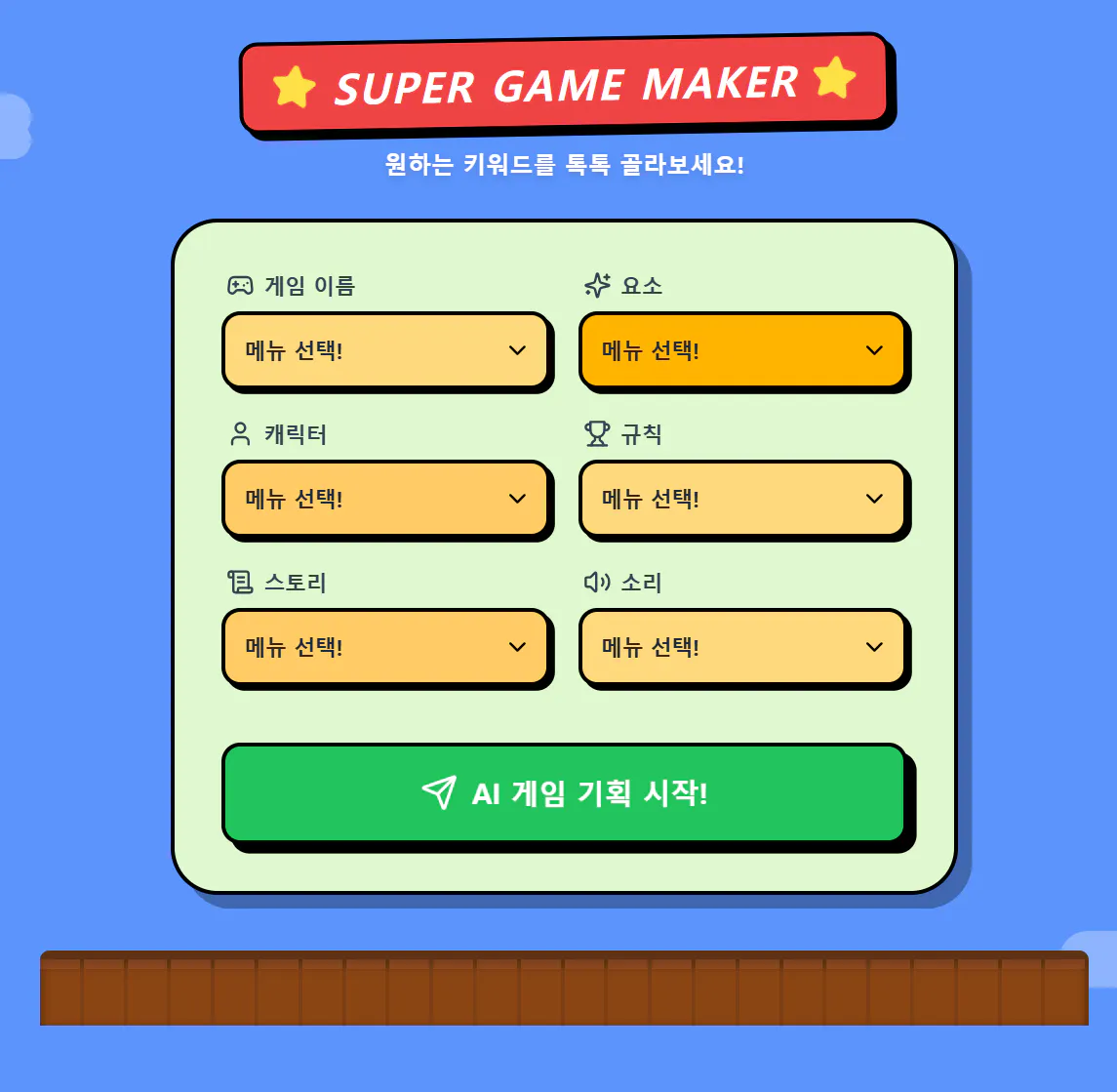
슈퍼 게임 메이커 - 스크린샷 썸네일
코드 전문
import React, { useState } from 'react';
import {
  Gamepad2,
  User,
  ScrollText,
  Music,
  Sparkles,
  Star,
  Send,
  RefreshCcw,
  Volume2,
  Trophy,
  Loader2,
  Copy,
  ChevronDown
} from 'lucide-react';

const apiKey = ""; // API key is handled by the environment

const App = () => {
  const [step, setStep] = useState('input'); // 'input', 'loading', 'result'
  const [inputs, setInputs] = useState({
    title: '',
    elements: '',
    characters: '',
    rules: '',
    story: '',
    sound: ''
  });
  const [result, setResult] = useState(null);
  const [error, setError] = useState(null);

  const categories = [
    {
      id: 'title',
      label: '게임 이름',
      icon: <Gamepad2 className="w-6 h-6" />,
      color: 'bg-[#FFD97D]',
      options: [
        "슈퍼 코딩 어드벤처", "픽셀 왕국의 전설", "스카이 런너", "심해의 미스터리",
        "던전 마스터", "은하계 전쟁", "동물 친구들의 마을", "비밀의 섬 탐험",
        "레트로 레이싱", "마법 학교의 하루"
      ]
    },
    {
      id: 'elements',
      label: '요소',
      icon: <Sparkles className="w-6 h-6" />,
      color: 'bg-[#FFB400]',
      options: [
        "점프와 달리기", "아이템 수집", "몬스터 배틀", "퍼즐 풀기",
        "시간 제한", "미로 탈출", "보스 레이드", "농사와 요리",
        "집 꾸미기", "낚시와 탐험"
      ]
    },
    {
      id: 'characters',
      label: '캐릭터',
      icon: <User className="w-6 h-6" />,
      color: 'bg-[#FFCC66]',
      options: [
        "용감한 기사", "영리한 마법사", "귀여운 강아지", "최첨단 로봇",
        "엉뚱한 외계인", "전설의 드래곤", "평범한 학생", "신비로운 닌자",
        "말하는 사과", "시간 여행자"
      ]
    },
    {
      id: 'rules',
      label: '규칙',
      icon: <Trophy className="w-6 h-6" />,
      color: 'bg-[#FFD97D]',
      options: [
        "생명력 3개", "코인 100개 모으기", "몬스터 10마리 처치", "3분 안에 탈출",
        "낙사하면 게임오버", "같은 색 퍼즐 맞추기", "모든 장애물 피하기",
        "서바이벌 생존", "체크포인트 통과", "보물 상자 5개 찾기"
      ]
    },
    {
      id: 'story',
      label: '스토리',
      icon: <ScrollText className="w-6 h-6" />,
      color: 'bg-[#FFCC66]',
      options: [
        "공주를 구출하라", "잃어버린 유물을 찾아", "지구 침공을 막아라", "전설의 검을 깨워라",
        "미지의 행성 탐험", "마을 축제 준비하기", "마법 시험 통과하기", "꿈의 세계 탈출하기",
        "전설의 요리사 도전", "시간의 문 닫기"
      ]
    },
    {
      id: 'sound',
      label: '소리',
      icon: <Volume2 className="w-6 h-6" />,
      color: 'bg-[#FFD97D]',
      options: [
        "경쾌한 8비트 음악", "신비로운 판타지음", "박진감 넘치는 락", "평화로운 숲의 소리",
        "통통 튀는 효과음", "으스스한 호러 사운드", "웅장한 오케스트라", "퓨처 일렉트로닉",
        "감성적인 피아노", "활기찬 만화 사운드"
      ]
    },
  ];

  const handleInputChange = (id, value) => {
    setInputs(prev => ({ ...prev, [id]: value }));
  };

  const generatePlan = async () => {
    const isReady = Object.values(inputs).every(val => val !== '');
    if (!isReady) {
      alert('모든 항목을 선택해주세요! 마법이 일어나기 직전이에요!');
      return;
    }

    setStep('loading');
    setError(null);

    const systemPrompt = `당신은 초등학생과 중학생을 위한 게임 기획 전문가입니다.
    사용자가 선택한 6가지 핵심 키워드를 바탕으로 아주 창의적이고 구체적인 게임 기획서를 작성해주세요.

    응답은 반드시 다음 JSON 구조를 따라야 합니다:
    {
      "detailedPlan": {
        "concept": "게임의 전체적인 느낌과 특징",
        "gameplay": "플레이어가 정확히 무엇을 하는지",
        "levelDesign": "스테이지 구성이나 난이도 설계",
        "targetAudience": "추천 대상 및 이유"
      },
      "aiPrompt": "이 게임을 개발하거나 이미지를 생성하기 위한 상세한 영어 프롬프트"
    }`;

    const userQuery = `다음 키워드로 게임을 기획해줘:
    - 게임 이름: ${inputs.title}
    - 요소: ${inputs.elements}
    - 캐릭터: ${inputs.characters}
    - 규칙: ${inputs.rules}
    - 스토리: ${inputs.story}
    - 소리: ${inputs.sound}`;

    let retries = 0;
    const maxRetries = 5;

    const callApi = async () => {
      try {
        const response = await fetch(`https://generativelanguage.googleapis.com/v1beta/models/gemini-2.5-flash-preview-09-2025:generateContent?key=${apiKey}`, {
          method: 'POST',
          headers: { 'Content-Type': 'application/json' },
          body: JSON.stringify({
            contents: [{ parts: [{ text: userQuery }] }],
            systemInstruction: { parts: [{ text: systemPrompt }] },
            generationConfig: { responseMimeType: "application/json" }
          })
        });

        if (!response.ok) throw new Error('API request failed');

        const data = await response.json();
        const content = JSON.parse(data.candidates[0].content.parts[0].text);
        setResult(content);
        setStep('result');
      } catch (err) {
        if (retries < maxRetries) {
          retries++;
          const delay = Math.pow(2, retries) * 1000;
          setTimeout(callApi, delay);
        } else {
          setError('AI가 기획서를 작성하는 데 실패했어요. 잠시 후 다시 시도해주세요.');
          setStep('input');
        }
      }
    };

    callApi();
  };

  const copyToClipboard = (text) => {
    const el = document.createElement('textarea');
    el.value = text;
    document.body.appendChild(el);
    el.select();
    document.execCommand('copy');
    document.body.removeChild(el);
    alert('복사되었습니다!');
  };

  return (
    <div className="min-h-screen bg-[#5C94FC] font-sans text-slate-800 p-4 md:p-8 flex flex-col items-center">
      {/* Decoration: Clouds & Pipes (CSS shapes) */}
      <div className="fixed top-20 left-10 opacity-30 pointer-events-none hidden md:block">
        <div className="w-24 h-10 bg-white rounded-full"></div>
        <div className="w-16 h-8 bg-white rounded-full -mt-4 ml-8"></div>
      </div>
      <div className="fixed bottom-20 right-10 opacity-30 pointer-events-none hidden md:block">
        <div className="w-32 h-12 bg-white rounded-full"></div>
        <div className="w-20 h-10 bg-white rounded-full -mt-6 ml-12"></div>
      </div>

      {/* Header */}
      <header className="mb-8 text-center relative z-10">
        <div className="inline-flex items-center gap-3 bg-red-500 text-white px-6 py-4 rounded-2xl border-4 border-black shadow-[6px_6px_0px_0px_rgba(0,0,0,1)] transform -rotate-1">
          <Star className="w-10 h-10 fill-yellow-300 text-yellow-300 animate-spin" style={{animationDuration: '3s'}} />
          <h1 className="text-3xl md:text-4xl font-black uppercase tracking-wider italic">Super Game Maker</h1>
          <Star className="w-10 h-10 fill-yellow-300 text-yellow-300 animate-spin" style={{animationDuration: '3s'}} />
        </div>
        <p className="mt-4 text-white text-xl font-bold drop-shadow-md">원하는 키워드를 톡톡 골라보세요!</p>
      </header>

      <main className="w-full max-w-2xl bg-[#E0F8CF] border-4 border-black rounded-[40px] p-6 md:p-10 shadow-[12px_12px_0px_0px_rgba(0,0,0,0.3)] relative z-10">
        {step === 'input' && (
          <div className="grid grid-cols-1 md:grid-cols-2 gap-6">
            {categories.map((cat) => (
              <div key={cat.id} className="relative group">
                <label className="flex items-center gap-2 mb-2 font-black text-lg text-slate-700 ml-1">
                  {cat.icon}
                  {cat.label}
                </label>
                <div className="relative">
                  <select
                    value={inputs[cat.id]}
                    onChange={(e) => handleInputChange(cat.id, e.target.value)}
                    className={`w-full appearance-none cursor-pointer ${cat.color} border-4 border-black rounded-2xl p-4 pr-10 font-bold text-lg shadow-[4px_4px_0px_0px_rgba(0,0,0,1)] focus:ring-4 focus:ring-white/50 transition-all outline-none`}
                  >
                    <option value="" disabled>메뉴 선택!</option>
                    {cat.options.map((opt, idx) => (
                      <option key={idx} value={opt} className="bg-white text-black font-medium">{opt}</option>
                    ))}
                  </select>
                  <ChevronDown className="absolute right-4 top-1/2 -translate-y-1/2 pointer-events-none w-6 h-6 text-black" />
                </div>
              </div>
            ))}

            <div className="md:col-span-2">
              <button
                onClick={generatePlan}
                className="w-full mt-6 bg-green-500 hover:bg-green-400 text-white font-black text-2xl py-6 rounded-2xl border-4 border-black shadow-[8px_8px_0px_0px_rgba(0,0,0,1)] transition-all active:translate-x-1 active:translate-y-1 active:shadow-none flex items-center justify-center gap-3"
              >
                <Send className="w-8 h-8" />
                AI 게임 기획 시작!
              </button>
            </div>
          </div>
        )}

        {step === 'loading' && (
          <div className="flex flex-col items-center justify-center py-20 space-y-6">
            <div className="relative">
              <div className="w-24 h-24 bg-yellow-400 border-4 border-black rounded-xl shadow-[6px_6px_0px_0px_rgba(0,0,0,1)] flex items-center justify-center animate-bounce">
                <span className="text-5xl font-black">?</span>
              </div>
            </div>
            <p className="text-2xl font-black animate-pulse text-green-800">모험을 구성하는 중...</p>
            <Loader2 className="w-12 h-12 animate-spin text-green-600" />
          </div>
        )}

        {step === 'result' && result && (
          <div className="space-y-8 animate-in fade-in slide-in-from-bottom-6 duration-500">
            <div className="bg-white border-4 border-black rounded-3xl p-6 shadow-[8px_8px_0px_0px_rgba(0,0,0,1)]">
              <h2 className="text-2xl md:text-3xl font-black mb-6 text-red-500 flex items-center gap-3 border-b-4 border-dashed border-red-100 pb-4">
                <Trophy className="w-10 h-10" />
                <span>"{inputs.title}" 기획서</span>
              </h2>

              <div className="space-y-6">
                {[
                  { title: "🌈 게임 컨셉", content: result.detailedPlan.concept, color: "blue" },
                  { title: "🎮 플레이 방식", content: result.detailedPlan.gameplay, color: "green" },
                  { title: "🏰 레벨 디자인", content: result.detailedPlan.levelDesign, color: "orange" },
                  { title: "👥 추천 타겟", content: result.detailedPlan.targetAudience, color: "purple" }
                ].map((sec, i) => (
                  <section key={i}>
                    <h3 className={`font-black text-xl text-${sec.color}-600 mb-2`}>{sec.title}</h3>
                    <p className={`bg-${sec.color}-50 p-4 rounded-2xl border-2 border-${sec.color}-100 leading-relaxed font-medium`}>
                      {sec.content}
                    </p>
                  </section>
                ))}
              </div>
            </div>

            <div className="bg-slate-800 text-white border-4 border-black rounded-3xl p-6 shadow-[8px_8px_0px_0px_rgba(0,0,0,1)]">
              <div className="flex justify-between items-center mb-4">
                <h2 className="text-xl font-black text-yellow-400 flex items-center gap-2">
                  <Sparkles className="w-6 h-6" /> 개발용 AI 프롬프트
                </h2>
                <button
                  onClick={() => copyToClipboard(result.aiPrompt)}
                  className="bg-slate-600 hover:bg-slate-500 p-2 rounded-xl transition-colors border-2 border-white/20"
                  title="복사하기"
                >
                  <Copy className="w-6 h-6" />
                </button>
              </div>
              <div className="bg-black/40 p-5 rounded-2xl border-2 border-white/10">
                <p className="text-sm font-mono leading-relaxed break-words text-yellow-100">
                  {result.aiPrompt}
                </p>
              </div>
              <p className="mt-4 text-xs text-slate-400 italic">
                * 이 영어 프롬프트를 다른 AI에게 보여주면 게임 이미지를 그려주거나 코드를 짜줄 거예요!
              </p>
            </div>

            <button
              onClick={() => setStep('input')}
              className="w-full bg-yellow-400 hover:bg-yellow-300 text-black font-black text-2xl py-5 rounded-2xl border-4 border-black shadow-[6px_6px_0px_0px_rgba(0,0,0,1)] transition-all active:translate-x-1 active:translate-y-1 active:shadow-none flex items-center justify-center gap-3"
            >
              <RefreshCcw className="w-8 h-8" />
              새로운 게임 만들기
            </button>
          </div>
        )}

        {error && (
          <div className="mt-6 p-6 bg-red-100 border-4 border-red-500 rounded-2xl text-red-700 font-black text-center animate-bounce">
            {error}
          </div>
        )}
      </main>

      {/* Ground Decoration (Brown Block) */}
      <footer className="w-full mt-12 max-w-4xl border-t-8 border-[#5C3317] bg-[#8B4513] h-16 rounded-t-lg relative overflow-hidden shadow-[inset_0_4px_10px_rgba(0,0,0,0.5)]">
        <div className="absolute inset-0 flex">
          {[...Array(24)].map((_, i) => (
            <div key={i} className="flex-1 h-full border-r-4 border-[#5C3317]/30 flex flex-col">
              <div className="h-2 bg-[#A0522D] opacity-50"></div>
              <div className="flex-1"></div>
            </div>
          ))}
        </div>
      </footer>
    </div>
  );
};

export default App;
결과물 바로가기!!
https://gemini.google.com/share/7ef79a161ab4
결과와 배운 점
배운 점과 나만의 꿀팁을 알려주세요.
꿀팁: 학생용 앱은 '자유도'보다 '가이드'가 중요합니다. 텍스트 입력창 대신 선택지를 주었을 때 학생들의 참여 속도와 결과물의 질이 훨씬 높아진다는 것을 확인했습니다.
시행착오: 처음에는 텍스트 입력 방식을 사용했으나, 모바일 환경에서 학생들이 오타를 내거나 입력을 귀찮아하는 문제가 있었습니다. 이를 해결하기 위해 모든 입력을 드롭다운 메뉴로 교체하여 접근성을 높였습니다.
도움이 필요한 부분이나 앞으로의 계획이 있다면 들려주세요.
도움: 현재는 일회성 기획에 그치고 있습니다. 학생들이 만든 기획서를 PDF로 저장하거나 친구들에게 공유할 수 있는 기능을 추가하고 싶습니다.
계획: 추후에는 저장된 기획서를 바탕으로 실제 작동하는 미니 게임 코드를 생성해주는 기능을 연동할 계획입니다.
도움 받은 글 (옵션)
지피터스(GPTERS)의 AI 에이전트 및 웹앱 제작 사례들
Tailwind CSS 공식 문서의 마리오 스타일 컬러 팔레트 참고
