


소개
학술 논문에서 통계적 방법이 잘 못되면 심각한 논문 결론의 오류로 이어집니다. 문제는 이 작업이 중요하다는 걸 알면서도, 많은 논문 리뷰어들이 통계적 지식이 부족하여 놓치게 되어 버젓이 출판되기도 합니다. 그래서 이번에는 Manus를 이용해 학술논문의 통계 리뷰를 돕는 Skill을 만들어보기로 했습니다. 목표는 AI가 논문을 대신 판정하게 만드는 것이 아니라, 리뷰어가 반복해서 확인해야 하는 통계 체크포인트를 구조화해서 먼저 점검해주는 보조 도구를 만드는 것이었습니다.
진행 방법
이번 작업에서 Manus가 잘 맞았던 이유는, 단순히 답변을 생성하는 수준이 아니라 특정 작업 흐름을 Skill 형태로 반복 가능하게 만들 수 있기 때문이었습니다.
제가 이해한 Manus의 장점은 아래와 같았습니다.
특정 기능이나 워크플로우를 Skill로 묶어서 재사용할 수 있다.
필요한 지침과 맥락을 넣어 전문화된 작업 흐름으로 다듬기 쉽다.
여러 단계의 작업을 하나의 흐름으로 설계해 일관된 출력 형식을 만들기 좋다.
안전한 실행 환경 안에서 작업을 다루기 때문에, 단순 채팅보다 자동화 실험의 구조를 잡기 편했다.
즉, “논문 입력 → 핵심 정보 파악 → 체크리스트 기반 검토 → 리뷰 초안 출력”처럼 반복적인 과정을 하나의 Skill로 묶기에 적절했습니다.어떤 도구를 사용했고, 어떻게 활용하셨나요?
Tip: 사용한 프롬프트 전문을 꼭 포함하고, 내용을 짧게 소개해 주세요.
Prompt: 논문에서 통계방법의 오류를 분석하는 스킬 만들어.
논문 통계방법 오류 분석 스킬(stat-error-analyzer) 제작이 완료되었습니다. 아래에서 스킬 구성을 확인하세요.
파일
역할
SKILL.md
스킬 핵심 — 4단계 분석 워크플로우 정의
references/stat_error_types.md
10개 범주, 40+ 통계 오류 유형 참조 사전
scripts/detect_stat_errors.py
논문 텍스트 자동 패턴 탐지 스크립트
templates/report_template.md
구조화된 분석 보고서 작성 템플릿
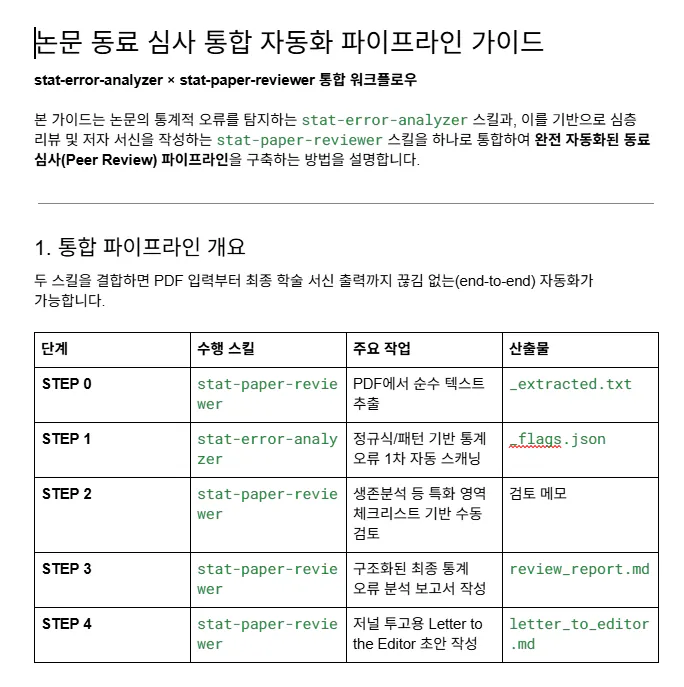
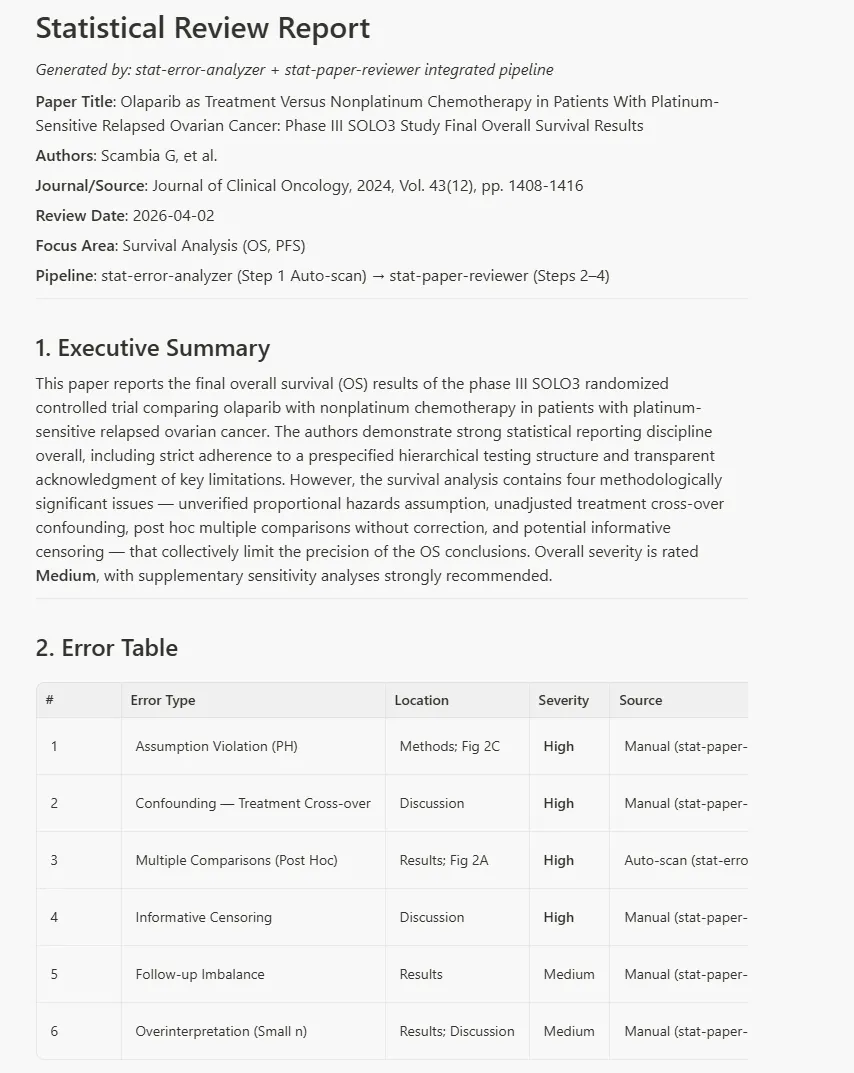
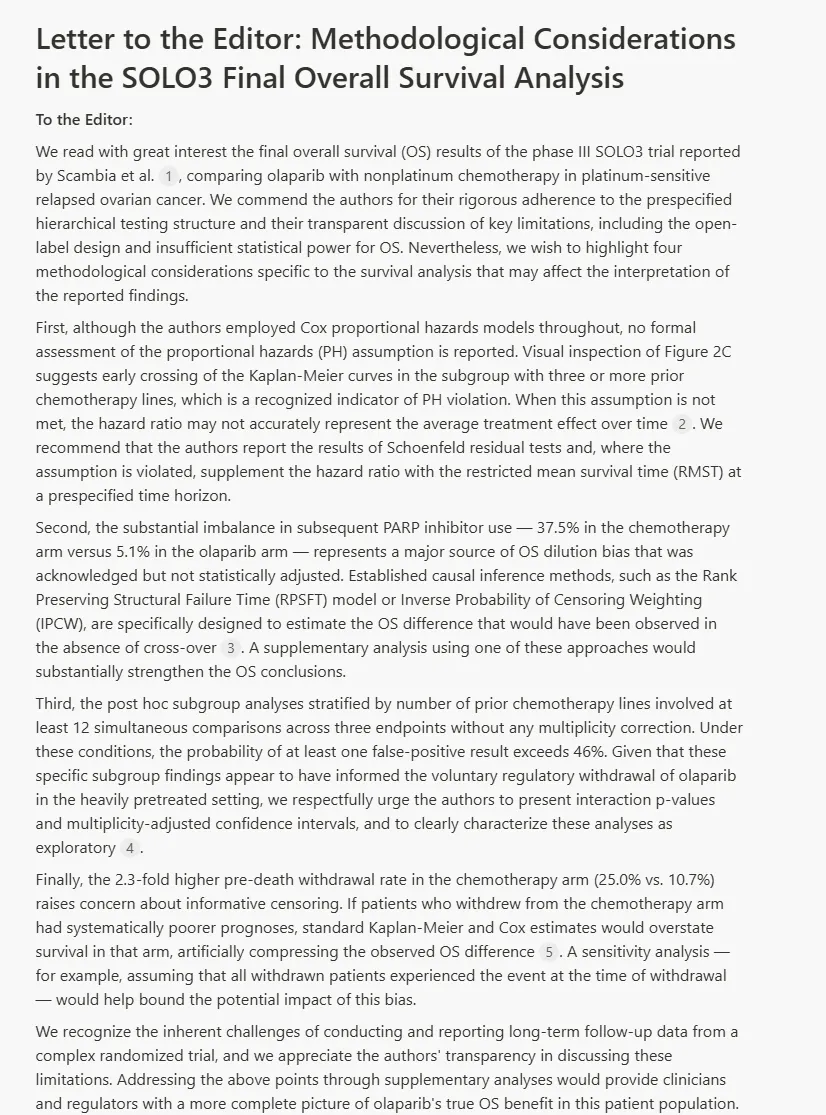
스킬 사용 흐름은 다음과 같습니다. 논문 PDF를 텍스트로 추출한 뒤 detect_stat_errors.py를 실행하면 p-value 오용, 다중비교 미보정, 가정 위반, 인과추론 오류 등 주요 통계 오류 패턴을 자동으로 탐지합니다. 이후 stat_error_types.md를 참조해 수동 검토로 오류를 확정하고, report_template.md에 따라 심각도(높음/중간/낮음)와 권고사항이 포함된 최종 보고서를 작성합니다.
Tip: 활용 이미지나 캡처 화면을 꼭 남겨주세요.
---
name: stat-error-analyzer
description: [TODO: Complete and informative explanation of what the skill does and when to use it. Include WHEN to use this skill - specific scenarios, file types, or tasks that trigger it.]
---

# Stat Error Analyzer

## Overview

[TODO: 1-2 sentences explaining what this skill enables]

## Structuring This Skill

[TODO: Choose the structure that best fits this skill's purpose. Common patterns:

**1. Workflow-Based** (best for sequential processes)
- Works well when there are clear step-by-step procedures
- Example: DOCX skill with "Workflow Decision Tree" → "Reading" → "Creating" → "Editing"
- Structure: ## Overview → ## Workflow Decision Tree → ## Step 1 → ## Step 2...

**2. Task-Based** (best for tool collections)
- Works well when the skill offers different operations/capabilities
- Example: PDF skill with "Quick Start" → "Merge PDFs" → "Split PDFs" → "Extract Text"
- Structure: ## Overview → ## Quick Start → ## Task Category 1 → ## Task Category 2...

**3. Reference/Guidelines** (best for standards or specifications)
- Works well for brand guidelines, coding standards, or requirements
- Example: Brand styling with "Brand Guidelines" → "Colors" → "Typography" → "Features"
- Structure: ## Overview → ## Guidelines → ## Specifications → ## Usage...

**4. Capabilities-Based** (best for integrated systems)
- Works well when the skill provides multiple interrelated features
- Example: Product Management with "Core Capabilities" → numbered capability list
- Structure: ## Overview → ## Core Capabilities → ### 1. Feature → ### 2. Feature...

Patterns can be mixed and matched as needed. Most skills combine patterns (e.g., start with task-based, add workflow for complex operations).

Delete this entire "Structuring This Skill" section when done - it's just guidance.]

## [TODO: Replace with the first main section based on chosen structure]

[TODO: Add content here. See examples in existing skills:
- Code samples for technical skills
- Decision trees for complex workflows
- Concrete examples with realistic user requests
- References to scripts/templates/references as needed]

## Resources

This skill includes example resource directories that demonstrate how to organize different types of bundled resources:

### scripts/
Executable code (Python/Bash/etc.) that can be run directly to perform specific operations.

**Examples from other skills:**
- PDF skill: `fill_fillable_fields.py`, `extract_form_field_info.py` - utilities for PDF manipulation
- DOCX skill: `document.py`, `utilities.py` - Python modules for document processing

**Appropriate for:** Python scripts, shell scripts, or any executable code that performs automation, data processing, or specific operations.

**Note:** Scripts may be executed without loading into context, but can still be read by Manus for patching or environment adjustments.

### references/
Documentation and reference material intended to be loaded into context to inform Manus's process and thinking.

**Examples from other skills:**
- Product management: `communication.md`, `context_building.md` - detailed workflow guides
- BigQuery: API reference documentation and query examples
- Finance: Schema documentation, company policies

**Appropriate for:** In-depth documentation, API references, database schemas, comprehensive guides, or any detailed information that Manus should reference while working.

### templates/
Files not intended to be loaded into context, but rather used within the output Manus produces.

**Examples from other skills:**
- Brand styling: PowerPoint template files (.pptx), logo files
- Frontend builder: HTML/React boilerplate project directories
- Typography: Font files (.ttf, .woff2)

**Appropriate for:** Templates, boilerplate code, document templates, images, icons, fonts, or any files meant to be copied or used in the final output.

---

**Any unneeded directories can be deleted.** Not every skill requires all three types of resources.
결과와 배운 점
배운 점과 나만의 꿀팁을 알려주세요.
이번 Skill 제작을 통해 가장 먼저 달라진 것은, 통계 리뷰를 시작할 때의 막막함이 줄었다는 점이었습니다. 예전에는 논문을 읽으면서 어디부터 의심해야 할지 매번 다시 정리해야 했다면, 이제는 Skill이 먼저 기본 체크포인트를 꺼내주기 때문에 검토의 출발선이 일정해졌습니다.
두 번째로 좋았던 점은, 리뷰의 깊이 자체보다 먼저 리뷰의 일관성이 좋아졌다는 것입니다. 같은 사람이 검토해도 그날의 피로도나 익숙함에 따라 놓치는 부분이 달라질 수 있는데, 구조화된 출력 형식이 그 흔들림을 꽤 줄여줬습니다.
세 번째는, Skill이 “정답”을 주지는 않더라도 위험 신호를 빠르게 드러내는 데는 충분히 쓸모가 있었다는 점입니다.
과정 중에 어떤 시행착오를 겪었나요?
Skill의 역할을 명확히 제한했습니다
초반에는 Skill이 너무 많은 일을 하도록 만들었습니다. 논문 요약, 통계 적절성 판단, 문장 교정, 저널 심사 의견 생성까지 한 번에 시키려 하다 보니 출력이 길어지고 초점이 흐려졌습니다.
도움이 필요한 부분이 있나요?
앞으로의 계획이 있다면 들려주세요.
Web에서 실행되는 앱을 만들어 무료로 배포할 계획입니다.
도움 받은 글 (옵션)
Manus Documentation, Manus 스킬
Manus, Build custom AI workflows with Agent Skills
EQUATOR Network, SAMPL guidelines for statistical reporting
Wiley, Step by Step Guide to Reviewing a Manuscript
