


소개
저는 본업 외에 '아동 언어 치료' 분야의 연구를 진행하고 있습니다.
인터뷰 연구를 진행하면서 언어재활사 선생님들이 수업 준비와 관리 과정에서 많은 부분을 수작업으로 처리하고 계시다는 것을 알게 되었습니다. 언어 치료는 체력적으로도 소모가 큰 일이기 때문에 수업 외 업무를 자동화해서 선생님들이 치료에 더 집중할 수 있는 환경을 만들면 좋겠다는 생각이 들었습니다.
그래서 수업 후 피드백을 기록하면 담당 아동의 부모님께 수업 내용과 숙제가 전달되고, 4주 수업이 종료되면 재 등록 안내 메일이 자동 전송되도록 하는 자동화를 구축해보았습니다.
초기에는 바이브코딩을 하려고 Google AI Studio로 시작을 했는데요. 모든 것들이 구글 생태계 내에서 해결 가능하다는 판단하에 Apps Script로 방향을 바꾸어 구현하였습니다.
진행 방법
사용 도구 및 역할
Google Sheets: (데이터 베이스 역할) 학생 정보, 수업 진행 내용 관리, 피드백 입력
Google Docs: (템플릿 문서) 구글 시트에 입력한 피드백 내용이 포맷에 맞게 자동입력
Apps Script: (자동화 스크립트) 전체 워크플로우를 자동으로 처리
Google Calendar: (수업 일정 관리) 다음 수업 일정을 자동으로 캘린더에 등록
Gmail: (알림 전송) 부모님께 피드백 문서 링크 전송, 4주차 종료 후 등록 안내 메일 전송
자동화 흐름
수업 피드백 입력 (Google Sheets)
수업을 듣는 학생들의 정보를 입력합니다.
각 수업 후, 구글 시트에 해당 회차 피드백과 과제 내용을 입력합니다.
피드백 문서 자동 생성 (Google Docs + Apps Script)
스크립트가 구글 문서 템플릿에 시트 데이터를 병합하여 피드백 문서를 자동으로 생성합니다.
이메일 전송 (Gmail)
생성된 피드백 문서 링크를 포함하여, 지메일을 통해 보호자에게 자동 전송됩니다.
다음 수업 일정 등록 (Google Calendar)
스크립트가 다음 수업 일정을 캘린더에 자동으로 생성합니다.
4주차 수업 종료 시, 등록 안내 메일 자동 발송 (Gmail)
수업 기록을 기반으로 4회차 종료 시점을 계산하여, 등록 유도 메일이 자동 발송됩니다.
통합 관리 시트
학생 정보

수업 정보

피드백 문서 템플릿
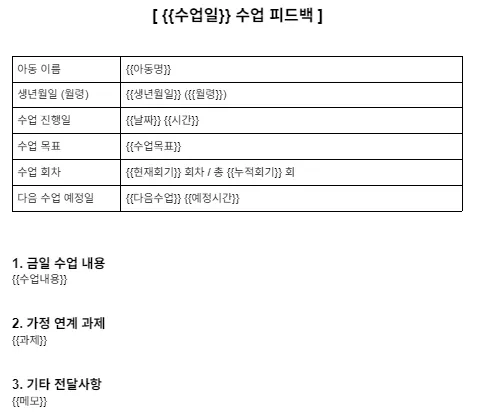
💡 템플릿 문서에는 {{날짜}}, {{피드백}}, {{과제}} 등 플레이스홀더를 사용하여 스크립트로 내용이 치환되도록 구성하였습니다.
Apps Script
// --- 설정 영역 ---
const TEMPLATE_ID = '1_7iK2tBCLZVXDGLZxZMwAdI_009jHIZp7S9qzBwdMIA'; // 피드백 템플릿 ID
const CALENDAR_ID = '4a67a49e8b5c2489e92dbde570555f2c3127c0c4a50390fff636654b6fd2034d@group.calendar.google.com'; // 선생님 캘린더 ID

// --- 트리거 함수 ---
function onCheckboxEdit(e) {
  if (!e || !e.range) return;
  const sheet = e.source.getActiveSheet();
  const range = e.range;

  // 수업일지 시트의 L열(12번째) 체크박스 감지
  if (sheet.getName() === '수업일지' && range.getColumn() === 12 && range.getValue() === true) {
    if (range.getNumRows() > 1) {
      Browser.msgBox("한 번에 하나의 행만 체크해주세요.");
      range.setValue(false);
      return;
    }
    sendFeedback(e.source, sheet, range.getRow());
  }
}

function sendFeedback(ss, logSheet, row) {
  try {
    // 0. 센터 정보 가져오기 (새로 추가된 기능)
    const centerSheet = ss.getSheetByName('센터정보');
    if (!centerSheet) {
      Browser.msgBox("'센터정보' 시트가 없습니다. 시트를 만들고 A2:센터명, B2:SLP명, C2:결재링크를 입력해주세요.");
      logSheet.getRange(row, 12).setValue(false);
      return;
    }
    const centerData = centerSheet.getRange(2, 1, 1, 3).getValues()[0];
    const centerName = centerData[0] || "언어치료실"; // A2
    const slpName = centerData[1] || "담임 선생님";    // B2
    const paymentLink = centerData[2] || "#";          // C2

    // 1. 수업일지 데이터 가져오기
    const dataRange = logSheet.getRange(row, 1, 1, 11);
    const data = dataRange.getValues()[0];

    const date = data[0];       // A: 날짜
    const time = data[1];       // B: 시간
    const childName = data[2];  // C: 아동명
    const totalCount = data[3]; // D: 누적회차
    const goal = data[5];       // F: 수업목표
    const content = data[6];    // G: 수업내용
    const homework = data[7];   // H: 과제
    const memo = data[8];       // I: 메모
    const nextDateRaw = data[9];// J: 다음날짜
    const nextTimeRaw = data[10];// K: 다음시간

    // 1-1. 날짜 포맷팅
    const dateStr = Utilities.formatDate(new Date(date), "GMT+9", "yyyy-MM-dd");
    let timeStr = time ? Utilities.formatDate(new Date(time), "GMT+9", "HH:mm") : "";

    // 1-2. 현재 회차 계산
    let currentCycle = 0;
    if (totalCount > 0) {
      currentCycle = (totalCount - 1) % 4 + 1;
    }

    // 2. 학생정보 가져오기
    const infoSheet = ss.getSheetByName('학생정보');
    const infoData = infoSheet.getDataRange().getValues();

    let email = "", folderId = "", birthDate = "", monthAge = "";
    let studentFound = false;

    for (let i = 1; i < infoData.length; i++) {
      if (infoData[i][1] === childName) {
        birthDate = Utilities.formatDate(new Date(infoData[i][2]), "GMT+9", "yyyy-MM-dd");
        monthAge = infoData[i][3];
        email = infoData[i][4];
        folderId = infoData[i][10];
        studentFound = true;
        break;
      }
    }

    if (!studentFound || !folderId) {
      Browser.msgBox("학생 정보를 찾을 수 없거나 폴더 ID가 없습니다.");
      logSheet.getRange(row, 12).setValue(false);
      return;
    }

    // 3. 문서 생성
    const fileName = `${childName}_${totalCount}회차_${dateStr}`;
    const folder = DriveApp.getFolderById(folderId);
    const templateFile = DriveApp.getFileById(TEMPLATE_ID);
    const newFile = templateFile.makeCopy(fileName, folder);
    const doc = DocumentApp.openById(newFile.getId());
    const body = doc.getBody();

    // 4. 템플릿 내용 교체
    // 다음 수업 일정 처리 (문서용, 메일용, 캘린더링크용)
    let nextDateStr = "미정";
    let nextTimeStr = "";
    let nextScheduleEmail = "미정";
    let nextStartObj = null;
    let googleCalendarLink = "#"; // 캘린더 추가 링크

    if (nextDateRaw) {
       nextDateStr = Utilities.formatDate(new Date(nextDateRaw), "GMT+9", "yyyy-MM-dd");
       let emailDateStr = Utilities.formatDate(new Date(nextDateRaw), "GMT+9", "MM월 dd일");

       if (nextTimeRaw) {
         const nDate = new Date(nextDateRaw);
         const nTime = new Date(nextTimeRaw);
         nextStartObj = new Date(nDate.getFullYear(), nDate.getMonth(), nDate.getDate(), nTime.getHours(), nTime.getMinutes());
         nextTimeStr = Utilities.formatDate(nTime, "GMT+9", "HH:mm");
         nextScheduleEmail = `${emailDateStr} ${nextTimeStr}`;

         // ** 구글 캘린더 링크 생성 로직 **
         // 시작시간 포맷: YYYYMMDDTHHmmSS
         const calStart = Utilities.formatDate(nextStartObj, "GMT+9", "yyyyMMdd'T'HHmmss");
         // 종료시간 (50분 후)
         const nextEndObj = new Date(nextStartObj.getTime() + 50 * 60000);
         const calEnd = Utilities.formatDate(nextEndObj, "GMT+9", "yyyyMMdd'T'HHmmss");

         const calTitle = encodeURIComponent(`[${centerName}] ${childName} 언어치료`);
         const calDetails = encodeURIComponent("수업 예정입니다.");

         googleCalendarLink = `https://www.google.com/calendar/render?action=TEMPLATE&text=${calTitle}&dates=${calStart}/${calEnd}&details=${calDetails}&ctz=Asia/Seoul`;

       } else {
         nextScheduleEmail = emailDateStr;
       }
    }

    // 치환 실행
    body.replaceText("{{아동명}}", childName);
    body.replaceText("{{생년월일}}", birthDate);
    body.replaceText("{{월령}}", monthAge);
    body.replaceText("{{수업일}}", dateStr);
    body.replaceText("{{날짜}}", dateStr);
    body.replaceText("{{시간}}", timeStr);
    body.replaceText("{{수업목표}}", goal || "-");
    body.replaceText("{{수업내용}}", content || "내용 없음");
    body.replaceText("{{과제}}", homework || "없음");
    body.replaceText("{{메모}}", memo || "없음");
    body.replaceText("{{현재회기}}", currentCycle);
    body.replaceText("{{누적회기}}", totalCount);
    body.replaceText("{{다음수업}}", nextDateStr);
    body.replaceText("{{예정시간}}", nextTimeStr);

    doc.saveAndClose();

    // 5. 피드백 이메일 발송 (HTML 수정: 볼드체 제거, 캘린더 링크 추가)
    if (email) {
      const subject = `[${centerName}] ${childName} 아동 ${dateStr} 수업 피드백`;

      const htmlBody = `
        <div style="font-family: sans-serif; font-size: 11pt; line-height: 1.6; color: #333;">
          ${childName} 부모님,<br><br>
          ${currentCycle}회차 수업 진행 내용입니다.<br><br>
          ▶ <a href="${newFile.getUrl()}" style="text-decoration: none; color: #1a73e8;">수업 피드백 내용 확인</a><br>
          ▶ 다음 수업 예약: ${nextScheduleEmail}
          ${nextStartObj ? `(<a href="${googleCalendarLink}" style="text-decoration: none; color: #1a73e8;">캘린더에 추가</a>)` : ""}<br><br>
          감사합니다.
        </div>
      `;

      GmailApp.sendEmail(email, subject, "HTML 지원 불가", {
        htmlBody: htmlBody,
        name: centerName // 보낸 사람 이름
      });
    }

    // 6. 4회기 종결 안내 (HTML 수정: 볼드체 제거, 결제 링크 추가)
    if (totalCount > 0 && totalCount % 4 === 0 && email) {
      const renewSubject = `[${centerName}] ${childName} 아동 재등록 안내`;

      const renewBody = `
        <div style="font-family: sans-serif; font-size: 11pt; line-height: 1.6; color: #333;">
          ${childName} 부모님,<br><br>
          4회기 수업이 진행되었습니다.<br>
          다음 4회기 등록을 부탁 드립니다.<br><br>
          ▶ <a href="${paymentLink}" style="text-decoration: none; color: #1a73e8;">결재 링크</a><br><br>
          감사합니다.<br><br>
          ${centerName} ${slpName} 드림
        </div>
      `;

      GmailApp.sendEmail(email, renewSubject, "HTML 지원 불가", {
        htmlBody: renewBody,
        name: centerName // 보낸 사람 이름
      });

      logSheet.getRange(row, 14).setValue("발송완료");
    }

    // 7. 마무리
    logSheet.getRange(row, 13).setValue(newFile.getUrl());
    logSheet.getRange(row, 12).setValue(false);

    if (nextStartObj) {
      createCalendarEvent(childName, nextStartObj);
    }

    ss.toast("처리 완료");

  } catch (error) {
    Browser.msgBox("오류 발생: " + error.toString());
    logSheet.getRange(row, 12).setValue(false);
  }
}

function createCalendarEvent(childName, startTime) {
  try {
    const calendar = CalendarApp.getCalendarById(CALENDAR_ID);
    const endTime = new Date(startTime);
    endTime.setMinutes(startTime.getMinutes() + 50);
    calendar.createEvent(`[${childName}] 언어수업`, startTime, endTime);
  } catch (e) {
    Logger.log("캘린더 오류: " + e.toString());
  }
}
결과와 배운 점
수업이 끝날 때마다 매번 메일을 보내거나 캘린더에 등록하는 부담이 사라질 것 같습니다.
다만 Apps Script로 작업할 경우 내 계정을 연결하는 것이어서 자동화 플로우를 선생님들께 공유해서 사용해보실 수 있도록 하려면 어떻게 해야할지 조금 더 연구해보고 싶습니다.
현장의 니즈를 조금 더 탐색해서 일정 관리, 등록 관리 측면에서 다양한 워크플로우를 담아낼 수 있는 자동화 툴로 발전시켜보고 싶습니다.
도움 받은 글
허세임AI 채널: 구글 시트를 DB로! CRM 자동화 영상
