Pac-Man 만들기 도전, 추억을 떠올리다

2026.07.26
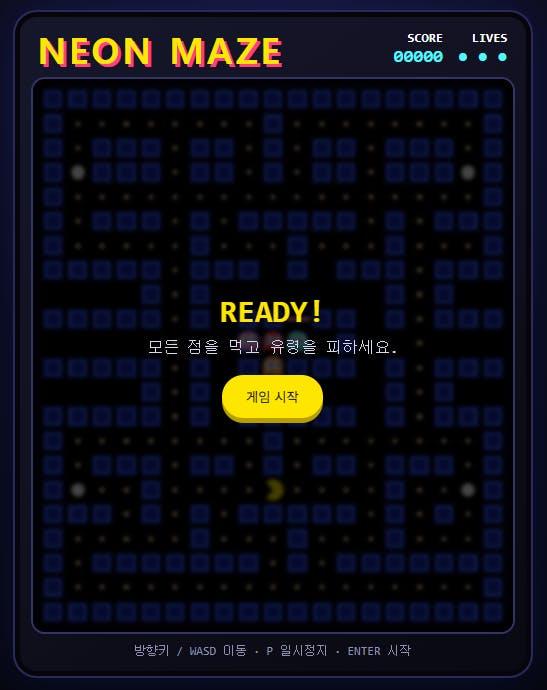
소개
게임바이브코딩 청강 중입니다. 영상보고 vercel 배포를 처음 도전해 봤습니다.
Repositories가 총 6개가 있었는데 public이 아니라도 배포가 되는 것 같아서 2개를 만들고 둘 다 private로 바꿨는데 하나가 블럭이 됐습니다.
1개만 private가 되는 것 같아요.
진행 방법
어떤 도구를 사용했고, 어떻게 활용하셨나요?
codex를 이용해서 Pac-Man을 만들어 보았습니다. 예전에 했던 기억이 나서 만들어 봤는데 플레이해보니 너무 어렵습니다. 예전에는 어떻게 게임을 했었는지 기억조차 나지 않네요.
Tip: 사용한 프롬프트 전문을 꼭 포함하고, 내용을 짧게 소개해 주세요.
팩맨을 만들어줘. html 단일 웹으로 개발해줘html 파일 여러개 만들까봐 단일 웹으로 개발해 달라고 했습니다.
Tip: 활용 이미지나 캡처 화면을 꼭 남겨주세요.
기존의 게임과는 좀 다른 뭔가를 추가하고 싶다는 욕구가 생깁니다.
Hunted Mansion 재미있었습니다.
Tip: 코드 전문은 코드블록에 감싸서 작성해주세요. ( / 을 눌러 '코드 블록'을 선택)
<!doctype html>
<html lang="ko">
<head>
  <meta charset="utf-8">
  <meta name="viewport" content="width=device-width,initial-scale=1,maximum-scale=1,user-scalable=no">
  <title>NEON MAZE</title>
  <style>
    :root{color-scheme:dark;--yellow:#ffe600;--blue:#2448ff;--ink:#070710;--cyan:#55f7ff}
    *{box-sizing:border-box}
    body{margin:0;min-height:100svh;display:grid;place-items:center;overflow:hidden;background:
      radial-gradient(circle at 50% 20%,#18183c 0,#090914 40%,#030307 100%);font-family:ui-monospace,Consolas,monospace;color:#fff}
    .cabinet{width:min(96vw,520px);padding:18px 18px 14px;border:2px solid #29295a;border-radius:24px;background:linear-gradient(145deg,#17172c,#090912);
      box-shadow:0 0 50px #193cff2c,inset 0 0 0 5px #05050b}
    header{display:flex;align-items:end;justify-content:space-between;margin:0 5px 12px}
    h1{margin:0;color:var(--yellow);font:900 clamp(22px,6vw,36px)/1 system-ui;letter-spacing:.08em;text-shadow:3px 3px 0 #ff3d7f}
    .stats{display:flex;gap:15px;font-weight:800;font-size:13px;text-align:right}.stats span{display:block;color:var(--cyan);font-size:18px}
    .screen{position:relative;padding:8px;border-radius:12px;background:#020208;box-shadow:inset 0 0 22px #000,0 0 0 2px #343468}
    canvas{display:block;width:100%;height:auto;aspect-ratio:19/22;background:#000;border-radius:6px;image-rendering:pixelated}
    .overlay{position:absolute;inset:8px;display:grid;place-items:center;background:#000b;border-radius:6px;text-align:center;backdrop-filter:blur(2px)}
    .overlay[hidden]{display:none}.card h2{margin:0 0 8px;color:var(--yellow);font-size:32px}.card p{margin:5px 0 18px;color:#d8d8ef}
    button{border:0;border-radius:999px;padding:12px 24px;background:var(--yellow);color:#111;font:900 15px inherit;cursor:pointer;box-shadow:0 5px 0 #b79f00}
    button:active{transform:translateY(4px);box-shadow:0 1px 0 #b79f00}
    .help{text-align:center;color:#8f90ab;font-size:12px;margin:12px 0 4px}
    .touch{display:none;margin:12px auto 0;width:154px;grid-template:repeat(3,44px)/repeat(3,44px);gap:5px}
    .touch button{padding:0;border-radius:12px;font-size:20px;box-shadow:none;background:#282848;color:#fff;touch-action:manipulation}
    .touch .up{grid-column:2}.touch .left{grid-area:2/1}.touch .down{grid-area:2/2}.touch .right{grid-area:2/3}
    @media(pointer:coarse),(max-width:600px){body{overflow:auto}.cabinet{margin:8px auto}.touch{display:grid}.help{display:none}}
  </style>
</head>
<body>
<main class="cabinet">
  <header>
    <h1>NEON MAZE</h1>
    <div class="stats"><div>SCORE<span id="score">00000</span></div><div>LIVES<span id="lives">● ● ●</span></div></div>
  </header>
  <section class="screen">
    <canvas id="game" width="456" height="528" aria-label="팩맨 미로 게임"></canvas>
    <div class="overlay" id="overlay">
      <div class="card"><h2 id="title">READY!</h2><p id="message">모든 점을 먹고 유령을 피하세요.</p><button id="start">게임 시작</button></div>
    </div>
  </section>
  <div class="touch" aria-label="터치 방향키">
    <button class="up" data-dir="up">▲</button><button class="left" data-dir="left">◀</button>
    <button class="down" data-dir="down">▼</button><button class="right" data-dir="right">▶</button>
  </div>
  <p class="help">방향키 / WASD 이동 · P 일시정지 · ENTER 시작</p>
</main>
<script>
(()=>{
  "use strict";
  const MAP=[
    "###################",
    "#........#........#",
    "#.###.##.#.##.###.#",
    "#o###.##.#.##.###o#",
    "#.................#",
    "#.###.#.#####.#.###",
    "#.....#...#...#...#",
    "#####.### # ###.###",
    "    #.#       #.#  ",
    "#####.# ##=## #.###",
    "     .  #   #  .   ",
    "#####.# ##### #.###",
    "    #.#       #.#  ",
    "#####.# ##### #.###",
    "#........#........#",
    "#.###.##.#.##.###.#",
    "#o..#....P....#..o#",
    "###.#.#.#####.#.#.#",
    "#.....#...#...#...#",
    "#.#######.#.#######",
    "#.................#",
    "###################"
  ];
  const C=24, canvas=document.querySelector("#game"),ctx=canvas.getContext("2d");
  const scoreEl=document.querySelector("#score"), livesEl=document.querySelector("#lives");
  const overlay=document.querySelector("#overlay"),title=document.querySelector("#title"),message=document.querySelector("#message"),start=document.querySelector("#start");
  const dirs={left:{x:-1,y:0,a:Math.PI},right:{x:1,y:0,a:0},up:{x:0,y:-1,a:-Math.PI/2},down:{x:0,y:1,a:Math.PI/2}};
  let grid,player,ghosts,score,lives,dots,state="ready",last=0,power=0,chain=0;
  function reset(full=true){
    grid=MAP.map(r=>[...r]);
    if(full){score=0;lives=3}
    player={x:9,y:16,dir:"left",next:"left",progress:0,speed:7};
    grid[16][9]=" ";
    const data=[["#ff365e",9,10,"blinky"],["#ff8bd7",8,10,"pinky"],["#56efff",10,10,"inky"],["#ff9f40",9,11,"clyde"]];
    ghosts=data.map((g,i)=>({color:g[0],x:g[1],y:g[2],dir:i%2?"right":"left",progress:0,speed:5.3,homeX:g[1],homeY:g[2],name:g[3],dead:false}));
    power=0;chain=0;updateHud();draw();
  }
  const tile=(x,y)=>grid[(y+grid.length)%grid.length]?.[(x+19)%19]??"#";
  const open=(x,y,ghost=false)=>{const t=tile(x,y);return t!=="#"&&(ghost||t!=="=")};
  function pickDir(g){
    const options=Object.keys(dirs).filter(d=>open(g.x+dirs[d].x,g.y+dirs[d].y,true)&&!(dirs[d].x===-dirs[g.dir].x&&dirs[d].y===-dirs[g.dir].y));
    if(!options.length)return Object.keys(dirs).find(d=>open(g.x+dirs[d].x,g.y+dirs[d].y,true))||g.dir;
    if(power>0&&!g.dead)return options[Math.floor(Math.random()*options.length)];
    let tx=player.x,ty=player.y;
    if(g.dead){tx=g.homeX;ty=g.homeY}
    else if(g.name==="pinky"){tx+=dirs[player.dir].x*4;ty+=dirs[player.dir].y*4}
    else if(g.name==="clyde"&&Math.hypot(g.x-player.x,g.y-player.y)<6){tx=1;ty=20}
    return options.sort((a,b)=>dist(g,a,tx,ty)-dist(g,b,tx,ty))[0];
  }
  const dist=(g,d,x,y)=>Math.hypot(g.x+dirs[d].x-x,g.y+dirs[d].y-y)+Math.random()*.15;
  function move(e,dt,isGhost=false){
    if(e.progress<=0){
      if(!isGhost&&open(e.x+dirs[e.next].x,e.y+dirs[e.next].y))e.dir=e.next;
      if(isGhost)e.dir=pickDir(e);
      if(!open(e.x+dirs[e.dir].x,e.y+dirs[e.dir].y,isGhost))return;
    }
    e.progress+=e.speed*dt*((isGhost&&power>0&&!e.dead)?.72:1);
    if(e.progress>=1){
      e.x=(e.x+dirs[e.dir].x+19)%19;e.y=(e.y+dirs[e.dir].y+22)%22;e.progress=0;
      if(!isGhost)eat();
      else if(e.dead&&e.x===e.homeX&&e.y===e.homeY)e.dead=false;
    }
  }
  function eat(){
    const t=tile(player.x,player.y);
    if(t==="."||t==="o"){
      grid[player.y][player.x]=" ";score+=t==="o"?50:10;
      if(t==="o"){power=8;chain=0}
      updateHud();
      if(!grid.some(r=>r.some(c=>c==="."||c==="o")))finish(true);
    }
  }
  function collide(){
    for(const g of ghosts){
      const px=player.x+dirs[player.dir].x*player.progress,py=player.y+dirs[player.dir].y*player.progress;
      const gx=g.x+dirs[g.dir].x*g.progress,gy=g.y+dirs[g.dir].y*g.progress;
      if(!g.dead&&Math.hypot(px-gx,py-gy)<.7){
        if(power>0){g.dead=true;g.progress=0;score+=200*(2**chain++);updateHud()}
        else loseLife();
      }
    }
  }
  function loseLife(){
    state="pause";lives--;updateHud();
    if(lives<=0)return finish(false);
    setTimeout(()=>{const keepScore=score,keepLives=lives;reset(false);score=keepScore;lives=keepLives;updateHud();state="play";last=performance.now();requestAnimationFrame(loop)},900);
  }
  function finish(win){
    state="over";title.textContent=win?"YOU WIN!":"GAME OVER";message.textContent=`최종 점수 ${score.toLocaleString()}점`;start.textContent="다시 플레이";overlay.hidden=false;
  }
  function updateHud(){scoreEl.textContent=String(score).padStart(5,"0");livesEl.textContent="● ".repeat(lives).trim()||"—"}
  function startGame(){reset(true);overlay.hidden=true;state="play";last=performance.now();requestAnimationFrame(loop)}
  function loop(now){
    if(state!=="play")return;
    const dt=Math.min((now-last)/1000,.05);last=now;
    if(power>0)power=Math.max(0,power-dt);
    move(player,dt);ghosts.forEach(g=>move(g,dt,true));collide();draw();
    if(state==="play")requestAnimationFrame(loop);
  }
  function draw(){
    ctx.clearRect(0,0,canvas.width,canvas.height);
    ctx.fillStyle="#000";ctx.fillRect(0,0,canvas.width,canvas.height);
    ctx.lineWidth=2;
    for(let y=0;y<grid.length;y++)for(let x=0;x<19;x++){
      const t=grid[y][x],cx=x*C+C/2,cy=y*C+C/2;
      if(t==="#"){ctx.fillStyle="#1023a8";ctx.fillRect(x*C+2,y*C+2,C-4,C-4);ctx.strokeStyle="#4469ff";ctx.strokeRect(x*C+5,y*C+5,C-10,C-10)}
      else if(t==="."){ctx.fillStyle="#ffd9b5";ctx.beginPath();ctx.arc(cx,cy,2.3,0,7);ctx.fill()}
      else if(t==="o"){ctx.fillStyle="#fff";ctx.beginPath();ctx.arc(cx,cy,6+Math.sin(performance.now()/120),0,7);ctx.fill()}
      else if(t==="="){ctx.fillStyle="#ff91d8";ctx.fillRect(x*C,y*C+10,C,4)}
    }
    drawPac(player);ghosts.forEach(drawGhost);
  }
  function pos(e){return{x:(e.x+dirs[e.dir].x*e.progress)*C+C/2,y:(e.y+dirs[e.dir].y*e.progress)*C+C/2}}
  function drawPac(p){
    const q=pos(p),mouth=.16+.13*Math.abs(Math.sin(performance.now()/70)),a=dirs[p.dir].a;
    ctx.fillStyle="#ffe600";ctx.beginPath();ctx.moveTo(q.x,q.y);ctx.arc(q.x,q.y,10.5,a+mouth*Math.PI,a+(2-mouth)*Math.PI);ctx.closePath();ctx.fill();
  }
  function drawGhost(g){
    const q=pos(g),flash=power<2&&Math.floor(power*6)%2===0;
    if(g.dead){eyes(q.x,q.y,g.dir);return}
    ctx.fillStyle=power>0?(flash?"#fff":"#263cff"):g.color;
    ctx.beginPath();ctx.arc(q.x,q.y-2,10,Math.PI,0);ctx.lineTo(q.x+10,q.y+9);
    for(let i=0;i<4;i++)ctx.lineTo(q.x+10-i*6.66,q.y+5+(i%2?4:0));
    ctx.lineTo(q.x-10,q.y-2);ctx.fill();eyes(q.x,q.y,g.dir);
  }
  function eyes(x,y,d){for(const s of[-4,4]){ctx.fillStyle="#fff";ctx.beginPath();ctx.ellipse(x+s,y-3,3.4,4.5,0,0,7);ctx.fill();ctx.fillStyle="#183bd4";ctx.beginPath();ctx.arc(x+s+dirs[d].x*1.4,y-3+dirs[d].y*1.4,1.7,0,7);ctx.fill()}}
  function setDir(d){if(dirs[d])player.next=d}
  addEventListener("keydown",e=>{
    const keys={ArrowLeft:"left",a:"left",A:"left",ArrowRight:"right",d:"right",D:"right",ArrowUp:"up",w:"up",W:"up",ArrowDown:"down",s:"down",S:"down"};
    if(keys[e.key]){e.preventDefault();setDir(keys[e.key])}
    if(e.key==="Enter"&&(state==="ready"||state==="over"))startGame();
    if((e.key==="p"||e.key==="P")&&state!=="ready"&&state!=="over"){state=state==="play"?"paused":"play";overlay.hidden=state==="play";title.textContent="PAUSED";message.textContent="P를 눌러 계속";start.textContent="계속";if(state==="play"){last=performance.now();requestAnimationFrame(loop)}}
  });
  document.querySelectorAll("[data-dir]").forEach(b=>{b.addEventListener("pointerdown",e=>{e.preventDefault();setDir(b.dataset.dir)})});
  start.addEventListener("click",()=>state==="paused"?(state="play",overlay.hidden=true,last=performance.now(),requestAnimationFrame(loop)):startGame());
  reset(true);
})();
</script>
</body>
</html>
<script async data-explicit-opt-in="true" data-cookie-opt-in="true" data-deployment-id="dpl_3LT1GweeacJN1aV3Z5ReQkdnVho5" src="https://vercel.live/_next-live/feedback/feedback.js"></script>
결과와 배운 점
vercel 배포를 처음 해봤는데 github랑 쉽게 연동이 되는데다가 github 아이디가 보이는 것이 굉장히 불편했는데 너무 좋은 꿀팁을 배웠습니다.
2주차에 복잡하고 규모있는 게임을 만드는 방법을 공유해주신다고 해서 매우 기대가 됩니다.
로그인하고 댓글을 남겨 주세요
처음 도전한 Vercel 배포를 GitHub와 연동해 실제로 플레이할 수 있는 결과물까지 완성하신 과정이 인상적이에요. 추억의 팩맨을 NEON MAZE라는 이름과 네온 색감, 점수·목숨·터치 방향키까지 갖춘 게임으로 구현하셔서 완성도가 더욱 돋보입니다. GitHub 아이디가 보이는 불편함과 배포 과정에서 새롭게 배운 점까지 솔직하게 정리해 주셔서, 첫 배포에 도전하는 분들에게도 유용한 기록이 될 것 같아요.

필요한 AI 정보만
메일함에 쏙쏙 넣어드려요.
지금 핫한 AI 소식부터 직접 해 본 사례까지, 월요일마다 무료로 받아보세요

오 이 작업도 해보셨군요.
의도를 가지고 'html 단일 웹으로 개발해줘'라고 하신 것도 좋은 것 같습니다.
내 의도를 정확히 전달하는 것은 바이브코딩에서 아주 좋은 습관이니까요.
한편으로는 바이브코딩은 점점 코드를 보지 않는 쪽으로 진행해도 충분히 좋다는 생각을 합니다.
저는 직접 코드를 작성하는 개발자로서 실무를 20년 했는데요.
작년말부터는 코드를 들여다보지 않고 채팅창으로만 개발을 하고 있습니다. (물론 파일들이 어떻게 만들어 질 지는 머릿속에서 예상하고, 실제로 목록을 훑어보기도 합니다. 하지만 내용은 잘 확인하지 않아요)
그래서 작은 단위 작업을 할 때는 html 파일이 하나인지, 파일이 여러개인지 신경쓰지 않습니다. 그것까지도 알아서하도록 맡겨두어도 좋다는 느낌입니다.
일을 아주 잘하는 보조자로서의 존재인 AI를 사람처럼 상정하고 "내가 부탁이 있는데 이런 작업을 해줘. 만드는건 네가 알아서 해주면 돼." 라는 느낌으로 지시를 하는거죠.
그런 존재라면 파일을 하나 만들지, 여러개 만들지는 알아서 처리 할 수도 있을테니까요.
스킬 사용해서 사례글 올리시다보니 가이드 대로 소스코드도 올려주신 것 같은데, 저희 스터디 하시는 동안은 소스코드 안올려주셔도 될거 같아요. 코드 안보고 결과물로 이야기하는 진행을 계속 할거거든요.
팩맨이 디지털 게임 초창기의 게임이라서... 옛스럽고 게임 방식이 직관적이 않은 느낌이 있습니다 ㅎㅎ
플레이해보니 너무 어렵다는 느낌이 드셨다면 팩맨이 아닌 다른 게임으로 시도해보시는 것도 좋았겠다 싶네요. '수퍼 마리오 같은 게임 만들어줘' 도 좋을테고, '간단한 점프 게임 만들어줘'도 좋을 것 같습니다. 내가 플레이하고, 재미있다고 느끼는 경험이 되어야 내가 만든 게임을 남들에게도 플레이해보라고 기꺼이 전해줄 수 있게 되니까요.