


소개
요즘 옵시디언에서 이것저것 메모를 하고 있는데요.
그걸 가지고 학생들 취업 준비 가이드 안내 페이지를 만들어 보면 어떨까? 라고 생각을 하게 되었습니다.
진행 방법
어떤 도구를 사용했고, 어떻게 활용하셨나요?
cluade code를 이용해서 html 파일을 만들어 달라고 했습니다.
Tip: 사용한 프롬프트 전문을 꼭 포함하고, 내용을 짧게 소개해 주세요.
주의사항.md 파일의 내용을 토대로 학생들에게 안내할 html 단일 페이지를 구현해줘.
Tip: 활용 이미지나 캡처 화면을 꼭 남겨주세요.
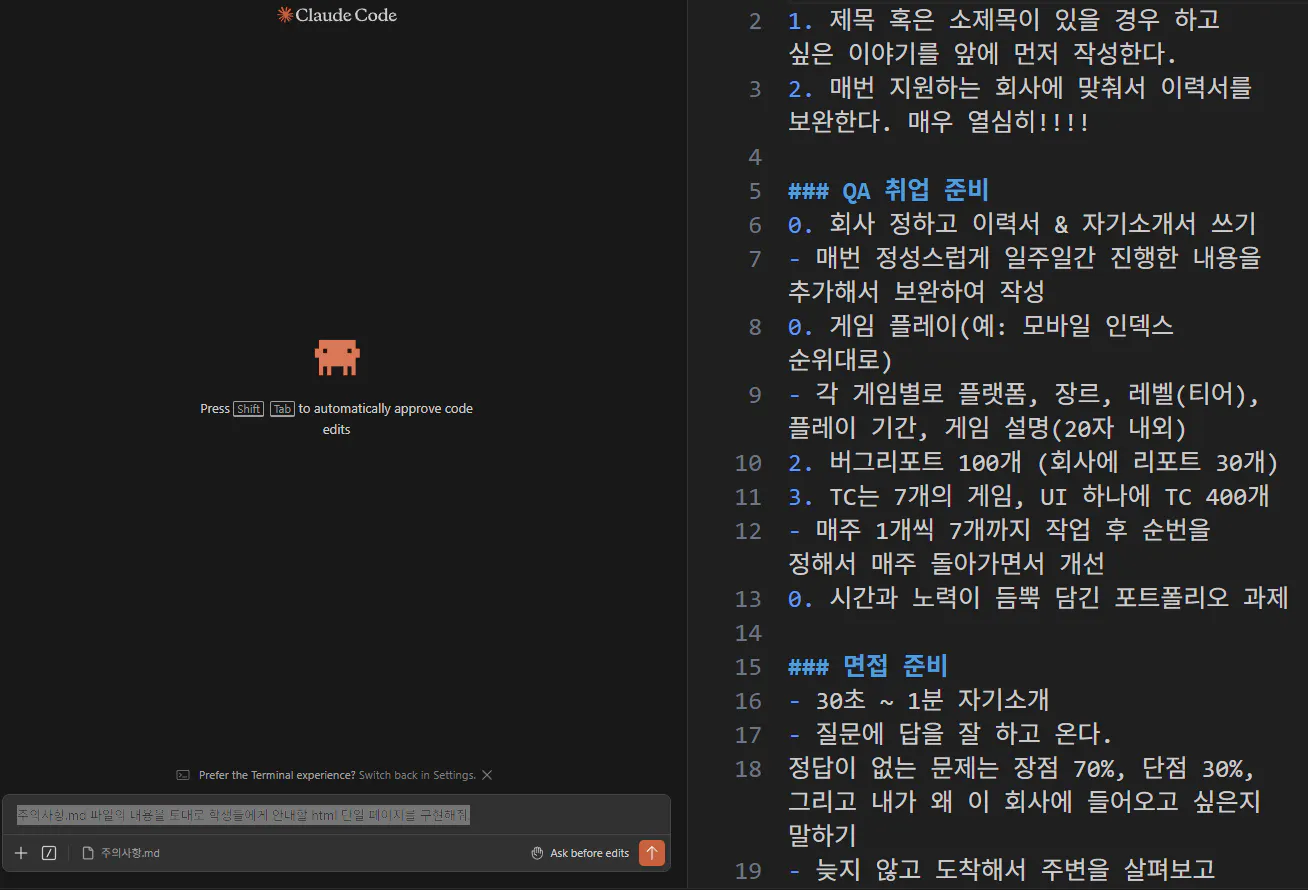
컴퓨터에 있는 한국어 앱의 스크린샷
Tip: 코드 전문은 코드블록에 감싸서 작성해주세요. ( / 을 눌러 '코드 블록'을 선택)
<!DOCTYPE html>
<html lang="ko">
<head>
<meta charset="UTF-8" />
<meta name="viewport" content="width=device-width, initial-scale=1.0" />
<title>취업 준비 가이드</title>
<style>
* {
box-sizing: border-box;
margin: 0;
padding: 0;
}
body {
font-family: 'Segoe UI', 'Apple SD Gothic Neo', sans-serif;
background: #f0f4f8;
color: #1a202c;
min-height: 100vh;
}
header {
background: linear-gradient(135deg, #2d3748 0%, #4a5568 100%);
color: white;
padding: 48px 24px 40px;
text-align: center;
}
header h1 {
font-size: 2rem;
font-weight: 700;
letter-spacing: -0.5px;
margin-bottom: 8px;
}
header p {
font-size: 0.95rem;
color: #cbd5e0;
}
main {
max-width: 860px;
margin: 0 auto;
padding: 40px 20px 60px;
display: flex;
flex-direction: column;
gap: 28px;
}
/* ── 카드 공통 ── */
.card {
background: white;
border-radius: 16px;
box-shadow: 0 2px 12px rgba(0,0,0,.08);
overflow: hidden;
}
.card-header {
display: flex;
align-items: center;
gap: 12px;
padding: 20px 24px 16px;
border-bottom: 1px solid #e2e8f0;
}
.card-header .icon {
font-size: 1.5rem;
line-height: 1;
}
.card-header h2 {
font-size: 1.1rem;
font-weight: 700;
color: #2d3748;
}
.card-body {
padding: 20px 24px 24px;
}
/* ── 이력서 팁 ── */
.tip-list {
list-style: none;
display: flex;
flex-direction: column;
gap: 12px;
}
.tip-list li {
display: flex;
align-items: flex-start;
gap: 12px;
background: #f7fafc;
border-left: 4px solid #4299e1;
border-radius: 0 8px 8px 0;
padding: 12px 14px;
font-size: 0.93rem;
line-height: 1.6;
color: #2d3748;
}
.tip-list li .num {
font-weight: 700;
color: #4299e1;
min-width: 20px;
}
/* ── QA 스텝 ── */
.steps {
display: flex;
flex-direction: column;
gap: 16px;
}
.step {
border: 1px solid #e2e8f0;
border-radius: 12px;
overflow: hidden;
transition: box-shadow .2s;
}
.step:hover {
box-shadow: 0 4px 16px rgba(0,0,0,.1);
}
.step-header {
display: flex;
align-items: center;
gap: 14px;
padding: 14px 18px;
cursor: pointer;
user-select: none;
background: #fafafa;
}
.step-badge {
display: flex;
align-items: center;
justify-content: center;
width: 32px;
height: 32px;
border-radius: 50%;
font-size: 0.8rem;
font-weight: 700;
flex-shrink: 0;
}
.step-badge.blue { background: #ebf8ff; color: #2b6cb0; }
.step-badge.green { background: #f0fff4; color: #276749; }
.step-badge.purple { background: #faf5ff; color: #553c9a; }
.step-badge.orange { background: #fffaf0; color: #c05621; }
.step-badge.red { background: #fff5f5; color: #c53030; }
.step-title {
font-size: 0.97rem;
font-weight: 600;
color: #2d3748;
flex: 1;
}
.step-toggle {
font-size: 0.75rem;
color: #a0aec0;
transition: transform .25s;
}
.step.open .step-toggle {
transform: rotate(180deg);
}
.step-body {
display: none;
padding: 0 18px 16px 64px;
}
.step.open .step-body {
display: block;
}
.step-body ul {
list-style: none;
display: flex;
flex-direction: column;
gap: 8px;
}
.step-body ul li {
display: flex;
align-items: flex-start;
gap: 8px;
font-size: 0.88rem;
color: #4a5568;
line-height: 1.6;
}
.step-body ul li::before {
content: '•';
color: #a0aec0;
flex-shrink: 0;
margin-top: 1px;
}
/* ── 진행 체크리스트 ── */
.checklist {
display: flex;
flex-direction: column;
gap: 10px;
}
.checklist label {
display: flex;
align-items: center;
gap: 12px;
padding: 10px 14px;
border-radius: 8px;
cursor: pointer;
transition: background .15s;
font-size: 0.9rem;
color: #2d3748;
}
.checklist label:hover {
background: #f7fafc;
}
.checklist input[type="checkbox"] {
width: 18px;
height: 18px;
accent-color: #48bb78;
flex-shrink: 0;
}
.checklist input[type="checkbox"]:checked + span {
text-decoration: line-through;
color: #a0aec0;
}
/* ── 게임 기록 테이블 ── */
.table-wrap {
overflow-x: auto;
}
table {
width: 100%;
border-collapse: collapse;
font-size: 0.85rem;
}
thead tr {
background: #edf2f7;
}
th, td {
padding: 10px 12px;
text-align: left;
border-bottom: 1px solid #e2e8f0;
white-space: nowrap;
}
th {
font-weight: 700;
color: #4a5568;
font-size: 0.8rem;
text-transform: uppercase;
letter-spacing: 0.04em;
}
tbody tr:hover {
background: #f7fafc;
}
tbody tr td:first-child {
font-weight: 600;
color: #2d3748;
}
.add-row-btn {
margin-top: 12px;
padding: 8px 16px;
background: #ebf8ff;
color: #2b6cb0;
border: 1px solid #bee3f8;
border-radius: 8px;
font-size: 0.85rem;
font-weight: 600;
cursor: pointer;
transition: background .15s;
}
.add-row-btn:hover {
background: #bee3f8;
}
/* ── 진행률 바 ── */
.progress-section {
display: flex;
flex-direction: column;
gap: 14px;
}
.progress-item label {
display: flex;
justify-content: space-between;
align-items: center;
margin-bottom: 6px;
font-size: 0.88rem;
}
.progress-item label span:first-child {
font-weight: 600;
color: #2d3748;
}
.progress-item label .count {
font-size: 0.82rem;
color: #718096;
}
.bar-bg {
background: #e2e8f0;
border-radius: 99px;
height: 10px;
overflow: hidden;
}
.bar-fill {
height: 100%;
border-radius: 99px;
transition: width .4s ease;
}
.bar-fill.blue { background: linear-gradient(90deg,#63b3ed,#4299e1); }
.bar-fill.green { background: linear-gradient(90deg,#68d391,#48bb78); }
.bar-fill.purple { background: linear-gradient(90deg,#b794f4,#9f7aea); }
.progress-input {
display: flex;
gap: 8px;
margin-top: 6px;
}
.progress-input input {
width: 70px;
padding: 4px 8px;
border: 1px solid #e2e8f0;
border-radius: 6px;
font-size: 0.85rem;
text-align: center;
}
.progress-input button {
padding: 4px 12px;
background: #4299e1;
color: white;
border: none;
border-radius: 6px;
font-size: 0.82rem;
font-weight: 600;
cursor: pointer;
}
.progress-input button:hover {
background: #3182ce;
}
/* ── 반응형 ── */
@media (max-width: 540px) {
header h1 { font-size: 1.5rem; }
.step-body { padding-left: 18px; }
}
</style>
</head>
<body>
<header>
<h1>취업 준비 가이드</h1>
<p>이력서 & 자기소개서 · QA 취업 로드맵 · 진행 관리</p>
</header>
<main>
<!-- ── 1. 이력서 & 자기소개서 주의사항 ── -->
<div class="card">
<div class="card-header">
<span class="icon">📄</span>
<h2>이력서 & 자기소개서 작성 주의사항</h2>
</div>
<div class="card-body">
<ul class="tip-list">
<li>
<span class="num">1</span>
<span>제목 혹은 소제목이 있을 경우, <strong>하고 싶은 이야기를 앞에 먼저</strong> 작성한다.</span>
</li>
<li>
<span class="num">2</span>
<span>매번 지원하는 <strong>회사에 맞춰</strong> 이력서를 보완한다. <strong>매우 열심히!!!!</strong></span>
</li>
</ul>
</div>
</div>
<!-- ── 2. QA 취업 준비 로드맵 ── -->
<div class="card">
<div class="card-header">
<span class="icon">🗺️</span>
<h2>QA 취업 준비 로드맵</h2>
</div>
<div class="card-body">
<div class="steps">
<div class="step open" id="step1">
<div class="step-header" onclick="toggleStep('step1')">
<span class="step-badge blue">0</span>
<span class="step-title">회사 정하고 이력서 & 자기소개서 쓰기</span>
<span class="step-toggle">▼</span>
</div>
<div class="step-body">
<ul>
<li>매번 정성스럽게 일주일간 진행한 내용을 추가해서 보완하여 작성</li>
<li>지원 회사의 요구사항을 꼼꼼히 파악하고 맞춤형으로 작성</li>
</ul>
</div>
</div>
<div class="step" id="step2">
<div class="step-header" onclick="toggleStep('step2')">
<span class="step-badge green">0</span>
<span class="step-title">게임 플레이 (모바일 인덱스 순위 기준)</span>
<span class="step-toggle">▼</span>
</div>
<div class="step-body">
<ul>
<li>각 게임별로 다음 항목을 기록한다:</li>
<li><strong>플랫폼</strong> (예: iOS / Android)</li>
<li><strong>장르</strong> (예: RPG, 전략, 퍼즐 등)</li>
<li><strong>레벨(티어)</strong> — 현재 달성한 레벨 또는 등급</li>
<li><strong>플레이 기간</strong> — 시작일 ~ 종료일</li>
<li><strong>게임 설명</strong> — 20자 내외로 핵심 요약</li>
</ul>
</div>
</div>
<div class="step" id="step3">
<div class="step-header" onclick="toggleStep('step3')">
<span class="step-badge purple">2</span>
<span class="step-title">버그 리포트 100개 작성 (회사 제출용 30개)</span>
<span class="step-toggle">▼</span>
</div>
<div class="step-body">
<ul>
<li>총 100개의 버그 리포트 작성</li>
<li>그 중 30개를 회사 제출용으로 정리 · 고도화</li>
<li>재현 방법, 심각도, 스크린샷 등 포함하여 작성</li>
</ul>
</div>
</div>
<div class="step" id="step4">
<div class="step-header" onclick="toggleStep('step4')">
<span class="step-badge orange">3</span>
<span class="step-title">TC 작성 — 7개 게임, UI 하나에 TC 400개</span>
<span class="step-toggle">▼</span>
</div>
<div class="step-body">
<ul>
<li>게임 7개에 대해 각각 TC를 작성 (UI 기준 400개)</li>
<li>매주 1개씩 순차적으로 작업하여 7개 완성</li>
<li>7개 완성 후 순번을 정해 매주 돌아가면서 개선</li>
</ul>
</div>
</div>
<div class="step" id="step5">
<div class="step-header" onclick="toggleStep('step5')">
<span class="step-badge red">4</span>
<span class="step-title">포트폴리오 과제 완성</span>
<span class="step-toggle">▼</span>
</div>
<div class="step-body">
<ul>
<li>시간과 노력이 듬뿍 담긴 포트폴리오 과제 완성</li>
<li>지금까지의 버그 리포트, TC, 게임 플레이 기록을 종합하여 구성</li>
<li>지원하는 회사의 직무에 맞게 강조점을 조정</li>
</ul>
</div>
</div>
</div>
</div>
</div>
<!-- ── 3. 진행 현황 ── -->
<div class="card">
<div class="card-header">
<span class="icon">📊</span>
<h2>진행 현황</h2>
</div>
<div class="card-body">
<div class="progress-section">
<div class="progress-item">
<label>
<span>버그 리포트</span>
<span class="count" id="bug-label">0 / 100</span>
</label>
<div class="bar-bg"><div class="bar-fill blue" id="bug-bar" style="width:0%"></div></div>
<div class="progress-input">
<input type="number" id="bug-input" min="0" max="100" placeholder="0" />
<button onclick="updateProgress('bug', 100)">업데이트</button>
</div>
</div>
<div class="progress-item">
<label>
<span>TC 작성 (게임 수)</span>
<span class="count" id="tc-label">0 / 7</span>
</label>
<div class="bar-bg"><div class="bar-fill green" id="tc-bar" style="width:0%"></div></div>
<div class="progress-input">
<input type="number" id="tc-input" min="0" max="7" placeholder="0" />
<button onclick="updateProgress('tc', 7)">업데이트</button>
</div>
</div>
<div class="progress-item">
<label>
<span>게임 플레이 기록</span>
<span class="count" id="game-label">0 / 10</span>
</label>
<div class="bar-bg"><div class="bar-fill purple" id="game-bar" style="width:0%"></div></div>
<div class="progress-input">
<input type="number" id="game-input" min="0" max="10" placeholder="0" />
<button onclick="updateProgress('game', 10)">업데이트</button>
</div>
</div>
</div>
</div>
</div>
<!-- ── 4. 게임 플레이 기록표 ── -->
<div class="card">
<div class="card-header">
<span class="icon">🎮</span>
<h2>게임 플레이 기록표</h2>
</div>
<div class="card-body">
<div class="table-wrap">
<table id="game-table">
<thead>
<tr>
<th>#</th>
<th>게임명</th>
<th>플랫폼</th>
<th>장르</th>
<th>레벨/티어</th>
<th>플레이 기간</th>
<th>게임 설명 (20자)</th>
</tr>
</thead>
<tbody id="game-tbody">
<tr>
<td>1</td>
<td><input type="text" style="width:100px;border:none;background:transparent;font-size:.85rem;" placeholder="게임명" /></td>
<td><input type="text" style="width:70px;border:none;background:transparent;font-size:.85rem;" placeholder="iOS/AOS" /></td>
<td><input type="text" style="width:60px;border:none;background:transparent;font-size:.85rem;" placeholder="RPG" /></td>
<td><input type="text" style="width:70px;border:none;background:transparent;font-size:.85rem;" placeholder="Lv.30" /></td>
<td><input type="text" style="width:110px;border:none;background:transparent;font-size:.85rem;" placeholder="24.01~24.03" /></td>
<td><input type="text" style="width:140px;border:none;background:transparent;font-size:.85rem;" placeholder="한 줄 설명" /></td>
</tr>
</tbody>
</table>
</div>
<button class="add-row-btn" onclick="addGameRow()">+ 행 추가</button>
</div>
</div>
<!-- ── 5. 주간 체크리스트 ── -->
<div class="card">
<div class="card-header">
<span class="icon">✅</span>
<h2>주간 체크리스트</h2>
</div>
<div class="card-body">
<div class="checklist">
<label><input type="checkbox" /><span>이력서 / 자기소개서 보완 (주 1회)</span></label>
<label><input type="checkbox" /><span>게임 플레이 기록 업데이트</span></label>
<label><input type="checkbox" /><span>버그 리포트 작성 (목표 분량 채우기)</span></label>
<label><input type="checkbox" /><span>TC 작성 또는 기존 TC 개선</span></label>
<label><input type="checkbox" /><span>포트폴리오 내용 추가 / 정리</span></label>
<label><input type="checkbox" /><span>지원 회사 조사 및 리스트 업데이트</span></label>
</div>
</div>
</div>
</main>
<script>
// 스텝 토글
function toggleStep(id) {
const el = document.getElementById(id);
el.classList.toggle('open');
}
// 진행률 업데이트
function updateProgress(key, max) {
const input = document.getElementById(key + '-input');
const bar = document.getElementById(key + '-bar');
const label = document.getElementById(key + '-label');
let val = Math.min(Math.max(parseInt(input.value) || 0, 0), max);
const pct = (val / max * 100).toFixed(1);
bar.style.width = pct + '%';
label.textContent = val + ' / ' + max;
}
// 게임 기록 행 추가
let rowCount = 1;
function addGameRow() {
rowCount++;
const tbody = document.getElementById('game-tbody');
const tr = document.createElement('tr');
tr.innerHTML = `
<td>${rowCount}</td>
<td><input type="text" style="width:100px;border:none;background:transparent;font-size:.85rem;" placeholder="게임명" /></td>
<td><input type="text" style="width:70px;border:none;background:transparent;font-size:.85rem;" placeholder="iOS/AOS" /></td>
<td><input type="text" style="width:60px;border:none;background:transparent;font-size:.85rem;" placeholder="RPG" /></td>
<td><input type="text" style="width:70px;border:none;background:transparent;font-size:.85rem;" placeholder="Lv.30" /></td>
<td><input type="text" style="width:110px;border:none;background:transparent;font-size:.85rem;" placeholder="24.01~24.03" /></td>
<td><input type="text" style="width:140px;border:none;background:transparent;font-size:.85rem;" placeholder="한 줄 설명" /></td>
`;
tbody.appendChild(tr);
}
</script>
</body>
</html>
결과와 배운 점
md 파일의 메모를 토대로 코드를 작성해 본 것은 처음이었는데요.
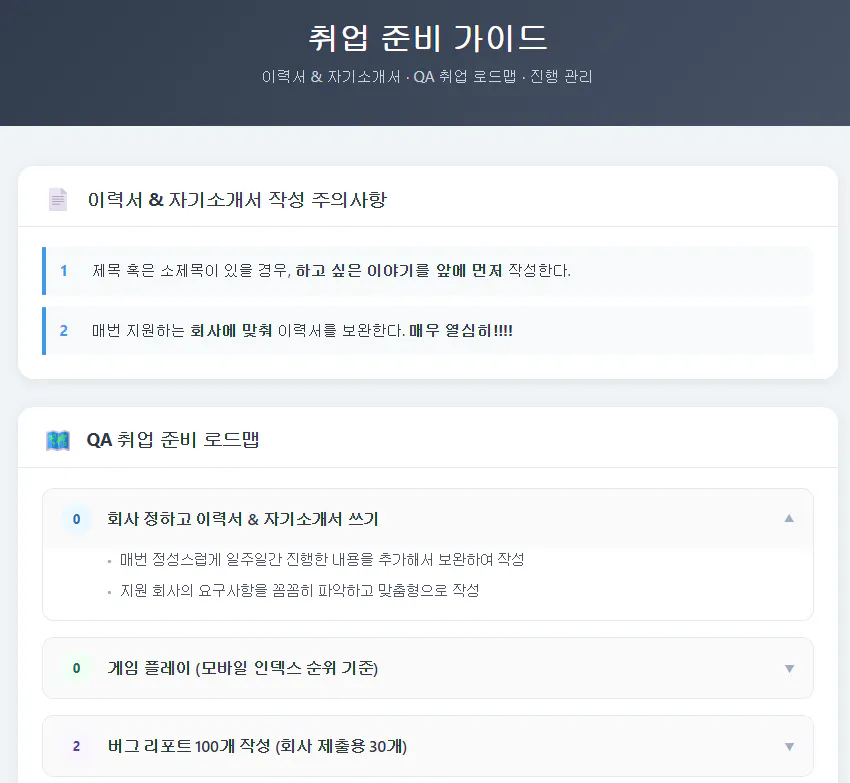
한국사이트 스크린샷
생각보다 결과물이 잘 나와서 굉장히 신기했습니다.
앞으로도 학생들에게 도움이 되는 다양한 정보들을 제공해주는 페이지들을 만들 수 있을 것 같아요.
