


소개
지난 주부터 스터디 진행하고 보조 자료들을 만들어보고 있는데요. 그래서인지 질문도 좀 많아진 느낌이 있습니다. 그냥 그렇게 느끼는 것 같기도 하지만...
아무튼 질문이 들어온 것이 CSS에서 셀렉터들의 개념을 좀 어렵게 생각하는 것 같아서 간단한 에제와 설명이 추가된 페이지를 만들어 달라고 했습니다.
진행 방법
어떤 도구를 사용했고, 어떻게 활용하셨나요?
claude를 썼습니다.
Tip: 사용한 프롬프트 전문을 꼭 포함하고, 내용을 짧게 소개해 주세요.
시크릿 모드에서 질문을 집어 넣어서 저장이 안 되었는데요. 대략 이런 내용이었습니다.
"CSS에서 셀렉터에 대해서 설명하는 페이지를 만들어 줘. 태그 네임 셀렉터, 클래스 셀렉터, id 셀렉터, 자식 셀렉터, 자손 셀렉터에 대해 비교 설명해주고, 학생들이 보기 좋게 발랄한 페이지를 만들어 줬으면 좋겠어. 약간의 실습 코드와 시뮬레이션을 할 수 있으면 좋을 것 같아."
Tip: 활용 이미지나 캡처 화면을 꼭 남겨주세요.
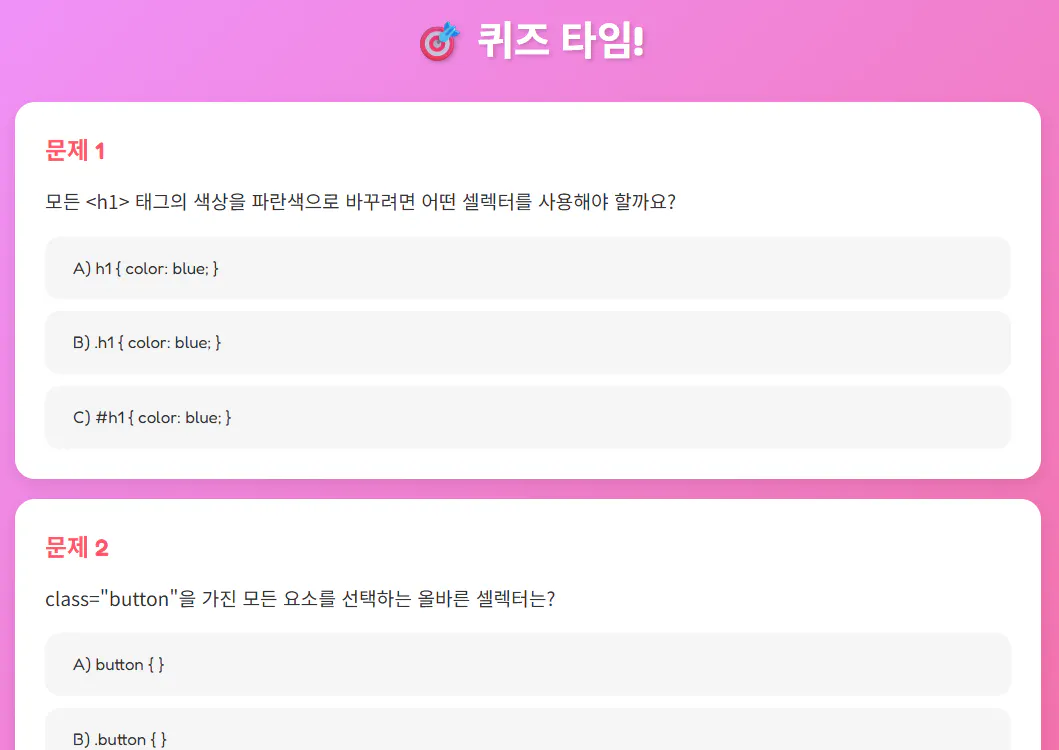
한국어 텍스트가 적힌 분홍색 화면
퀴즈가 들어간 것이 너무 좋더라구요.
Tip: 코드 전문은 코드블록에 감싸서 작성해주세요. ( / 을 눌러 '코드 블록'을 선택)
<!DOCTYPE html>
<html lang="ko">
<head>
<meta charset="UTF-8">
<meta name="viewport" content="width=device-width, initial-scale=1.0">
<title>CSS 셀렉터 놀이터 🎨</title>
<link href="https://fonts.googleapis.com/css2?family=Fredoka:wght@400;600;700&family=Noto+Sans+KR:wght@400;500;700&family=Fira+Code:wght@400;500&display=swap" rel="stylesheet">
<style>
* {
margin: 0;
padding: 0;
box-sizing: border-box;
}
:root {
--color-tag: #FF6B6B;
--color-class: #4ECDC4;
--color-id: #FFE66D;
--color-child: #A8E6CF;
--color-descendant: #C7A9FF;
--bg-gradient: linear-gradient(135deg, #667eea 0%, #764ba2 100%);
--shadow: 0 10px 30px rgba(0,0,0,0.1);
--shadow-hover: 0 15px 40px rgba(0,0,0,0.15);
}
body {
font-family: 'Noto Sans KR', sans-serif;
background: linear-gradient(135deg, #f5f7fa 0%, #c3cfe2 100%);
min-height: 100vh;
padding: 20px;
line-height: 1.6;
}
.container {
max-width: 1200px;
margin: 0 auto;
}
/* Header */
header {
background: var(--bg-gradient);
color: white;
padding: 60px 40px;
border-radius: 30px;
text-align: center;
margin-bottom: 40px;
box-shadow: var(--shadow);
position: relative;
overflow: hidden;
}
header::before {
content: '';
position: absolute;
top: -50%;
right: -50%;
width: 200%;
height: 200%;
background: radial-gradient(circle, rgba(255,255,255,0.1) 0%, transparent 70%);
animation: float 15s infinite ease-in-out;
}
@keyframes float {
0%, 100% { transform: translate(0, 0) rotate(0deg); }
33% { transform: translate(30px, -30px) rotate(120deg); }
66% { transform: translate(-20px, 20px) rotate(240deg); }
}
h1 {
font-family: 'Fredoka', sans-serif;
font-size: 3.5em;
font-weight: 700;
margin-bottom: 15px;
position: relative;
text-shadow: 3px 3px 6px rgba(0,0,0,0.2);
}
.subtitle {
font-size: 1.3em;
opacity: 0.95;
position: relative;
}
/* Section Cards */
.section {
background: white;
border-radius: 25px;
padding: 40px;
margin-bottom: 30px;
box-shadow: var(--shadow);
transition: transform 0.3s ease, box-shadow 0.3s ease;
}
.section:hover {
transform: translateY(-5px);
box-shadow: var(--shadow-hover);
}
.section-header {
display: flex;
align-items: center;
margin-bottom: 25px;
padding-bottom: 20px;
border-bottom: 3px solid #f0f0f0;
}
.section-icon {
font-size: 2.5em;
margin-right: 15px;
display: flex;
align-items: center;
justify-content: center;
width: 70px;
height: 70px;
border-radius: 50%;
animation: pulse 2s infinite;
}
@keyframes pulse {
0%, 100% { transform: scale(1); }
50% { transform: scale(1.05); }
}
.section-title {
font-family: 'Fredoka', sans-serif;
font-size: 2em;
font-weight: 600;
}
/* Selector specific colors */
.tag-selector .section-icon { background: var(--color-tag); }
.class-selector .section-icon { background: var(--color-class); }
.id-selector .section-icon { background: var(--color-id); }
.child-selector .section-icon { background: var(--color-child); }
.descendant-selector .section-icon { background: var(--color-descendant); }
.tag-selector .section-title { color: var(--color-tag); }
.class-selector .section-title { color: var(--color-class); }
.id-selector .section-title { color: var(--color-id); }
.child-selector .section-title { color: var(--color-child); }
.descendant-selector .section-title { color: var(--color-descendant); }
/* Content */
.description {
font-size: 1.1em;
margin-bottom: 20px;
color: #555;
line-height: 1.8;
}
.syntax {
background: #2d2d2d;
color: #f8f8f2;
padding: 20px 25px;
border-radius: 15px;
margin: 20px 0;
font-family: 'Fira Code', monospace;
font-size: 1.1em;
overflow-x: auto;
box-shadow: inset 0 2px 10px rgba(0,0,0,0.3);
}
.syntax-label {
font-family: 'Fredoka', sans-serif;
font-weight: 600;
margin-bottom: 10px;
font-size: 1.1em;
color: #666;
}
/* Comparison Table */
.comparison-table {
width: 100%;
border-collapse: separate;
border-spacing: 0;
margin: 30px 0;
overflow: hidden;
border-radius: 15px;
box-shadow: var(--shadow);
}
.comparison-table th {
background: var(--bg-gradient);
color: white;
padding: 20px;
text-align: left;
font-family: 'Fredoka', sans-serif;
font-size: 1.1em;
font-weight: 600;
}
.comparison-table td {
padding: 20px;
border-bottom: 1px solid #e0e0e0;
background: white;
}
.comparison-table tr:last-child td {
border-bottom: none;
}
.comparison-table tr:nth-child(even) td {
background: #f9f9f9;
}
.table-syntax {
font-family: 'Fira Code', monospace;
background: #2d2d2d;
color: #f8f8f2;
padding: 8px 12px;
border-radius: 8px;
display: inline-block;
font-size: 0.95em;
}
/* Quiz Section */
.quiz {
background: linear-gradient(135deg, #f093fb 0%, #f5576c 100%);
color: white;
padding: 40px;
border-radius: 25px;
box-shadow: var(--shadow);
}
.quiz-title {
font-family: 'Fredoka', sans-serif;
font-size: 2.5em;
margin-bottom: 30px;
text-align: center;
text-shadow: 2px 2px 4px rgba(0,0,0,0.2);
}
.quiz-question {
background: white;
color: #333;
padding: 30px;
border-radius: 20px;
margin-bottom: 20px;
box-shadow: 0 5px 15px rgba(0,0,0,0.1);
}
.question-number {
font-family: 'Fredoka', sans-serif;
font-size: 1.5em;
color: #f5576c;
margin-bottom: 15px;
font-weight: 600;
}
.question-text {
font-size: 1.2em;
margin-bottom: 20px;
line-height: 1.6;
}
.quiz-options {
display: flex;
flex-direction: column;
gap: 12px;
}
.quiz-option {
font-family: 'Fredoka', sans-serif;
padding: 15px 25px;
background: #f5f5f5;
border: 3px solid transparent;
border-radius: 15px;
cursor: pointer;
transition: all 0.3s ease;
font-size: 1.05em;
font-weight: 500;
}
.quiz-option:hover {
background: #e8e8e8;
transform: translateX(10px);
}
.quiz-option.correct {
background: #4ECDC4;
color: white;
border-color: #3ab8af;
animation: correctAnswer 0.5s ease;
}
.quiz-option.wrong {
background: #ff6b6b;
color: white;
border-color: #ee5a52;
animation: wrongAnswer 0.5s ease;
}
@keyframes correctAnswer {
0%, 100% { transform: scale(1); }
50% { transform: scale(1.05); }
}
@keyframes wrongAnswer {
0%, 100% { transform: translateX(0); }
25% { transform: translateX(-10px); }
75% { transform: translateX(10px); }
}
.quiz-feedback {
margin-top: 15px;
padding: 15px;
border-radius: 10px;
font-weight: 500;
text-align: center;
display: none;
}
.quiz-feedback.show {
display: block;
}
.quiz-feedback.correct {
background: #4ECDC4;
color: white;
}
.quiz-feedback.wrong {
background: #ff6b6b;
color: white;
}
/* Score Display */
.score-display {
background: white;
color: #333;
padding: 25px;
border-radius: 20px;
text-align: center;
margin-top: 30px;
box-shadow: 0 5px 15px rgba(0,0,0,0.1);
}
.score-text {
font-family: 'Fredoka', sans-serif;
font-size: 2em;
font-weight: 600;
color: #f5576c;
}
/* Responsive */
@media (max-width: 768px) {
h1 {
font-size: 2.5em;
}
.section {
padding: 25px;
}
.section-title {
font-size: 1.5em;
}
.comparison-table {
font-size: 0.9em;
}
}
/* Additional Animations */
@keyframes slideInUp {
from {
opacity: 0;
transform: translateY(30px);
}
to {
opacity: 1;
transform: translateY(0);
}
}
.section {
animation: slideInUp 0.6s ease forwards;
opacity: 0;
}
.section:nth-child(1) { animation-delay: 0.1s; }
.section:nth-child(2) { animation-delay: 0.2s; }
.section:nth-child(3) { animation-delay: 0.3s; }
.section:nth-child(4) { animation-delay: 0.4s; }
.section:nth-child(5) { animation-delay: 0.5s; }
.section:nth-child(6) { animation-delay: 0.6s; }
</style>
</head>
<body>
<div class="container">
<header>
<h1>🎨 CSS 셀렉터 놀이터</h1>
<p class="subtitle">클릭하고 배우는 재미있는 CSS 셀렉터 수업!</p>
</header>
<!-- Tag Selector -->
<section class="section tag-selector">
<div class="section-header">
<div class="section-icon">🏷️</div>
<h2 class="section-title">1. 태그 네임 셀렉터 (Tag Name Selector)</h2>
</div>
<p class="description">
가장 기본적인 셀렉터예요! HTML 태그의 이름으로 스타일을 적용합니다.
같은 태그를 사용하는 <strong>모든 요소</strong>에 스타일이 적용됩니다.
</p>
<div class="syntax-label">📝 문법</div>
<div class="syntax">태그이름 { 속성: 값; }</div>
<div class="syntax-label">✏️ 예제</div>
<div class="syntax">/* 모든 p 태그를 빨간색으로 */<br>p { color: red; }</div>
<div class="syntax">/* 모든 h1 태그를 크게 */<br>h1 { font-size: 36px; }</div>
</section>
<!-- Class Selector -->
<section class="section class-selector">
<div class="section-header">
<div class="section-icon">🎯</div>
<h2 class="section-title">2. 클래스 셀렉터 (Class Selector)</h2>
</div>
<p class="description">
점(.)으로 시작하는 셀렉터예요! 같은 클래스 이름을 가진 요소들에게 스타일을 적용합니다.
한 페이지에서 <strong>여러 번 사용</strong>할 수 있어요.
</p>
<div class="syntax-label">📝 문법</div>
<div class="syntax">.클래스이름 { 속성: 값; }</div>
<div class="syntax-label">✏️ 예제</div>
<div class="syntax">/* special 클래스를 가진 모든 요소 */<br>.special { background: yellow; }</div>
<div class="syntax">/* button 클래스에 스타일 적용 */<br>.button { padding: 10px; border-radius: 5px; }</div>
</section>
<!-- ID Selector -->
<section class="section id-selector">
<div class="section-header">
<div class="section-icon">🌟</div>
<h2 class="section-title">3. ID 셀렉터 (ID Selector)</h2>
</div>
<p class="description">
샵(#)으로 시작하는 셀렉터예요! ID는 페이지에서 <strong>단 하나만</strong> 존재해야 해요.
특별한 한 개의 요소만 스타일을 적용할 때 사용합니다.
</p>
<div class="syntax-label">📝 문법</div>
<div class="syntax">#아이디이름 { 속성: 값; }</div>
<div class="syntax-label">✏️ 예제</div>
<div class="syntax">/* main-title ID를 가진 요소 */<br>#main-title { font-size: 30px; color: blue; }</div>
<div class="syntax">/* header ID에 배경색 적용 */<br>#header { background: gray; padding: 20px; }</div>
</section>
<!-- Child Selector -->
<section class="section child-selector">
<div class="section-header">
<div class="section-icon">👶</div>
<h2 class="section-title">4. 자식 셀렉터 (Child Selector)</h2>
</div>
<p class="description">
부등호(>)를 사용하는 셀렉터예요! <strong>바로 아래</strong> 자식 요소에만 스타일을 적용합니다.
손자, 증손자 요소는 선택되지 않아요.
</p>
<div class="syntax-label">📝 문법</div>
<div class="syntax">부모 > 자식 { 속성: 값; }</div>
<div class="syntax-label">✏️ 예제</div>
<div class="syntax">/* div의 바로 아래 자식 p만 선택 */<br>div > p { color: blue; }</div>
<div class="syntax">/* ul의 바로 아래 자식 li만 선택 */<br>ul > li { font-weight: bold; }</div>
<div class="description" style="margin-top: 20px; padding: 20px; background: #f0f9f0; border-radius: 10px; border-left: 5px solid var(--color-child);">
<strong>💡 기억하세요!</strong> 자식 셀렉터는 <strong>바로 한 단계 아래</strong>만 선택합니다.<br>
손자나 증손자는 선택되지 않아요!
</div>
</section>
<!-- Descendant Selector -->
<section class="section descendant-selector">
<div class="section-header">
<div class="section-icon">🌳</div>
<h2 class="section-title">5. 자손 셀렉터 (Descendant Selector)</h2>
</div>
<p class="description">
띄어쓰기만 사용하는 셀렉터예요! 자식은 물론 손자, 증손자 등 <strong>모든 하위 요소</strong>에 스타일을 적용합니다.
</p>
<div class="syntax-label">📝 문법</div>
<div class="syntax">조상 자손 { 속성: 값; }</div>
<div class="syntax-label">✏️ 예제</div>
<div class="syntax">/* div 안의 모든 p를 선택 (깊이 상관없음) */<br>div p { font-weight: bold; }</div>
<div class="syntax">/* article 안의 모든 a를 선택 */<br>article a { color: purple; text-decoration: none; }</div>
<div class="description" style="margin-top: 20px; padding: 20px; background: #f9f0ff; border-radius: 10px; border-left: 5px solid var(--color-descendant);">
<strong>💡 기억하세요!</strong> 자손 셀렉터는 <strong>모든 깊이</strong>의 하위 요소를 선택합니다.<br>
자식, 손자, 증손자... 모두 포함돼요!
</div>
</section>
<!-- Comparison Table -->
<section class="section">
<div class="section-header">
<div class="section-icon" style="background: linear-gradient(135deg, #667eea 0%, #764ba2 100%);">📊</div>
<h2 class="section-title" style="color: #667eea;">셀렉터 비교표</h2>
</div>
<table class="comparison-table">
<thead>
<tr>
<th>셀렉터 종류</th>
<th>문법</th>
<th>예시</th>
<th>특징</th>
</tr>
</thead>
<tbody>
<tr>
<td><strong style="color: var(--color-tag);">태그 네임</strong></td>
<td><span class="table-syntax">태그이름</span></td>
<td><span class="table-syntax">p { }</span></td>
<td>같은 태그 모두 선택</td>
</tr>
<tr>
<td><strong style="color: var(--color-class);">클래스</strong></td>
<td><span class="table-syntax">.클래스이름</span></td>
<td><span class="table-syntax">.box { }</span></td>
<td>여러 번 사용 가능</td>
</tr>
<tr>
<td><strong style="color: #d4a942;">ID</strong></td>
<td><span class="table-syntax">#아이디이름</span></td>
<td><span class="table-syntax">#main { }</span></td>
<td>페이지에 단 하나만</td>
</tr>
<tr>
<td><strong style="color: var(--color-child);">자식</strong></td>
<td><span class="table-syntax">부모 > 자식</span></td>
<td><span class="table-syntax">div > p { }</span></td>
<td>바로 아래 자식만</td>
</tr>
<tr>
<td><strong style="color: var(--color-descendant);">자손</strong></td>
<td><span class="table-syntax">조상 자손</span></td>
<td><span class="table-syntax">div p { }</span></td>
<td>모든 하위 요소</td>
</tr>
</tbody>
</table>
</section>
<!-- Quiz Section -->
<section class="quiz">
<h2 class="quiz-title">🎯 퀴즈 타임!</h2>
<div class="quiz-question" id="q1">
<div class="question-number">문제 1</div>
<div class="question-text">
모든 <h1> 태그의 색상을 파란색으로 바꾸려면 어떤 셀렉터를 사용해야 할까요?
</div>
<div class="quiz-options">
<div class="quiz-option" onclick="checkAnswer(1, 'a', 'h1 { color: blue; }')">
A) h1 { color: blue; }
</div>
<div class="quiz-option" onclick="checkAnswer(1, 'b', '.h1 { color: blue; }')">
B) .h1 { color: blue; }
</div>
<div class="quiz-option" onclick="checkAnswer(1, 'c', '#h1 { color: blue; }')">
C) #h1 { color: blue; }
</div>
</div>
<div class="quiz-feedback" id="feedback1"></div>
</div>
<div class="quiz-question" id="q2">
<div class="question-number">문제 2</div>
<div class="question-text">
class="button"을 가진 모든 요소를 선택하는 올바른 셀렉터는?
</div>
<div class="quiz-options">
<div class="quiz-option" onclick="checkAnswer(2, 'a', 'button { }')">
A) button { }
</div>
<div class="quiz-option" onclick="checkAnswer(2, 'b', '.button { }')">
B) .button { }
</div>
<div class="quiz-option" onclick="checkAnswer(2, 'c', '#button { }')">
C) #button { }
</div>
</div>
<div class="quiz-feedback" id="feedback2"></div>
</div>
<div class="quiz-question" id="q3">
<div class="question-number">문제 3</div>
<div class="question-text">
<div id="header"> 안의 바로 아래 자식 <p> 태그만 선택하려면?
</div>
<div class="quiz-options">
<div class="quiz-option" onclick="checkAnswer(3, 'a', '#header p { }')">
A) #header p { }
</div>
<div class="quiz-option" onclick="checkAnswer(3, 'b', '#header > p { }')">
B) #header > p { }
</div>
<div class="quiz-option" onclick="checkAnswer(3, 'c', '.header > p { }')">
C) .header > p { }
</div>
</div>
<div class="quiz-feedback" id="feedback3"></div>
</div>
<div class="quiz-question" id="q4">
<div class="question-number">문제 4</div>
<div class="question-text">
페이지에서 단 하나의 요소만 선택할 때 사용하는 셀렉터는?
</div>
<div class="quiz-options">
<div class="quiz-option" onclick="checkAnswer(4, 'a', '태그 네임 셀렉터')">
A) 태그 네임 셀렉터
</div>
<div class="quiz-option" onclick="checkAnswer(4, 'b', '클래스 셀렉터')">
B) 클래스 셀렉터
</div>
<div class="quiz-option" onclick="checkAnswer(4, 'c', 'ID 셀렉터')">
C) ID 셀렉터
</div>
</div>
<div class="quiz-feedback" id="feedback4"></div>
</div>
<div class="quiz-question" id="q5">
<div class="question-number">문제 5</div>
<div class="question-text">
<div> 안의 모든 <span> 요소 (자식, 손자, 증손자 모두)를 선택하려면?
</div>
<div class="quiz-options">
<div class="quiz-option" onclick="checkAnswer(5, 'a', 'div > span { }')">
A) div > span { }
</div>
<div class="quiz-option" onclick="checkAnswer(5, 'b', 'div span { }')">
B) div span { }
</div>
<div class="quiz-option" onclick="checkAnswer(5, 'c', 'div.span { }')">
C) div.span { }
</div>
</div>
<div class="quiz-feedback" id="feedback5"></div>
</div>
<div class="score-display">
<div class="score-text">점수: <span id="scoreDisplay">0</span> / 5</div>
</div>
</section>
</div>
<script>
let score = 0;
const correctAnswers = {
1: 'a',
2: 'b',
3: 'b',
4: 'c',
5: 'b'
};
const answeredQuestions = new Set();
// Quiz Functions
function checkAnswer(questionNum, selectedAnswer, answerText) {
const feedback = document.getElementById(`feedback${questionNum}`);
const options = document.querySelectorAll(`#q${questionNum} .quiz-option`);
// Disable all options for this question
options.forEach(opt => opt.style.pointerEvents = 'none');
// If already answered, don't change score
if (answeredQuestions.has(questionNum)) {
return;
}
answeredQuestions.add(questionNum);
if (selectedAnswer === correctAnswers[questionNum]) {
feedback.className = 'quiz-feedback show correct';
feedback.textContent = '🎉 정답입니다! 잘했어요!';
event.target.classList.add('correct');
score++;
} else {
feedback.className = 'quiz-feedback show wrong';
feedback.textContent = '❌ 아쉬워요! 다시 한번 생각해보세요.';
event.target.classList.add('wrong');
// Show correct answer
options.forEach(opt => {
if (opt.textContent.trim().startsWith(correctAnswers[questionNum].toUpperCase())) {
setTimeout(() => {
opt.classList.add('correct');
}, 1000);
}
});
}
document.getElementById('scoreDisplay').textContent = score;
}
</script>
</body>
</html>
결과와 배운 점
처음에 만든 것은 시뮬레이션이 너무 이상해서 빼고 해달라고 했구요. 전체 선택자를 추가해서 넣어달라고 했더니 이건 설명이 좀 어려웠는지 예제도 이상하고 그래서 그냥 뺐습니다.
간단한 질문들을 웹 페이지로 만들어서 배포하니 아이들이 좀 더 잘 이해하는 것 같은 기분이 들어요.
나중에 설문을 한 번 해봐야 겠습니다.
