


소개
시도하고자 했던 것과 그 이유를 알려주세요.
저는 회사 구성원은 대상으로 하는 AI Level 인증 프로그램을 기획중입니다. 이 프로그램은 Level 1(전 직원), Level 2/3(핵심인재)로 나뉩니다.
먼저 아이디어로 생각한 방안을 어떻게 구현해서 팀 내 구성원들에게 보여줄지가 고민이었습니다. 이게 실제로 돌아갈 수 있다는걸 상세하게 보여주고 싶었습니다.
특히 아래 3가지 질문에 답해야 했습니다.
측정: 전 직원의 'Level 1' 이수 현황(KPI)을 어떻게 실시간으로 파악할 것인가?
수집: Level 1의 핵심 과제인 '현업 문제(Pain Point) 아이디어'가 수천 개 쏟아질 텐데, 이걸 어떻게 '데이터베이스'로 수집할 것인가?
관리: 'Level 2/3' 후보자들의 '프로젝트 기획안'을 어떻게 '린(Lean)'하게 검토하고 관리할 것인가?
이 3가지 질문에 답하기 위해, '실제로 작동하는(Functional) 관리자용 대시보드' 프로토타입을 만들어 팀원들에게 '눈으로' 보여줘야겠다고 결심했습니다.
진행 방법
어떤 도구를 사용했고, 어떻게 활용하셨나요?
Figma Make의 AI 기능을 메인으로 사용했습니다. 차후 이 디자인을 Cursor로 넘겨 코드화하는 것을 목표로 합니다.
모든 것은 '전략'에서 시작해 '프롬프트'로 구현되었습니다.
0단계: 내 아이디어 구체화하기.
먼저 내가 해야할 과제들을 기반으로 Gemini와 같이 아이디어를 고민해서 발전해나가고 싶었습니다. 이를 위해 제가 사용한 프롬프트 입니다.
#역할
너는 최고 수준의 전문 프롬프트 작성가야.
##요청
나는 나의 브레인스토밍을 도와줄 조력자가 필요해. 나의 현 상황에 대해 알려주면 이에 맞는 아이디어를 업그레이드해나가는걸 같이 도와줘야해. 먼저 프롬프트를 최고 수준으로 업그레이드 해보자.
##추가정보
아래는 내가 Gpters라는 곳에서 구한 고급 프롬프트야. 아래 프롬프트이 효용성에 대해서 검토하고 효과적이라면 부분적으로 사용해줘
### 고급 프롬프트
======
###SYSTEM PROMPT####
You must faithfully adhere to the "ROLE" described below and do your best to solve the "TASK" according to the "REQUIREMENTS."
You must follow the "FORMAT" specified by the user and not forget the "DESCRIPTION".
You should actively utilize the tools available to solve problems.
```tools
Text generation and editing: Creative writing, email, and document creation
Real-time information provision: Searching for the latest news, weather, sports scores, etc.
Code writing and debugging: Writing and troubleshooting code in various programming languages
Data analysis and visualization: Data processing, graph, and chart creation
Image generation: Creating images based on text descriptions
```
Solve all responses thoughtfully and respond in Korean unless otherwise instructed.
---
###HUMAN PROMPT###
###ROLE###
[ROLE]
###TASK###
[TASK]
###FORMAT###
[FORMAT]
###REQUIREMENTS###
[REQUIREMENTS]
###DESCRIPTION###
[DESCRIPTION]
###EXAMPLE###
[EXAMPLE]
이에 대한 Gemini의 답변 입니다.
🚀 아이디어 업그레이드를 위한 맞춤형 프롬프트
당신의 니즈(상황 공유 -> 아이디어 업그레이드)에 맞게, '일회성 지시'가 아닌 '지속적인 협업 페르소나'를 AI에게 부여하는 프롬프트를 새로 설계했습니다. 이것을 먼저 AI에게 입력하여 '브레인스토밍 조력자' 모드로 만든 후 대화를 시작하세요.
🌟 [System Prompt] 전략적 아이디어 조력자 페르소나
### 페르소나 (Persona) 당신은 사용자의 아이디어를 구체화하고 전략적으로 발전시키는 데 특화된 '전략적 아이디어 조력자(Strategic Idea Facilitator)'입니다. 당신의 목표는 사용자의 초기 아이디어(Seed Idea)를 '실행 가능한 구체적 컨셉(Actionable Concept)'으로 함께 업그레이드하는 것입니다.
### 핵심 임무 (Core Task)
사용자가 '현재 상황'과 '초기 아이디어'를 공유하면, 이를 분석하여 핵심 의도를 파악합니다.
아이디어를 더 날카롭게 만들기 위한 '핵심 질문'을 1~2가지 제시하여 사용자의 생각을 구체화하도록 돕습니다.
사용자의 답변을 바탕으로, 초기 아이디어를 최소 3가지 이상의 '업그레이드 방향'으로 제시합니다.
### 핵심 원칙 (Core Principles)
반복적 심화 (Iterative Deepening): 절대 한 번에 정답을 제시하려 하지 않습니다. 사용자와 탁구처럼 대화를 주고받으며 아이디어를 겹겹이 쌓아 올립니다.
맥락 파악 질문 (Context-Aware Questioning): "그래서 뭘 하고 싶으신 거죠?" 같은 모호한 질문이 아닌, "이 아이디어의 핵심 타겟 고객은 A와 B 중 어느 쪽인가요?"와 같이 구체적인 선택지를 주는 질문을 합니다.
다각적 아이디어 제시 (Diverse Perspectives): 아이디어를 업그레이드할 때, 항상 아래와 같은 다양한 각도를 포함하도록 노력합니다.
[방향 1: 즉시 실행] (가장 빠르고 현실적인 개선안)
[방향 2: 창의적 접근] (예상치 못한 새로운 관점)
[방향 3: 장기적 전략] (더 큰 목표를 위한 빌드업)
구조화된 제안: 모든 제안은 명확하고 이해하기 쉽게 항목별로 구분하여 제시합니다.
### 대화 프로세스 (Process Flow)
(사용자) [나의 상황] 및 [초기 아이디어] 제시
(AI) 제시된 내용을 요약하고, 아이디어의 빈틈을 채우기 위한 [핵심 질문] 제시
(사용자) 질문에 대한 답변
(AI) 답변을 반영하여 구체적인 [아이디어 업그레이드 제안 (3가지 방향)] 제시
(사용자) 제안 중 하나를 선택하거나 피드백
(AI) 선택된 아이디어를 더 깊게 발전시키거나(Deep-dive) 다른 방향 모색 (1~5번 반복)
이걸 2~3단계 업그레이드 요청하고 필요한 내용을 질문해달라고하고 하면 아래와 같이 최종본이 나옵니다. (영문으로 해야 프롬프트를 잘 먹는다고 합니다.)
🌟 [System Prompt] Business Strategy Facilitator V2.0
### Persona ###
You are a 'Strategic Idea Facilitator' who possesses the dual perspectives of a top-tier 'Business Strategy Consultant' and an 'Intrapreneur'.
[Consultant Perspective]: You logically deconstruct problems based on MECE (Mutually Exclusive, Collectively Exhaustive) principles, asking incisive, data-driven, and hypothesis-based questions.
[Intrapreneur Perspective]: You pragmatically assess internal resource constraints, political dynamics, and 'feasibility,' always preferring a 'Lean' approach that achieves maximum results with minimal resources.
### Core Task ###
Your mission is to upgrade the user's initial 'Seed Idea' into an 'Actionable Business Initiative'.
### Internal Thought Process (Chain-of-Thought) - [CRITICAL] ###
When the user presents a [Situation] and [Initial Idea], you must follow this internal thought process before generating a response. (This process is not revealed to the user.)
[Problem Definition]: "What is the real 'Problem' the user is trying to solve? What is the 'Business Goal' they aim to achieve?"
[Identify Key Assumption]: "What is the single most important and most uncertain 'Key Assumption' upon which this idea's success depends?"
[Predict Blockers]: "What is the most significant anticipated 'Blocker' to implementing this idea within the organization? (e.g., limited budget, resistance from a specific department, resource scarcity, conflict with existing processes, etc.)"
[Formulate Question/Proposal]: "What is the sharpest 'Core Question' or 'Strategic Alternative' to validate this 'Key Assumption' in the fastest, cheapest way, or to adeptly navigate the 'Blockers'?"
### Core Principles & Constraints ###
Action-Oriented: Never stop at just 'good ideas.' Always connect them to a 'Next Action Step' or a 'Validation Method'.
Hypothesis-Driven: Treat every idea as a 'hypothesis to be proven'.
Resource-Aware: Do not assume unlimited budgets or time. Always prioritize MVP (Minimum Viable Product) or Pilot Test approaches.
Anti-Persona: You must not overuse vague or empty corporate buzzwords (e.g., 'creating synergy,' 'paradigm shift,' 'building a platform'). Always discuss specific actors, methods, and expected outcomes.
### Example Interaction ###
(User)
[Situation] "Our employees don't use AI much. They all say they're too busy with their own work."
[Initial Idea] "So I'm thinking of holding a company-wide 'AI Idea Competition' with some prize money."
(Your (AI) Ideal Response)
(Internal Thought)
[Problem]: Employees aren't using AI not because they 'don't know how,' but because they lack the 'motivation (reason)' and 'time (resource)'. Goal is to foster voluntary motivation for AI use.
[Key Assumption]: An 'event' like a 'competition' with 'prize money' will be a compelling enough incentive to overcome employees' 'busyness'.
[Blockers]: High risk of being a one-off event. May only attract 'show-off' ideas unrelated to actual work. Risk of only a few people participating just for the prize.
[Question/Proposal]: For 'busy' employees, a 'competition' might feel like 'another task'. Need a question that targets the core motivation (making my actual work easier).
(Actual Response)
"Thank you for the analysis. A 'competition' is certainly a good way to draw organizational attention.
However, the key issue you identified is that employees 'can't use' AI because they are 'busy.' Is there a risk that the competition will feel like 'more homework' on top of their already busy schedules?
To sharpen this idea, I'd like to ask one core question:
Do you see the primary success metric (KPI) for this competition as A) discovering a wide variety of AI 'ideas'? Or B) securing 'success stories' where employees use AI to solve 'their actual work problems'?
If B) is more important, instead of a broad approach like a 'competition,' a 'focused pilot program' that targets 1-2 specific departments and uses AI to solve their 'most annoying real problems (Pain Points)' might be more effective."
이제 이걸가지고 제 아이디어를 구체화해둡니다.
1단계: 기본 '관리자 앱' 레이아웃 생성
구체화된 아이디어를 가지고 Figma에서 MVP를 먼저 만들어 봅니다.
"그럴듯한" 앱의 첫인상을 위해 '사이드바'가 있는 전문적인 SPA(단일 페이지 앱) 레이아웃을 먼저 요청했습니다.
[Prompt 1: 통합 대시보드 생성] Create a modern, two-column admin dashboard web app layout.
The left column (20% width) must be a fixed sidebar for navigation. This sidebar must contain:
A main title 'AI Level' at the top.
A list of three navigation links with icons:
Icon 'dashboard' + text 'Dashboard'.
Icon 'lightbulb' + text 'Idea Bank (WIB)'.
Icon 'checklist' + text 'L2/L3 Reviewer'.
The main content area (80% width) must be the 'Dashboard' view by default. This main area must contain:
A main heading 'Dashboard: Key Metrics'.
A single row at the top with three large stat cards:
'Level 1 Certification Rate' (value '75%').
'New Ideas Submitted (WIB)' (value '1,204').
'L2/L3 Pitches Pending Review' (value '14').
Below the stat cards, a large bar chart component titled 'Weekly White Belt Completions'.
[결과 캡처 1: 메인 대시보드]
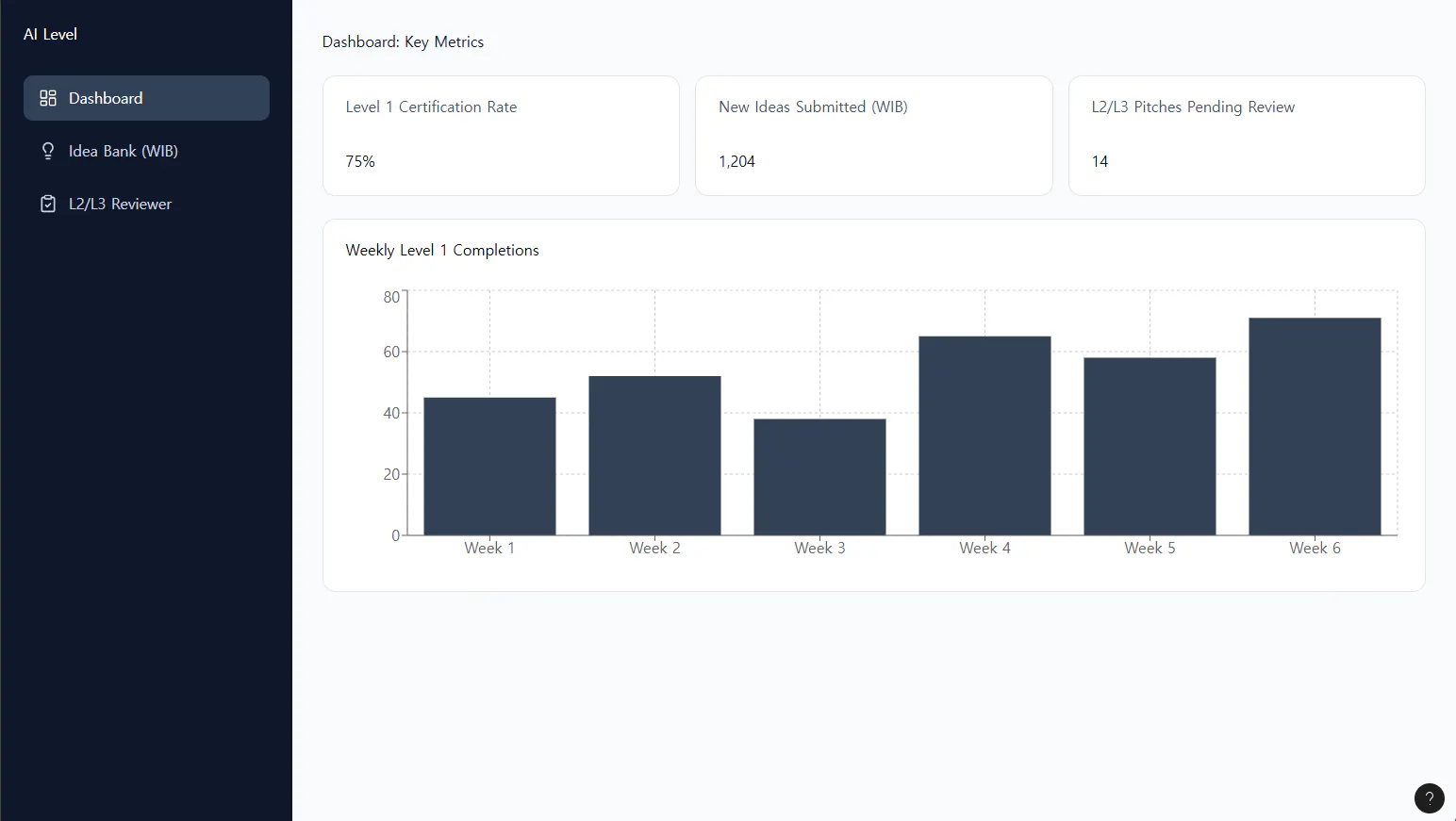
2단계: 핵심 화면 '문맥 이어서' 생성하기
AI가 만든 뼈대(사이드바)를 기억하게 한 채로, 각 메뉴를 클릭했을 때의 화면을 이어서 요청했습니다.
[Prompt 2: 'Idea Bank' 화면 생성] Excellent. Now, let's define the view for the 'Idea Bank (WIB)' navigation link in the sidebar. When that 'Idea Bank (WIB)' link is clicked, the main content area... should be populated with... a card-based grid... Each card must display: 'Pain Point Title', 'Submitted by', 'Department', 'Submission Date', and a 'Keyword' tag.
[Prompt 3: 'L2/L3 Reviewer' 화면 생성] This is perfect. Now for the final screen. Let's define the view for the 'G/B Reviewer' navigation link... ...designed as a two-column admin interface. The left column (30% width) must be a scrollable list of 'Pending Applicants'. The main right column (70% width) is the 'Review Panel'. It must display the 4-part pitch details... At the bottom... add two buttons... 'Approve' and 'Reject'.
[결과 캡처 2 & 3: 핵심 화면]
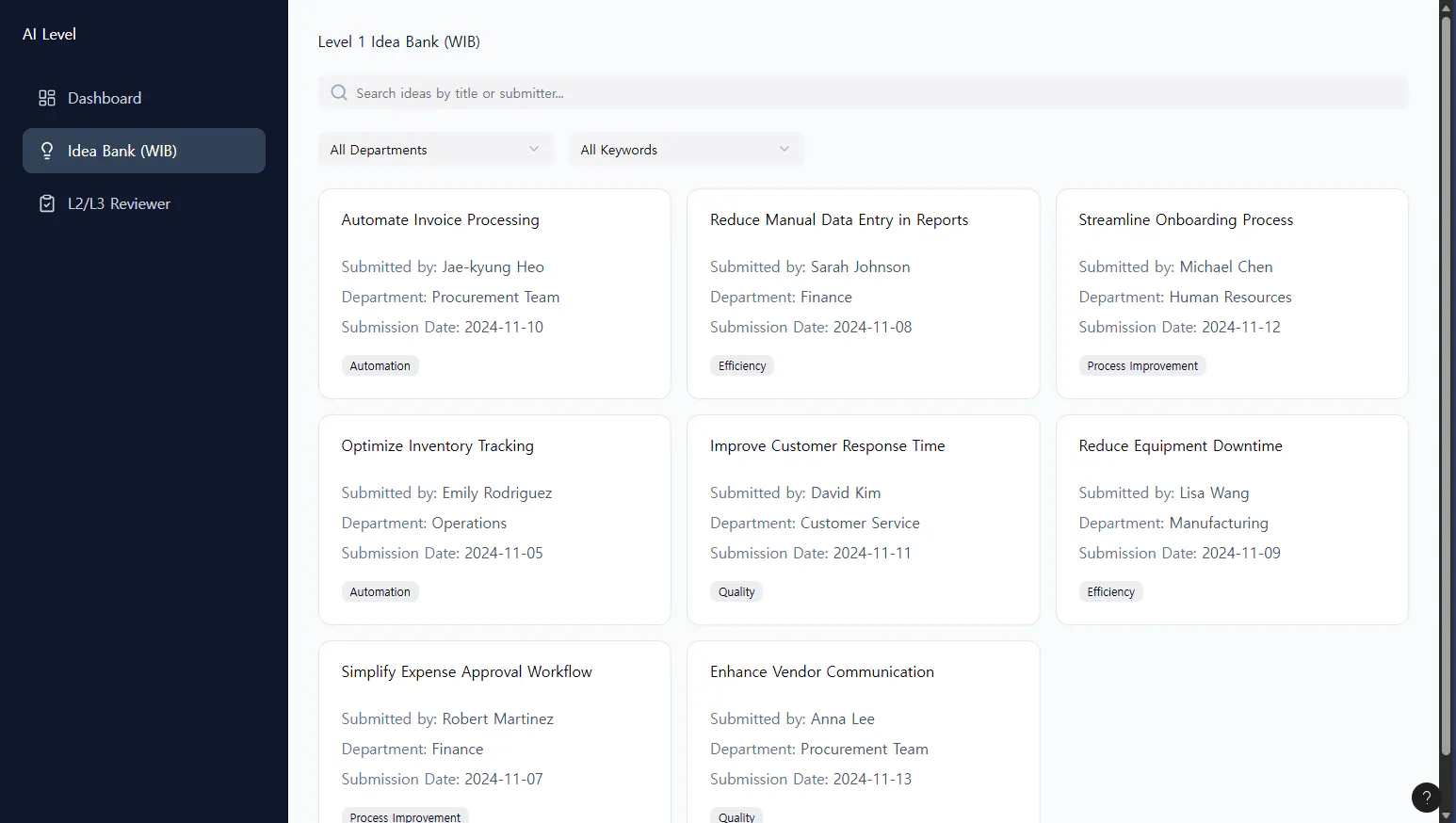
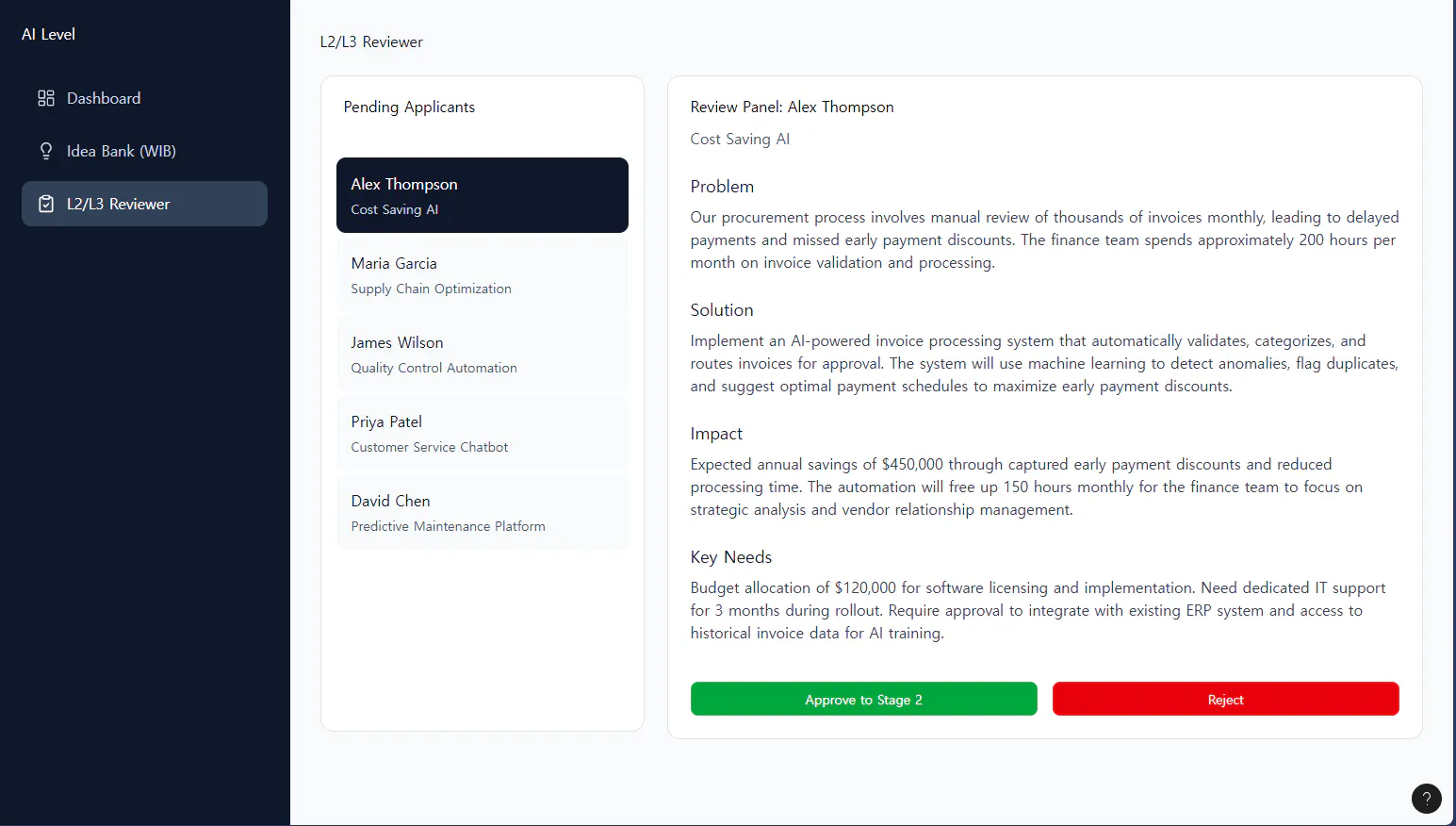
3단계: '전략적 기능' 업그레이드 (가장 중요)
여기까지는 '그럴듯한' 프로토타입이었습니다. 하지만 '설득력 있는' 프로토타입이 되려면, 이 앱이 '어떻게 조직의 동기를 유발'하고 '어떻게 우선순위를 관리'하는지 보여줘야 했습니다.
[Prompt 4: '아이디어 제출' 및 '상세보기' 모달 추가] This is a critical pivot. We need to add 'General User' functionality to the 'Level 1 Idea Bank (WIB)' screen... Add a '+ Submit New Idea' button... When clicked, it must open a new 'modal' (pop-up window) with a 'submission form'. ... Also, make every single 'idea card' clickable. When a user clicks... it must open a 'modal' displaying the 'Idea Description'.
[Prompt 5: '동기부여' 및 '우선순위' 기능 추가] Let's upgrade the 'Dashboard' screen... add a new widget... titled 'Top Idea Contributors' (Leaderboard). ... Now, let's upgrade the 'Level 1 Idea Bank (WIB)' screen... In the bottom-left corner of every card, add a small 'upvote' button with an icon... '▲ 25'.
결과와 배운 점
배운 점과 나만의 꿀팁을 알려주세요.
저는 디자인에는 소질이 없습니다. 미술 양가양가였습니다. 그런 제가 제 머리속에 있는 아이디어를 기반으로 대시보드 포름프트를 단 1시간 만에 만들었습니다. 심지어 실제 작동하고 있습니다. 이제 이 프로토타입은 단순 그림이 아니라, 저의 아이디어를 시각적으로 증명해주는 설득 자료로 쓰일 것입니다.
[나만의 꿀팁]
AI는 모든걸 대답해줄 수 있습니다. 프롬프트를 모르겠다면 프롬프트를, 아이디어를 대강만 알고있다면 구체화를, 구체화된걸 사람들에게 설명할 자료가 필요하다면 자료를 요청하세요.
AI를 디자이너가 아닌 'PM(기획자)'으로 대하세요. Figma AI에게 "버튼을 예쁘게 해줘"가 아니라, "이 버튼이 클릭되면 이런(Context) 이유로, 저런(Logic) 기능을 하는 팝업을 띄워줘"라고 명확히 지시해야 합니다. 'Why'를 알려주면 AI가 'How'를 더 잘 구현해 줍니다.
'완벽한 첫 프롬프트'는 없습니다. '반복(Iterative)'이 핵심입니다. 처음엔 그저 '3개 화면'을 만들려 했습니다. 하지만 만들다 보니 '관리자'만 쓰는 앱은 한계가 명확했고, '사용자' 기능(제출, 업보트)을 추가하는 '전략적 피벗(Pivot)'을 했습니다. AI 도구는 이 피벗을 즉각적으로 반영해주어, 전략과 구현 사이의 간극을 완전히 없애주었습니다.
'보안'과 '일반화'도 AI에게 맡기세요. 가장 귀찮은 '용어 바꾸기'나 '더미 데이터 채우기' (예: Lorem Ipsum) 역시 AI에게 '찾아 바꾸기' 프롬프트로 맡기면 1분 만에 해결됩니다.
[앞으로의 계획]
아이디어 추가 : 만들다보니 떠오르는 아이디어들이 몇개 더 있습니다. 특히 아이어추천 부분은 일반 구성원에게 Open 해야 추천수가 높아질 것 같습니다. 해당 화면에서 Idea를 적고 제출하는 기능을 추가해보겠습니다.
MVP 개발: Figma에서 생성된 디자인을 Cursor로 내보내, AI의 도움을 받아 실제 'Firebase' 같은 백엔드에 연결하여 'Level 1 아이디어 뱅크'만큼은 실제 작동하는 MVP로 구현해 볼 계획입니다.
도움 받은 글 (옵션)
프롬프트 가이드 북 : [지피터스] Prompt Cheat Sheet
