소개
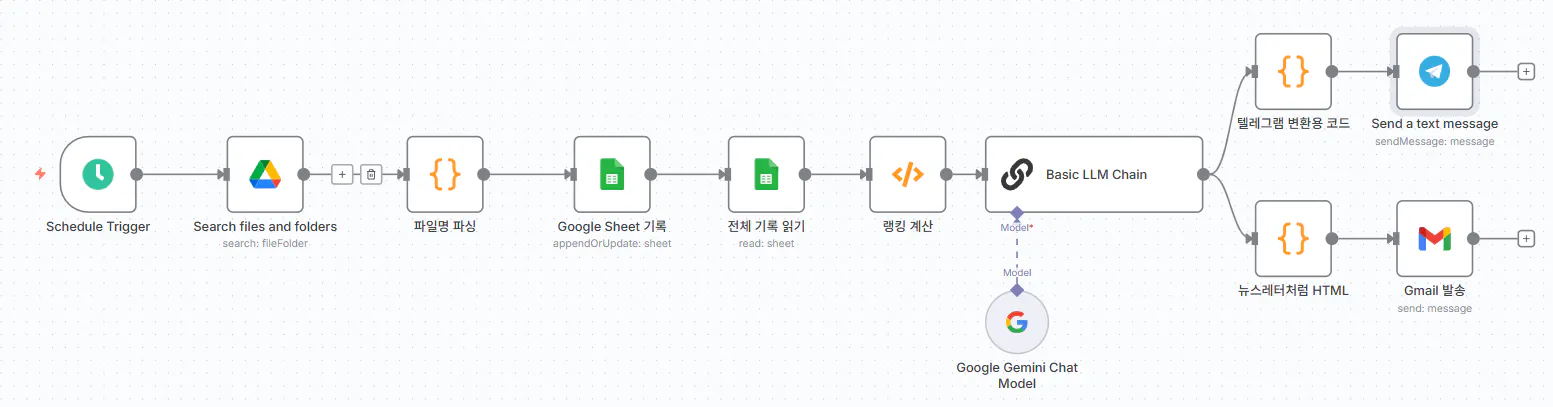
1주차에 기획한했던 AI 루틴의 후반부 단계를 실습해 보았습니다. 구체적으로는 1) 구글 시트에 누적된 전체 기록을 불러오고 2) 이를 기반으로 랭킹을 계산한 뒤 HR 담당자에게 유용한 영어 표현을 생성하고 3) 최종 결과(랭킹과 오늘의 영어 표현)를 텔레그램과 이메일로 자동 발송하는 과정까지 시도해보았습니다.
진행 방법
무료로 제공되는 클로드에는 한계가 있어 유료 버전으로 사용 중인 GPT o4-mini-high를 활용하여 코드를 작성하고, 이를 n8n에서 실행하는 방식으로 구현하였습니다.
[전체 workflow]
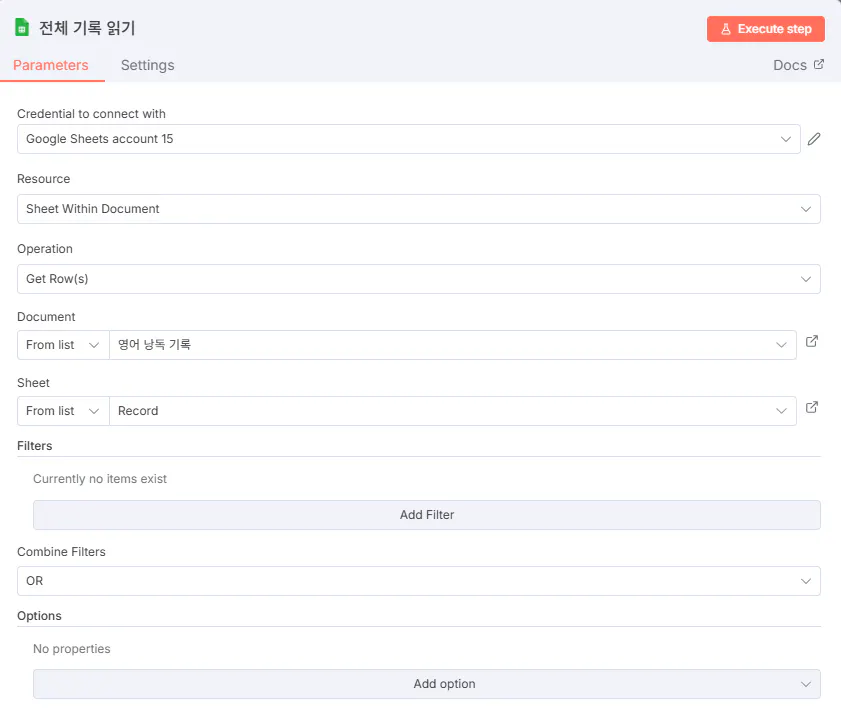
1) 전체 기록 읽기
2) 랭킹 계산 & 영어 표현 생성
(1) Function
// === 랭킹 계산 및 LLM Prompt 생성 코드 ===

// 1. 전체 기록 불러오기
const allRecords = $input.all();

// 2. 집계용 객체
const participationCount = {};
const recentParticipants = [];

// 3. 오늘 날짜 (YYYY-MM-DD)
const today = new Date().toISOString().split('T')[0];

// 4. 각 레코드 처리
for (const record of allRecords) {
  const data = record.json;
  const name = data['parsedName'];    // 실제 필드명
  const date = data['uploadDate'];    // 실제 필드명

  if (name && date) {
    // 누적 참여 횟수 계산
    participationCount[name] = (participationCount[name] || 0) + 1;

    // 오늘 참여자 수집
    if (date === today) {
      recentParticipants.push({
        name: name,
        fileName: data['fileName'],      // fileName 필드 사용
        uploadTime: data['uploadDate']   // uploadDate 를 시간으로 표시
      });
    }
  }
}

// 5. 전체 랭킹 정렬
const fullRanking = Object.entries(participationCount)
  .sort(([, a], [, b]) => b - a)
  .map(([name, count], index) => ({
    rank: index + 1,
    name,
    count
  }));

// 6. 상위 3명 추출
const topRanking = fullRanking.slice(0, 3);

// 7. 랭킹 문자열 생성
const rankingLines = topRanking.length > 0
  ? topRanking.map(r => `${r.rank}위 ${r.name} (${r.count}회)`).join('\n')
  : '참여자가 아직 없습니다.';

// 8. LLM Prompt 생성
const promptText = String.raw`
당신은 영어 교육 전문가이며, 역할은 ‘HR 담당자들을 위한 실용 영어 선생님’입니다. 학습 대상은 C.O.R.E Learning Crew 학습자들이며, 실무에 바로 쓰일 수 있는 표현을 재미있고 이해하기 쉽게 알려줘야 합니다.

[1] 오늘의 영어 낭독 누적 랭킹 (Top 3)
${rankingLines}

[2] 위 랭킹 정보를 바탕으로,
- 학습자들에게 짧게 칭찬/독려 메시지를 한국어로 2~3문장 작성한다.
- 낭독 파일 제출 링크(https://gpters-n8n.org/form/831be740-3876-4e3d-9451-30963cc78025)를 자연스럽게 안내한다.
- 낭독 연습을 독려한다.

[3] HR 실무자가 쓸 수 있는 "오늘의 HR 영어 패턴" 1개를 만들어준다.
아래 규칙을 반드시 지켜라:
- 친근하고 명확한 말투
- 문법 설명보다 “패턴 + 상황” 중심
- 예시는 HR 실무(채용, 교육, 평가, 피드백 등) 맥락으로 3개 제시
- 각 예문에 한글 해석 포함
- 구성 순서:
  1. 오늘의 영어 표현
  2. 간단한 해석
  3. HR 실무 예문 3개 (한글 해석 포함)
  4. 활용 팁 (예: 자주 쓰는 시점, 말투 변화 등)

내용은 너무 길지 않게, 초보자도 부담 없이 이해할 수 있게.
### 출력 형식(중요)
반드시 아래 JSON만 출력하고, 코드블록( \`\`\` )이나 다른 텍스트를 넣지 마라.
{
  "msg12": "여기에 [1]과 [2]를 묶은 전체 텍스트",
  "msg3": "여기에 [3]만 넣는다"
}
`;

// 9. 출력
return [{
  json: {
    ranking: topRanking,
    fullRanking,
    recentParticipants,
    totalParticipants: Object.keys(participationCount).length,
    todayCount: recentParticipants.length,
    rankingLines,               // 나중에 쓸 수 있게
    prompt: promptText.trim()   // LLM에 줄 프롬프트
  }
}];
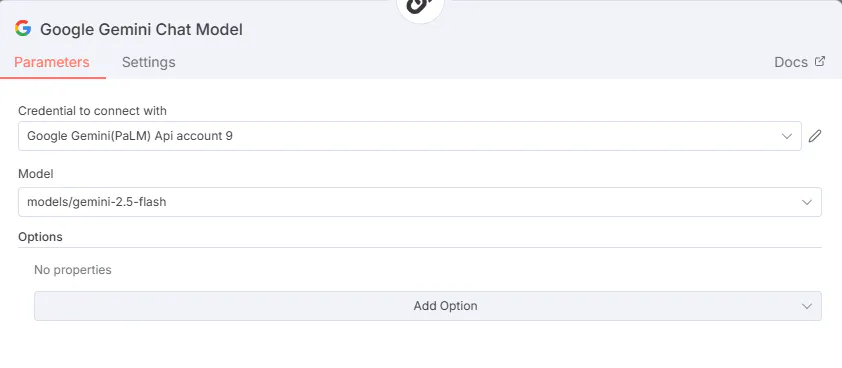
(2) Basic LLM Chain & Google Gemini Chat Model
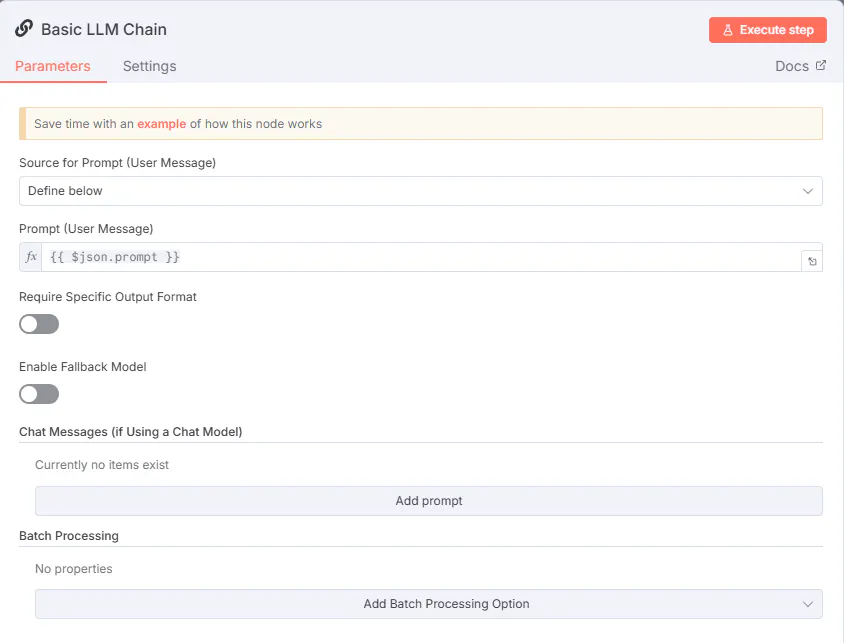
간단한 목록 체인의 설정을 보여주는 화면
3) 텔레그램 발송
(1) code
/**
* 텔레그램용 HTML 변환 (Parse Mode = HTML)
* - msg12, msg3를 HTML 메시지로 가공
* - 두 개의 아이템을 반환하여 텔레그램 노드로 두 번 전송 가능
*/
// ===== 0) 소스 노드 이름 지정 =====
const SRC_NODE = "Basic LLM Chain";
// ===== 1) 유틸 =====
const srcItems = $items(SRC_NODE, 0) || [];
const src = (srcItems[0] && srcItems[0].json) ? srcItems[0].json : {};
function pick(obj, path){
return path.split('.').reduce((o,k)=> (o && o[k]!==undefined)? o[k] : undefined, obj);
}
function toStr(v){
if (v == null) return '';
if (typeof v === 'string') return v;
if (Array.isArray(v)) return v.map(toStr).join('\n');
if (typeof v === 'object'){
for (const k of ['text','content','value','message','md','html']) {
if (typeof v[k] === 'string') return v[k];
}
return JSON.stringify(v, null, 2);
}
return String(v);
}
function pickStr(obj, paths){
for (const p of paths){
const v = pick(obj, p);
const s = toStr(v).trim();
if (s) return s;
}
return '';
}
// ===== 2) JSON 파싱 =====
let raw = pickStr(src, [
'data', 'text', 'content', 'message.content', 'result', 'output'
]);
let obj;
try { obj = JSON.parse(raw.replace(/^```json\s*|\s*```$/g,'')); }
catch { obj = {}; }
const msg12_raw = pickStr(obj, ['msg12','data.msg12','text.msg12','content.msg12','msg12_md']);
const msg3_raw = pickStr(obj, ['msg3','data.msg3','text.msg3','content.msg3','msg3_md']);
// ===== 3) HTML 이스케이프 + 변환기 =====
function escapeHtml(str) {
return str
.replace(/&/g, "&")
.replace(/</g, "<")
.replace(/>/g, ">");
}
// 마크다운 스타일을 Telegram HTML로 바꾸기
function mdToTelegramHtml(md) {
let s = toStr(md).replace(/\r\n/g, '\n').trim();
// 코드블록
s = s.replace(/```([\s\S]*?)```/g, (_, code) => `<pre>${escapeHtml(code)}</pre>`);
// 인라인 코드
s = s.replace(/`([^`]+?)`/g, (_, code) => `<code>${escapeHtml(code)}</code>`);
// 굵게/기울임
s = s.replace(/\*\*(.+?)\*\*/g, "<b>$1</b>");
s = s.replace(/(^|[^*])\*(?!\*)([^*\n]+)\*(?!\*)/g, "$1<i>$2</i>");
// 헤딩 제거 (단순 줄바꿈으로)
s = s.replace(/^#{1,6}\s+/gm, '');
// 리스트 정리
s = s.replace(/^[\-\*]\s+/gm, "• ");
// 링크 (자동 변환 X, 명시적 `<a>` 필요)
s = s.replace(/\[([^\]]+)]\(([^)]+)\)/g, '<a href="$2">$1</a>');
// 줄바꿈 (Telegram은 \n만 인식)
s = s.replace(/\n{3,}/g, "\n\n");
return escapeHtml(s)
.replace(/<b>/g, "<b>").replace(/<\/b>/g, "</b>")
.replace(/<i>/g, "<i>").replace(/<\/i>/g, "</i>")
.replace(/<pre>/g, "<pre>").replace(/<\/pre>/g, "</pre>")
.replace(/<code>/g, "<code>").replace(/<\/code>/g, "</code>")
.replace(/<a href="(.*?)">/g, '<a href="$1">')
.replace(/<\/a>/g, '</a>');
}
// ===== 4) 최종 메시지 조립 =====
const header1 = '<b>🏆 오늘의 랭킹 & 독려</b>';
const header2 = '<b>📚 오늘의 HR 영어 패턴</b>';
const html1 = `${header1}\n\n${mdToTelegramHtml(msg12_raw)}`;
const html2 = `${header2}\n\n${mdToTelegramHtml(msg3_raw)}`;
// ===== 5) 반환 (각 메시지 분리 전송)
return [
{ json: { text: html1 } },
{ json: { text: html2 } }
];
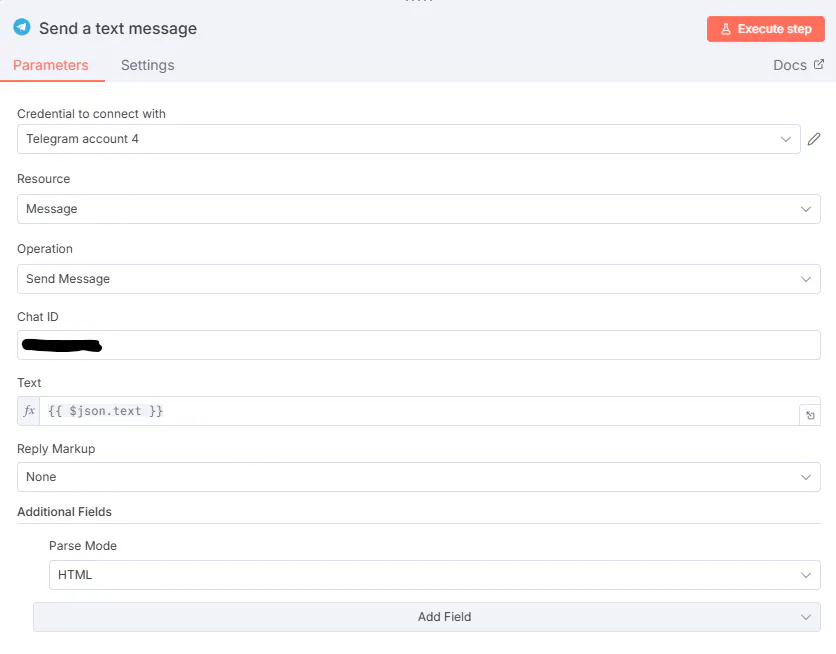
(2) Send a text message
4) 이메일 발송
(1) Code
// ===== 0) LLM 응답 파싱 =====
let raw = $json.data || $json.text || $json.content || '';
if (typeof raw === 'string') {
raw = raw.replace(/^```json\s*|\s*```$/g, '').trim();
}
let obj;
try {
obj = typeof raw === 'string' ? JSON.parse(raw) : {};
} catch {
obj = {};
}
// ===== 1) Markdown → HTML 처리 함수 =====
function mdToHtml(md = '') {
if (typeof md !== 'string') md = '';
let s = md.replace(/\r\n/g, '\n').trim();
// 코드블럭
s = s.replace(/```([\s\S]*?)```/g, (_, code) =>
`<pre style="
font-family:'Noto Sans','Noto Sans KR';
background:#f1f5f9;padding:12px;border-radius:8px;
overflow:auto;font-size:13px;line-height:1.4;
">${code}</pre>`
);
// 헤딩
s = s.replace(/^###\s+(.*)$/gm,
'<h3 style="font-size:18px;color:#334155;margin:16px 0;">$1</h3>')
.replace(/^##\s+(.*)$/gm,
'<h2 style="font-size:20px;color:#334155;margin:18px 0;">$1</h2>')
.replace(/^#\s+(.*)$/gm,
'<h1 style="font-size:22px;color:#334155;margin:20px 0;">$1</h1>');
// 볼드/이탤릭
s = s.replace(/\*\*(.+?)\*\*/g,
'<strong style="font-weight:700;">$1</strong>')
.replace(/(^|[^*])\*(?!\*)([^*]+)\*(?!\*)/g,
'$1<em style="font-style:italic;">$2</em>');
// 리스트
s = s.replace(/^\s*[-*]\s+(.+)$/gm, '<li style="margin:8px 0;">$1</li>');
if (s.includes('<li>')) {
s = `<ul style="margin:0 0 18px 22px;padding:0;">${s}</ul>`;
}
// 일반 단락
return s.split(/\n{2,}/).map(p => {
if (p.startsWith('<')) return p;
return `<p style="margin:12px 0;color:#475569;
font-family:'Noto Sans','Noto Sans KR';">
${p.replace(/\n/g,'<br/>')}
</p>`;
}).join('');
}
// ===== 2) msg12, msg3 변환 =====
const msg12_html = mdToHtml(obj.msg12 || '');
const msg3_html = mdToHtml(obj.msg3 || '');
// ===== 3) 섹션 블록 생성 =====
function block(innerHtml, bg, borderColor) {
return `
<table width="100%" cellpadding="0" cellspacing="0" role="presentation" style="border-collapse:collapse;margin-bottom:20px;">
<tr>
<td bgcolor="${bg}" style="
padding:24px 26px;
border-left:4px solid ${borderColor};
font-family:'Noto Sans','Noto Sans KR';
color:#475569;
line-height:1.8;
">
${innerHtml}
</td>
</tr>
</table>`;
}
// ===== 4) 레이아웃 조립 =====
const date = new Date().toISOString().split('T')[0];
const title = `영어 낭독 루틴 데일리 리포트 (${date})`;
// 레이블 (Notion 스타일 이모지 + 텍스트)
const section1Label = `<span style="
display:inline-block;
font-size:12px;line-height:16px;
background:#eef2ff;color:#475569;
padding:6px 12px;border-radius:20px;
font-family:'Noto Sans','Noto Sans KR';
">📊 오늘의 랭킹 & 독려</span>`;
const section2Label = `<span style="
display:inline-block;
font-size:12px;line-height:16px;
background:#f5f3ff;color:#6b21a8;
padding:6px 12px;border-radius:20px;
font-family:'Noto Sans','Noto Sans KR';
">📚 오늘의 HR 영어 패턴</span>`;
const section1 = block(msg12_html, '#f8fafc', '#6366f1');
const section2 = block(msg3_html, '#fdf4ff', '#7c3aed');
const spacer = `<div style="height:24px;line-height:24px;font-size:0;"> </div>`;
const html = `
<!DOCTYPE html>
<html lang="ko">
<head>
<meta charset="UTF-8"/>
<meta name="viewport" content="width=device-width,initial-scale=1.0"/>
<title>${title}</title>
</head>
<body style="
margin:0;padding:0;
background:#f8fafc;
font-family:'Noto Sans','Noto Sans KR';
color:#334155;
">
<table width="100%" cellpadding="0" cellspacing="0" role="presentation" style="border-collapse:collapse;background:#f8fafc;">
<tr><td align="center" style="padding:20px;">
<table width="600" cellpadding="0" cellspacing="0" role="presentation"
style="border-collapse:collapse;background:#ffffff;box-shadow:0 4px 6px -1px rgba(0,0,0,0.1);">
<!-- HEADER -->
<tr>
<td bgcolor="#6366f1" style="padding:32px 24px;text-align:center;">
<h1 style="margin:0;color:#ffffff;font-size:24px;font-weight:700;">
${title}
</h1>
</td>
</tr>
<!-- BODY -->
<tr>
<td style="padding:28px 24px;">
<!-- Section1 -->
<table width="100%" cellpadding="0" cellspacing="0" role="presentation">
<tr><td style="padding-bottom:12px;">${section1Label}</td></tr>
</table>
${section1}
${spacer}
<!-- Section2 -->
<table width="100%" cellpadding="0" cellspacing="0" role="presentation">
<tr><td style="padding-bottom:12px;">${section2Label}</td></tr>
</table>
${section2}
${spacer}
<!-- OUTRO -->
<table width="100%" cellpadding="0" cellspacing="0" role="presentation">
<tr>
<td bgcolor="#fef3c7" style="padding:20px;text-align:center;">
<p style="margin:0;font-size:15px;line-height:1.6;color:#92400e;">
꾸준함이 실력을 만듭니다. 내일도 함께 낭독해요! ✨
</p>
</td>
</tr>
</table>
</td>
</tr>
</table>
</td></tr>
</table>
</body>
</html>
`;
// ===== 5) 반환 =====
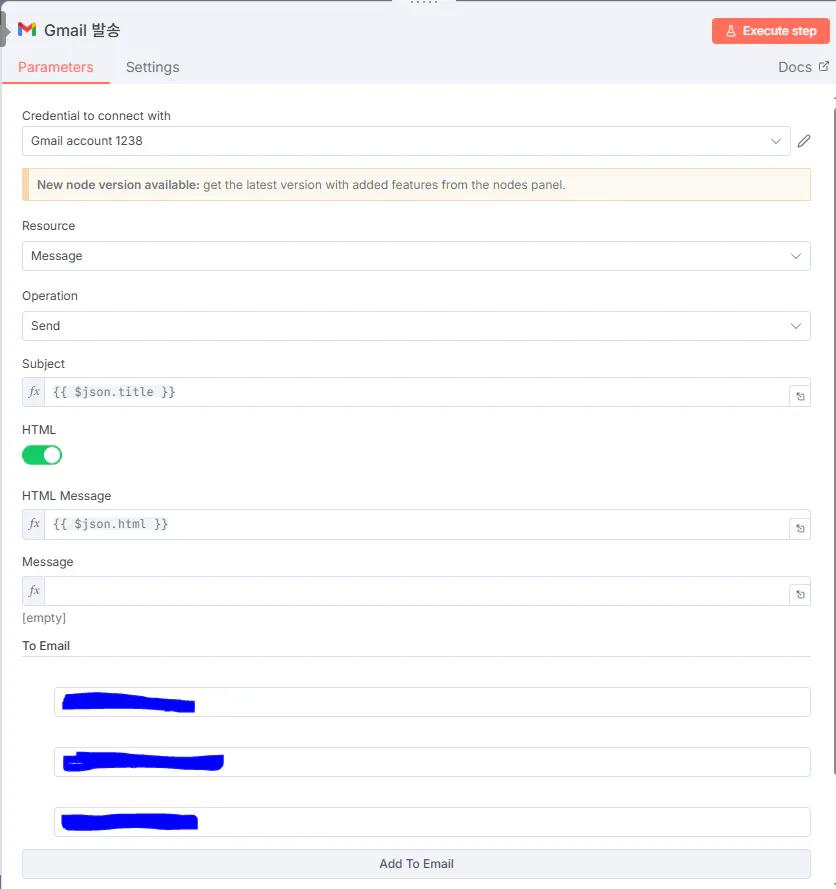
return [{ json: { title, html } }];(2) Gmail 발송
결과와 배운 점
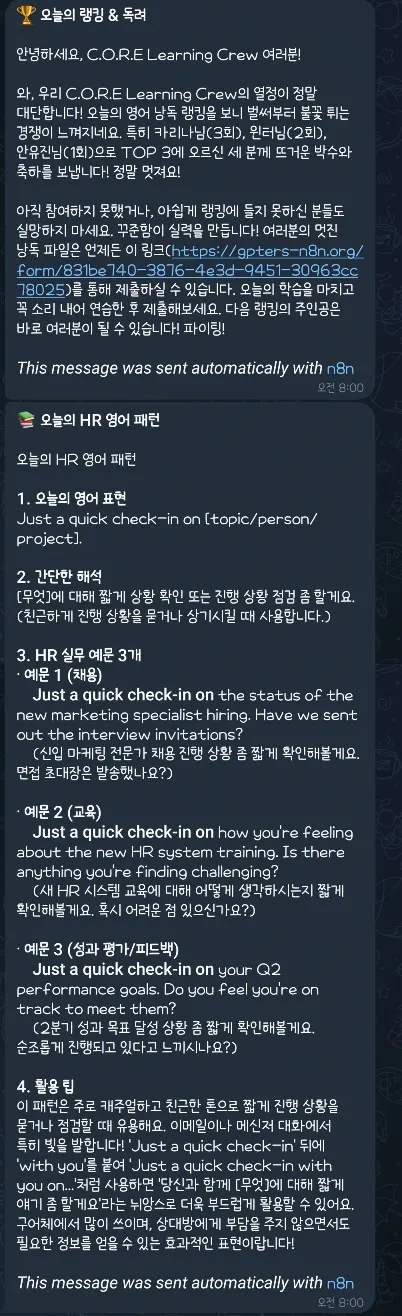
텔레그램은 예상한 대로 문단 정렬도 잘 이루어졌고, 랭킹과 영어 패턴이 각각 두 개의 메시지로 나뉘어 정해진 시간에 문제없이 발송되었습니다.
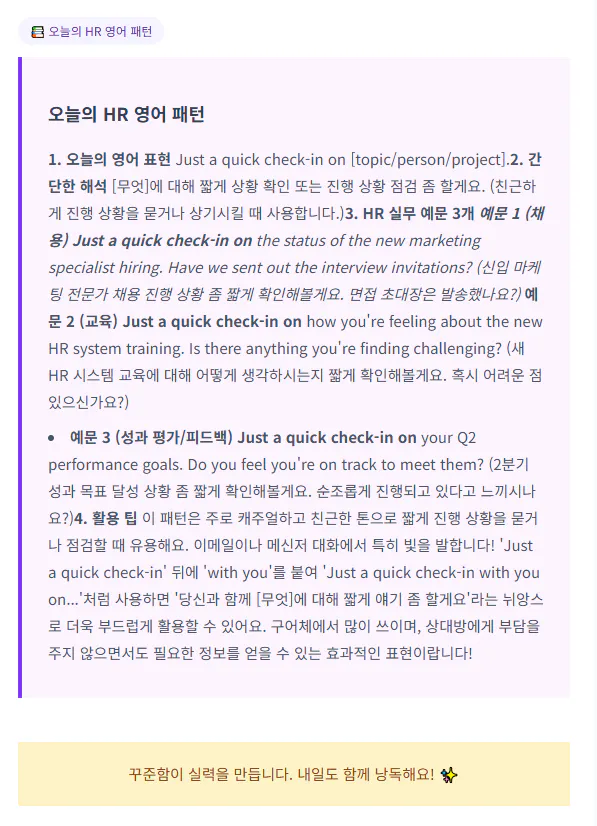
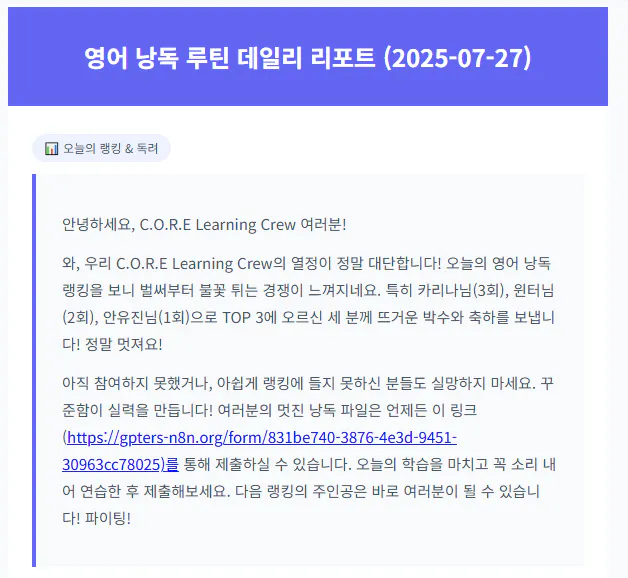
반면, 이메일로 전송되는 HTML에서는 여전히 줄바꿈 문제가 발생하고 있어 계속해서 수정을 시도하고 있는 상황입니다. 수정할수록 코드가 점점 복잡해져 어려움을 겪고 있어, 이번 주에는 HTML 줄바꿈 이슈를 집중적으로 해결해 볼 예정입니다.
또한, 현재는 GPTers에서 제공하는 n8n 클라우드 계정을 사용하고 있으나, 이후에도 지속적으로 루틴을 활용하기 위해서는 셀프 호스팅 환경에서 재구현이 필요할 것으로 판단하고 있습니다.
이에 따라 마지막 주에는 셀프 호스팅 기반으로 이전하는 작업도 시도해 볼 계획입니다.
<텔레그램 결과>
<이메일 발송 결과>
CLC 학습 승무원에 대한 메시지가 담긴 한국 웹 사이트