


소개
텔레그램 봇으로 링크를 인풋 -> 요약을 아웃풋
진행 방법
텔레그램 트리거를 인풋으로 하고, 클로드의 제안에 따라 코드에 다음을 통해 영상 링크 추출
// 텔레그램 메시지에서 YouTube URL 추출
const message = $json.message.text || "";
const chatId = $json.message.chat.id;
// YouTube URL 패턴
const youtubeRegex = /(?:https?:\/\/)?(?:www\.)?(?:youtube\.com\/watch\?v=|youtu\.be\/)([a-zA-Z0-9_-]{11})/;
const match = message.match(youtubeRegex);
if (match) {
return [{
json: {
link: https://www.youtube.com/watch?v=${match[1]},
videoId: match[1],
chatId: chatId,
hasUrl: true
}
}];
} else {
return [{
json: {
chatId: chatId,
hasUrl: false,
error: "YouTube URL을 찾을 수 없습니다."
}
}];
}
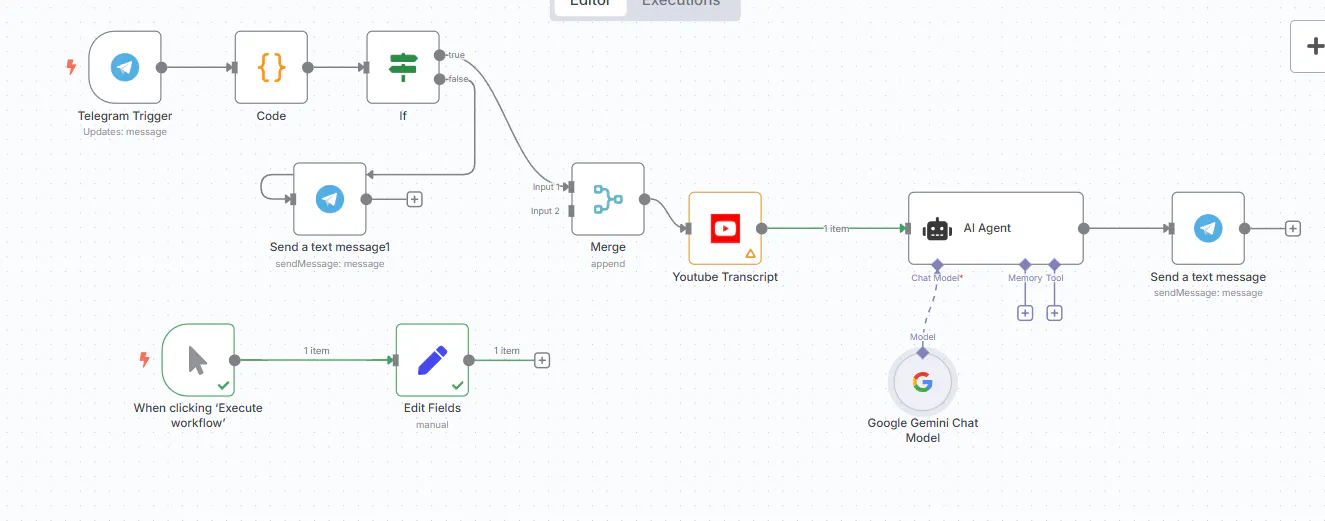
프로세스 작동 방식을 보여주는 흐름도
결과와 배운 점
텔레그램 봇이 생각보다 어렵지 않다는 자신감을 얻고, 실제로 결과가 나오는 점이 동기부여를 자극
