


소개
학생들에게 코드 리뷰 자료를 배포하려고 했더니 코드가 많이 바뀌어서 다시 만들어야 하는 상황이라는 것을 알게 되었습니다. 하...
리뷰를 claude에게 시켜볼까? 라는 생각으로 진행해 보게 되었습니다.
진행 방법
어떤 도구를 사용했고, 어떻게 활용하셨나요?
claude code를 사용해서 만들었습니다.
Tip: 사용한 프롬프트 전문을 꼭 포함하고, 내용을 짧게 소개해 주세요.
기존의 코드를 폴더에 넣고, 분석 후 설명하는 단일 웹 페이지를 만들도록 요청했습니다.
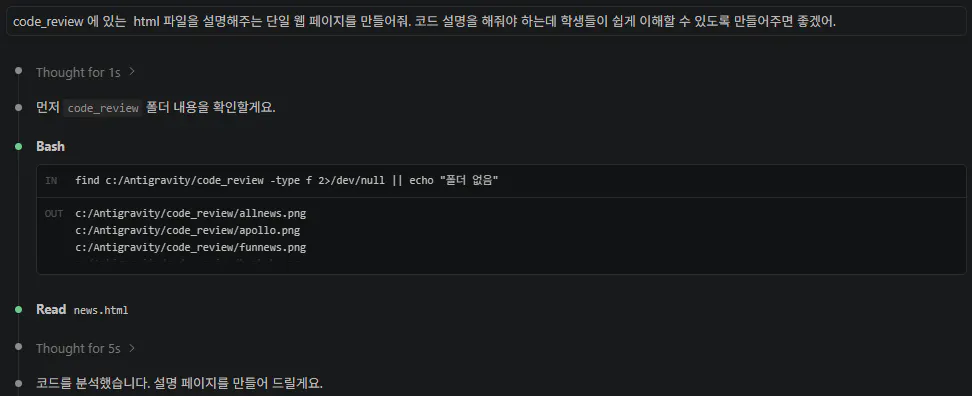
한국어 텍스트가 있는 검은 화면
Tip: 활용 이미지나 캡처 화면을 꼭 남겨주세요.
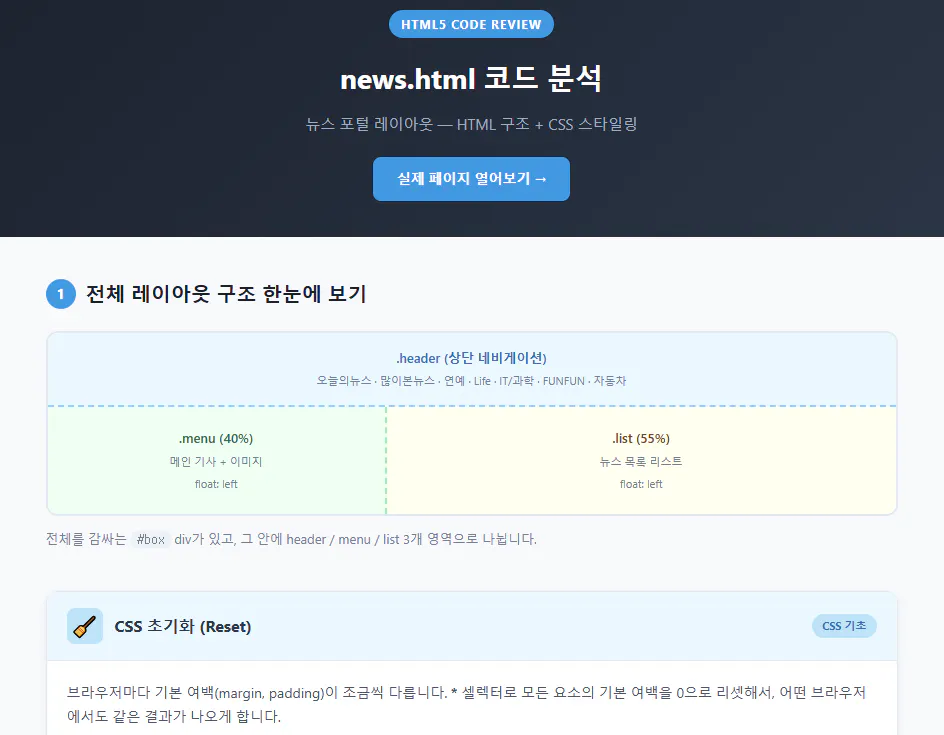
뉴스 호텔 웹사이트 스크린샷
Tip: 코드 전문은 코드블록에 감싸서 작성해주세요. ( / 을 눌러 '코드 블록'을 선택)
<!DOCTYPE html>
<html lang="ko">
<head>
<meta charset="UTF-8">
<meta name="viewport" content="width=device-width, initial-scale=1.0">
<title>news.html 코드 리뷰</title>
<style>
* { margin: 0; padding: 0; box-sizing: border-box; }
body {
font-family: 'Segoe UI', 'Malgun Gothic', sans-serif;
background: #f8f9fc;
color: #2d3748;
line-height: 1.7;
}
/* ── 상단 히어로 ── */
.hero {
background: linear-gradient(135deg, #1a202c 0%, #2d3748 100%);
color: white;
padding: 48px 40px 36px;
text-align: center;
}
.hero .badge {
display: inline-block;
background: #4299e1;
color: white;
font-size: 12px;
font-weight: 700;
letter-spacing: 1px;
padding: 4px 12px;
border-radius: 20px;
margin-bottom: 16px;
text-transform: uppercase;
}
.hero h1 { font-size: 28px; margin-bottom: 10px; }
.hero p { font-size: 15px; color: #a0aec0; }
/* ── 미리보기 링크 버튼 ── */
.preview-btn {
display: inline-block;
margin-top: 20px;
padding: 10px 24px;
background: #4299e1;
color: white;
text-decoration: none;
border-radius: 8px;
font-size: 14px;
font-weight: 600;
transition: background 0.2s;
}
.preview-btn:hover { background: #2b6cb0; }
/* ── 레이아웃 다이어그램 ── */
.diagram-section {
max-width: 900px;
margin: 40px auto;
padding: 0 24px;
}
.section-title {
font-size: 20px;
font-weight: 700;
color: #1a202c;
margin-bottom: 20px;
display: flex;
align-items: center;
gap: 10px;
}
.section-title .num {
display: inline-flex;
align-items: center;
justify-content: center;
width: 30px; height: 30px;
background: #4299e1;
color: white;
border-radius: 50%;
font-size: 14px;
font-weight: 700;
flex-shrink: 0;
}
.diagram {
border: 2px solid #e2e8f0;
border-radius: 12px;
overflow: hidden;
background: white;
font-size: 13px;
font-weight: 600;
}
.diagram .d-header {
background: #ebf8ff;
border-bottom: 2px dashed #90cdf4;
padding: 14px;
text-align: center;
color: #2b6cb0;
}
.diagram .d-body {
display: flex;
}
.diagram .d-menu {
width: 40%;
background: #f0fff4;
border-right: 2px dashed #9ae6b4;
padding: 20px 14px;
text-align: center;
color: #276749;
min-height: 100px;
}
.diagram .d-list {
width: 60%;
background: #fffff0;
padding: 20px 14px;
text-align: center;
color: #744210;
}
.diagram-label {
font-size: 11px;
color: #718096;
margin-top: 4px;
font-weight: 400;
}
/* ── 설명 카드 그룹 ── */
.cards-section {
max-width: 900px;
margin: 0 auto 48px;
padding: 0 24px;
display: flex;
flex-direction: column;
gap: 24px;
}
.card {
background: white;
border-radius: 12px;
border: 1px solid #e2e8f0;
overflow: hidden;
box-shadow: 0 2px 8px rgba(0,0,0,0.05);
}
.card-header {
display: flex;
align-items: center;
gap: 12px;
padding: 16px 20px;
border-bottom: 1px solid #e2e8f0;
}
.card-header .icon {
font-size: 20px;
width: 36px; height: 36px;
display: flex; align-items: center; justify-content: center;
border-radius: 8px;
}
.card-header h3 { font-size: 16px; font-weight: 700; }
.card-header .tag {
margin-left: auto;
font-size: 11px;
font-weight: 700;
padding: 3px 10px;
border-radius: 20px;
}
/* 카드 색상 테마 */
.theme-blue .card-header { background: #ebf8ff; }
.theme-blue .icon { background: #bee3f8; }
.theme-blue .tag { background: #bee3f8; color: #2b6cb0; }
.theme-green .card-header { background: #f0fff4; }
.theme-green .icon { background: #c6f6d5; }
.theme-green .tag { background: #c6f6d5; color: #276749; }
.theme-purple .card-header { background: #faf5ff; }
.theme-purple .icon { background: #e9d8fd; }
.theme-purple .tag { background: #e9d8fd; color: #553c9a; }
.theme-orange .card-header { background: #fffaf0; }
.theme-orange .icon { background: #feebc8; }
.theme-orange .tag { background: #feebc8; color: #c05621; }
.theme-red .card-header { background: #fff5f5; }
.theme-red .icon { background: #fed7d7; }
.theme-red .tag { background: #fed7d7; color: #c53030; }
.theme-teal .card-header { background: #e6fffa; }
.theme-teal .icon { background: #b2f5ea; }
.theme-teal .tag { background: #b2f5ea; color: #234e52; }
.card-body {
padding: 20px;
display: flex;
flex-direction: column;
gap: 14px;
}
.desc { font-size: 14px; color: #4a5568; }
/* 코드 블록 */
pre {
background: #1a202c;
color: #e2e8f0;
border-radius: 8px;
padding: 16px;
font-size: 13px;
overflow-x: auto;
line-height: 1.6;
font-family: 'Consolas', 'D2Coding', monospace;
}
.kw { color: #f6ad55; } /* 키워드: display, float, ... */
.sel { color: #63b3ed; } /* 셀렉터 */
.val { color: #68d391; } /* 값 */
.cm { color: #718096; font-style: italic; } /* 주석 */
.tag-c{ color: #fc8181; } /* HTML 태그 */
.attr { color: #faf089; } /* 속성 */
.str { color: #68d391; } /* 문자열 */
/* 포인트 박스 */
.point-box {
background: #fffbeb;
border-left: 4px solid #f6ad55;
border-radius: 0 8px 8px 0;
padding: 12px 16px;
font-size: 13px;
color: #744210;
}
.point-box strong { display: block; margin-bottom: 4px; color: #c05621; }
/* 비교 테이블 */
.compare {
display: grid;
grid-template-columns: 1fr 1fr;
gap: 12px;
font-size: 13px;
}
.compare-item {
border-radius: 8px;
padding: 12px;
}
.compare-item h4 { font-size: 13px; margin-bottom: 6px; }
.compare-item ul { padding-left: 16px; color: #4a5568; }
.compare-item li { margin-bottom: 4px; }
.bg-blue-light { background: #ebf8ff; }
.bg-green-light { background: #f0fff4; }
/* 시각적 미리보기 박스 */
.visual-demo {
border: 1px solid #e2e8f0;
border-radius: 8px;
overflow: hidden;
font-size: 13px;
}
.vd-label {
background: #edf2f7;
padding: 6px 12px;
font-size: 11px;
color: #718096;
font-weight: 600;
letter-spacing: 0.5px;
}
.vd-body { padding: 14px; }
/* 호버 시각화 */
.hover-demo-list { list-style: none; display: flex; gap: 12px; flex-wrap: wrap; }
.hover-demo-list li {
font-size: 14px;
padding: 6px 12px;
cursor: pointer;
border-bottom: 3px solid transparent;
transition: all 0.2s;
}
.hover-demo-list li:hover {
border-bottom: 3px solid blue;
color: gray;
}
.hover-demo-list .active-li {
border-bottom: 3px solid blue;
color: gray;
}
/* float 시각화 */
.float-demo {
background: #f7fafc;
border: 1px solid #e2e8f0;
border-radius: 6px;
padding: 10px;
font-size: 12px;
}
.float-demo::after { content: ''; display: block; clear: both; }
.fd-left { float: left; width: 38%; background: #bee3f8; padding: 8px; text-align: center; border-radius: 4px; }
.fd-right { float: left; width: 55%; margin-left: 7%; background: #fefcbf; padding: 8px; text-align: center; border-radius: 4px; }
/* 구분선 */
.divider {
max-width: 900px;
margin: 0 auto 32px;
padding: 0 24px;
}
/* 푸터 */
footer {
background: #1a202c;
color: #718096;
text-align: center;
padding: 24px;
font-size: 13px;
}
</style>
</head>
<body>
<!-- 히어로 -->
<div class="hero">
<div class="badge">HTML5 Code Review</div>
<h1>news.html 코드 분석</h1>
<p>뉴스 포털 레이아웃 — HTML 구조 + CSS 스타일링</p>
<a href="news.html" class="preview-btn" target="_blank">실제 페이지 열어보기 →</a>
</div>
<!-- ① 전체 레이아웃 구조 -->
<div class="diagram-section">
<div class="section-title">
<span class="num">1</span>
전체 레이아웃 구조 한눈에 보기
</div>
<div class="diagram">
<div class="d-header">
.header (상단 네비게이션)<br>
<span class="diagram-label">오늘의뉴스 · 많이본뉴스 · 연예 · Life · IT/과학 · FUNFUN · 자동차</span>
</div>
<div class="d-body">
<div class="d-menu">
.menu (40%)<br>
<span class="diagram-label">메인 기사 + 이미지<br>float: left</span>
</div>
<div class="d-list">
.list (55%)<br>
<span class="diagram-label">뉴스 목록 리스트<br>float: left</span>
</div>
</div>
</div>
<p style="margin-top:12px; font-size:13px; color:#718096;">
전체를 감싸는 <code style="background:#edf2f7;padding:2px 6px;border-radius:4px;">#box</code> div가 있고, 그 안에 header / menu / list 3개 영역으로 나뉩니다.
</p>
</div>
<!-- 설명 카드들 -->
<div class="cards-section">
<!-- 카드 1: CSS 초기화 -->
<div class="card theme-blue">
<div class="card-header">
<div class="icon">🧹</div>
<h3>CSS 초기화 (Reset)</h3>
<span class="tag">CSS 기초</span>
</div>
<div class="card-body">
<p class="desc">
브라우저마다 기본 여백(margin, padding)이 조금씩 다릅니다.
<strong>*</strong> 셀렉터로 모든 요소의 기본 여백을 0으로 리셋해서, 어떤 브라우저에서도 같은 결과가 나오게 합니다.
</p>
<pre><span class="sel">*</span> {
<span class="kw">margin</span>: <span class="val">0</span>;
<span class="kw">padding</span>: <span class="val">0</span>;
}</pre>
<div class="point-box">
<strong>왜 필요한가요?</strong>
크롬과 파이어폭스가 기본으로 주는 여백이 서로 달라서, 리셋을 안 하면 브라우저마다 레이아웃이 달라집니다.
</div>
</div>
</div>
<!-- 카드 2: ID vs Class -->
<div class="card theme-green">
<div class="card-header">
<div class="icon">🏷️</div>
<h3>ID 셀렉터(#) vs 클래스 셀렉터(.)</h3>
<span class="tag">셀렉터</span>
</div>
<div class="card-body">
<p class="desc">
HTML 요소를 CSS로 찾아가는 방법이 2가지 있습니다.
</p>
<div class="compare">
<div class="compare-item bg-blue-light">
<h4><code>#id</code> — ID 셀렉터</h4>
<ul>
<li>페이지에서 <strong>딱 1번만</strong> 사용</li>
<li>고유한 요소에 붙임</li>
<li>예: <code>#box</code>, <code>#apollo</code></li>
</ul>
</div>
<div class="compare-item bg-green-light">
<h4><code>.class</code> — 클래스 셀렉터</h4>
<ul>
<li><strong>여러 요소</strong>에 반복 사용 가능</li>
<li>같은 스타일을 묶을 때 사용</li>
<li>예: <code>.header</code>, <code>.menu</code>, <code>.list</code></li>
</ul>
</div>
</div>
<pre><span class="cm">/* ID: #box 하나만 존재 */</span>
<span class="sel">#box</span> {
<span class="kw">width</span>: <span class="val">1600px</span>;
<span class="kw">margin</span>: <span class="val">auto</span>; <span class="cm">/* 가운데 정렬 */</span>
}
<span class="cm">/* 클래스: .header, .menu, .list 여러 곳에 재사용 */</span>
<span class="sel">.header</span> {
<span class="kw">height</span>: <span class="val">100px</span>;
<span class="kw">border-bottom</span>: <span class="val">1px solid gray</span>;
}</pre>
</div>
</div>
<!-- 카드 3: display inline-block -->
<div class="card theme-purple">
<div class="card-header">
<div class="icon">📦</div>
<h3>display: inline-block — 가로로 나열하기</h3>
<span class="tag">display</span>
</div>
<div class="card-body">
<p class="desc">
<code><li></code>는 원래 세로로 쌓입니다. <code>display: inline-block</code>을 주면 <strong>가로로 나열</strong>되면서도 width/height를 지정할 수 있습니다.
</p>
<pre><span class="sel">.header li</span> {
<span class="kw">font-size</span>: <span class="val">30px</span>;
<span class="kw">width</span>: <span class="val">200px</span>;
<span class="kw">display</span>: <span class="val">inline-block</span>; <span class="cm">/* 가로 정렬의 핵심! */</span>
<span class="kw">margin-right</span>: <span class="val">20px</span>;
}</pre>
<div class="visual-demo">
<div class="vd-label">미리보기 — 가로로 나열된 네비게이션</div>
<div class="vd-body">
<ul style="list-style:none; display:flex; flex-wrap:wrap; gap:8px;">
<li style="display:inline-block; padding:6px 14px; background:#ebf8ff; border-radius:4px; font-size:13px;">오늘의 뉴스</li>
<li style="display:inline-block; padding:6px 14px; background:#ebf8ff; border-radius:4px; font-size:13px;">많이본뉴스</li>
<li style="display:inline-block; padding:6px 14px; background:#ebf8ff; border-radius:4px; font-size:13px;">연예</li>
<li style="display:inline-block; padding:6px 14px; background:#ebf8ff; border-radius:4px; font-size:13px;">IT/과학</li>
</ul>
</div>
</div>
</div>
</div>
<!-- 카드 4: hover 가상 셀렉터 -->
<div class="card theme-orange">
<div class="card-header">
<div class="icon">🖱️</div>
<h3>:hover 가상 셀렉터 — 마우스 올렸을 때</h3>
<span class="tag">가상 셀렉터</span>
</div>
<div class="card-body">
<p class="desc">
<code>:hover</code>는 마우스를 올렸을 때만 적용되는 CSS입니다.
코드에는 <strong>마우스를 올리면 파란 밑줄</strong>이 생기도록 설정했습니다.
</p>
<pre><span class="sel">.header li:hover</span> {
<span class="kw">border-bottom</span>: <span class="val">5px solid blue</span>; <span class="cm">/* 파란 밑줄 */</span>
<span class="kw">padding-bottom</span>: <span class="val">30px</span>;
<span class="kw">color</span>: <span class="val">gray</span>;
}</pre>
<div class="visual-demo">
<div class="vd-label">직접 마우스를 올려보세요</div>
<div class="vd-body">
<ul class="hover-demo-list">
<li>오늘의 뉴스</li>
<li class="active-li">많이본뉴스 ← 호버 상태</li>
<li>연예</li>
<li>IT/과학</li>
</ul>
</div>
</div>
</div>
</div>
<!-- 카드 5: float -->
<div class="card theme-red">
<div class="card-header">
<div class="icon">↔️</div>
<h3>float: left — 두 컬럼 레이아웃</h3>
<span class="tag">레이아웃</span>
</div>
<div class="card-body">
<p class="desc">
<code>float: left</code>는 요소를 왼쪽으로 띄워서 옆에 다른 요소가 붙을 수 있게 합니다.
<code>.menu</code>와 <code>.list</code> 둘 다 float: left를 써서 <strong>2컬럼 구조</strong>를 만들었습니다.
</p>
<pre><span class="sel">.menu</span> {
<span class="kw">width</span>: <span class="val">40%</span>;
<span class="kw">float</span>: <span class="val">left</span>; <span class="cm">/* 왼쪽 컬럼 */</span>
}
<span class="sel">.list</span> {
<span class="kw">width</span>: <span class="val">55%</span>;
<span class="kw">padding-left</span>: <span class="val">5%</span>;
<span class="kw">float</span>: <span class="val">left</span>; <span class="cm">/* 오른쪽 컬럼 */</span>
}</pre>
<div class="visual-demo">
<div class="vd-label">float 레이아웃 결과</div>
<div class="vd-body">
<div class="float-demo">
<div class="fd-left">
.menu (40%)<br>
<small>메인기사 + 이미지</small>
</div>
<div class="fd-right">
.list (55%)<br>
<small>뉴스 목록</small>
</div>
</div>
</div>
</div>
<div class="point-box">
<strong>현대적인 대안</strong>
float 대신 <code>display: flex</code> 또는 <code>display: grid</code>를 쓰면 더 직관적으로 레이아웃을 만들 수 있습니다. float는 오래된 방식이지만 여전히 많은 코드에서 쓰입니다.
</div>
</div>
</div>
<!-- 카드 6: 자식 셀렉터 (주석 포함) -->
<div class="card theme-teal">
<div class="card-header">
<div class="icon">🌿</div>
<h3>자식 셀렉터 & 후손 셀렉터</h3>
<span class="tag">셀렉터 심화</span>
</div>
<div class="card-body">
<p class="desc">
코드 주석에 <code>/* > 자식 셀렉터 */</code>라고 적혀 있습니다.
공백( )과 꺽쇠(>)는 비슷해 보이지만 다릅니다.
</p>
<pre><span class="cm">/* 후손 셀렉터: .header 안의 모든 li (중첩 포함) */</span>
<span class="sel">.header li</span> { ... }
<span class="cm">/* 자식 셀렉터: .header 바로 아래 li만 선택 */</span>
<span class="sel">.header > li</span> { ... }</pre>
<div class="compare">
<div class="compare-item bg-blue-light">
<h4>공백 ( ) 후손 셀렉터</h4>
<ul>
<li>깊이에 상관없이 <strong>모든 하위</strong> 요소 선택</li>
<li>이 코드에서 사용 중</li>
</ul>
</div>
<div class="compare-item bg-green-light">
<h4>> 자식 셀렉터</h4>
<ul>
<li><strong>바로 아래</strong> 자식만 선택</li>
<li>더 정확하게 지정 가능</li>
</ul>
</div>
</div>
</div>
</div>
</div><!-- /cards-section -->
<!-- 푸터 -->
<footer>
news.html — HTML5 + CSS 레이아웃 실습 코드 리뷰
</footer>
</body>
</html>
결과와 배운 점
한국어가 포함된 한국어 웹사이트 스크린샷
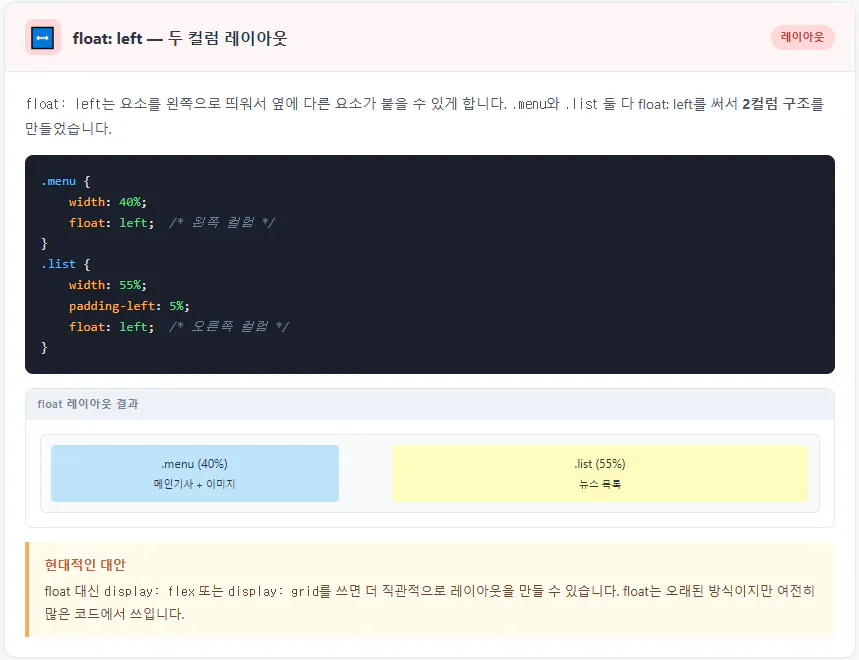
많이 쓰기는 하지만 현대적인 대안을 설명해 주더라구요.
아 이런게 있구나.... 계속 배워야 하는 모양입니다.
일단 현대적인 대안으로 공부를 더 해보고 발전해 봐야 겠습니다.
