


소개
제 컴퓨터가 아닌 곳에서 일을 하게 되어서 제미나이에게도 일을 시켜볼 수 있을까 하고 진행을 해 보았습니다.
수업에서 학생들이 블록과 인라인에 대해서 잘 모르기 때문에 강의 자료를 만들어 놓으면 좋을 것 같아서 아주 간단하게 만들었습니다.
진행 방법
어떤 도구를 사용했고, 어떻게 활용하셨나요?
Gamini3 pro 사용했습니다.
Tip: 사용한 프롬프트 전문을 꼭 포함하고, 내용을 짧게 소개해 주세요.
block 태그와 inline 태그의 차이를 알려주는 웹 페이지를 만들어 줬으면 해. html 단일 파일로 만들어주고, 파일 다운로드 받을 수 있도록 해줘.
파일 다운로드 해달라고 했는데 코드를 그냥 작성해 주더라구요.
Tip: 활용 이미지나 캡처 화면을 꼭 남겨주세요.
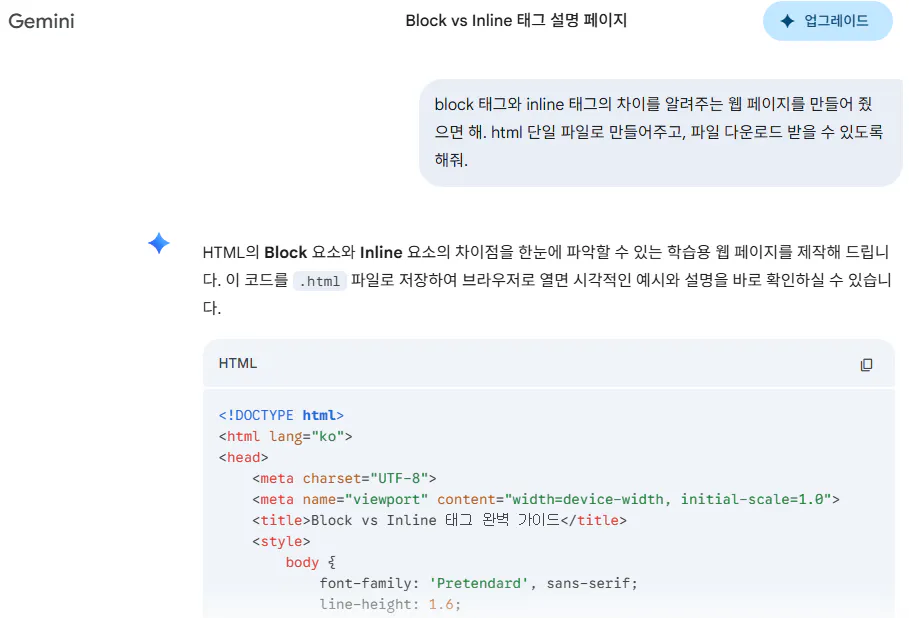
한국어 문자 메시지 스크린샷
Tip: 코드 전문은 코드블록에 감싸서 작성해주세요. ( / 을 눌러 '코드 블록'을 선택)
<!DOCTYPE html>
<html lang="ko">
<head>
<meta charset="UTF-8">
<meta name="viewport" content="width=device-width, initial-scale=1.0">
<title>Block vs Inline 태그 완벽 가이드</title>
<style>
body {
font-family: 'Pretendard', sans-serif;
line-height: 1.6;
color: #333;
max-width: 800px;
margin: 0 auto;
padding: 20px;
background-color: #f8f9fa;
}
h1 { border-bottom: 3px solid #007bff; padding-bottom: 10px; }
section {
background: #fff;
padding: 20px;
margin-bottom: 20px;
border-radius: 8px;
box-shadow: 0 2px 5px rgba(0,0,0,0.1);
}
.visual-box {
padding: 15px;
border: 2px dashed #ccc;
margin: 10px 0;
}
/* 스타일 적용 시각화 */
.block-ex {
background-color: #e7f3ff;
border: 1px solid #007bff;
margin-bottom: 5px;
padding: 5px;
}
.inline-ex {
background-color: #ffeef0;
border: 1px solid #ff4d4f;
padding: 2px 5px;
}
code {
background: #eee;
padding: 2px 4px;
border-radius: 4px;
}
table {
width: 100%;
border-collapse: collapse;
margin-top: 10px;
}
th, td {
border: 1px solid #ddd;
padding: 12px;
text-align: left;
}
th { background-color: #f2f2f2; }
</style>
</head>
<body>
<h1>HTML 레이아웃: Block vs Inline</h1>
<section>
<h2>1. Block (블록 레벨 요소)</h2>
<p>항상 <strong>새로운 라인</strong>에서 시작하며, 부모 요소의 <strong>전체 너비</strong>를 차지합니다.</p>
<div class="visual-box">
<div class="block-ex">Block 요소 1 (div)</div>
<div class="block-ex">Block 요소 2 (div)</div>
</div>
<ul>
<li>크기 지정: <code>width</code>, <code>height</code> 사용 가능</li>
<li>상하좌우 마진/패딩: 모두 적용 가능</li>
<li>대표 태그: <code><div></code>, <code><h1~6></code>, <code><p></code>, <code><ul></code>, <code><li></code> 등</li>
</ul>
</section>
<section>
<h2>2. Inline (인라인 레벨 요소)</h2>
<p>새로운 라인에서 시작하지 않으며, <strong>콘텐츠의 크기만큼만</strong> 너비를 차지합니다.</p>
<div class="visual-box">
<span class="inline-ex">Inline 요소 1 (span)</span>
<span class="inline-ex">Inline 요소 2 (span)</span>
<span class="inline-ex">텍스트와 함께 쓰임</span>
</div>
<ul>
<li>크기 지정: <code>width</code>, <code>height</code> <strong>적용 불가</strong></li>
<li>상하 마진: <strong>적용 불가</strong> (좌우만 가능)</li>
<li>대표 태그: <code><span></code>, <code><a></code>, <code><img></code>, <code><strong></code> 등</li>
</ul>
</section>
<section>
<h2>3. 핵심 차이점 비교</h2>
<table>
<thead>
<tr>
<th>특징</th>
<th>Block</th>
<th>Inline</th>
</tr>
</thead>
<tbody>
<tr>
<td>줄바꿈</td>
<td>항상 일어남</td>
<td>줄바꿈 없이 옆으로 나열</td>
</tr>
<tr>
<td>기본 너비</td>
<td>부모 요소의 100%</td>
<td>콘텐츠 크기만큼</td>
</tr>
<tr>
<td>크기 설정</td>
<td>width/height 가능</td>
<td>불가능</td>
</tr>
<tr>
<td>포함 관계</td>
<td>다른 블록, 인라인 모두 포함 가능</td>
<td>인라인 요소만 포함 가능 (블록 포함 X)</td>
</tr>
</tbody>
</table>
</section>
<script>
// 파일 다운로드 기능 (참고용)
function downloadHTML() {
const element = document.createElement('a');
const file = new Blob([document.documentElement.outerHTML], {type: 'text/html'});
element.href = URL.createObjectURL(file);
element.download = "block_vs_inline.html";
document.body.appendChild(element);
element.click();
}
</script>
</body>
</html>코드는 이렇게 작성해 줬는데요.
하단 스크립트는 제거했습니다.
다운로드를 받게 해줄건 아니라서.
결과와 배운 점
Gamini3로도 코드 구현이 되는건 알았지만 다운로드는 안 해주는 구나. 좀 아쉬웠습니다.
무료 버전에서 중고등학생들과 5주간 뭘 만들어 보면 좋을 것 같은데 간단한 웹 페이지를 만드는 것을 해보면 좋지 않을까 해서 교안을 만들어 보려고 합니다.
