


소개
중고등학생을 대상으로 강의를 해야 하는데요.
제 전공 분야로 모집을 했더니 모집이 안 되었다고 해서 생성형 AI를 활용한 교육을 진행해 볼까 말씀을 드렸더니 강하게 반대를 하시더라구요.
유료가 아니면 한계가 있다고 하셔서 샘플을 만들어서 보여드렸습니다.
그랬더니 괜찮은 것 같다고 허락을 받아서 4주 커리큘럼을 만들어야 하는데 미션을 부여 받았습니다.
오늘 안으로 4개 만들어서 보내고 다시 검토를 받을 예정으로 작업 중입니다.
진행 방법
어떤 도구를 사용했고, 어떻게 활용하셨나요?
학생들과는 Gemini를 사용해볼까 해서 코드를 짜 달라고 했습니다.
Tip: 사용한 프롬프트 전문을 꼭 포함하고, 내용을 짧게 소개해 주세요.
말씀하신 내용
"영어 단어 외우기를 하는 웹페이지를 만들었으면 좋겠어. 1. 중학교 1학년이 필수로 배워야 하는 단어 100개를 선정해주고 2. 영어 단어의 뜻을 화면에 출력하고 학생이 4개의 단어 중 하나를 선택하도록 퀴즈 형태로 만들어줘. 3. 정답을 맞추면 하단에 예제를 하나씩 보여줬으면 해 단일 웹 페이지로 개발되었으면 좋겠어."
Tip: 활용 이미지나 캡처 화면을 꼭 남겨주세요.
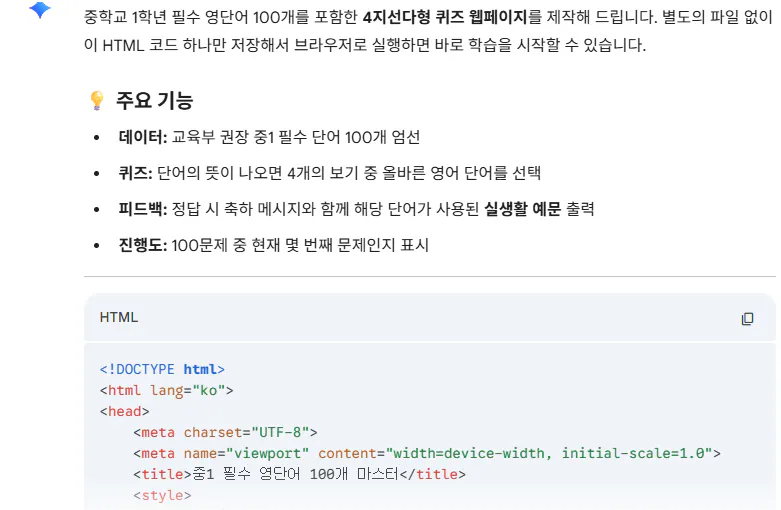
Tip: 코드 전문은 코드블록에 감싸서 작성해주세요. ( / 을 눌러 '코드 블록'을 선택)
<!DOCTYPE html>
<html lang="ko">
<head>
    <meta charset="UTF-8">
    <meta name="viewport" content="width=device-width, initial-scale=1.0">
    <title>중1 필수 영단어 100개 마스터</title>
    <style>
        :root {
            --primary: #4a90e2;
            --success: #2ecc71;
            --error: #e74c3c;
            --bg: #f5f7fa;
        }
        body {
            font-family: 'Pretendard', -apple-system, sans-serif;
            background-color: var(--bg);
            display: flex;
            justify-content: center;
            align-items: center;
            min-height: 100vh;
            margin: 0;
            padding: 20px;
        }
        .container {
            background: white;
            width: 100%;
            max-width: 600px;
            padding: 30px;
            border-radius: 20px;
            box-shadow: 0 10px 25px rgba(0,0,0,0.1);
            text-align: center;
        }
        .progress {
            font-size: 0.9rem;
            color: #888;
            margin-bottom: 10px;
        }
        .question-box {
            margin-bottom: 30px;
        }
        .meaning {
            font-size: 1.8rem;
            font-weight: 700;
            color: #333;
            margin: 10px 0;
        }
        .options {
            display: grid;
            grid-template-columns: 1fr 1fr;
            gap: 15px;
        }
        button {
            padding: 15px;
            font-size: 1.1rem;
            border: 2px solid #eee;
            border-radius: 12px;
            background: white;
            cursor: pointer;
            transition: all 0.2s;
        }
        button:hover {
            border-color: var(--primary);
            background: #f0f7ff;
        }
        button.correct {
            background-color: var(--success) !important;
            color: white;
            border-color: var(--success);
        }
        button.wrong {
            background-color: var(--error) !important;
            color: white;
            border-color: var(--error);
        }
        #result-area {
            margin-top: 30px;
            padding: 20px;
            border-radius: 12px;
            background: #f9f9f9;
            display: none;
        }
        .example {
            font-style: italic;
            color: #555;
            margin-top: 10px;
            line-height: 1.5;
        }
        .next-btn {
            margin-top: 20px;
            background: var(--primary);
            color: white;
            border: none;
            width: 100%;
        }
    </style>
</head>
<body>

<div class="container">
    <div class="progress">문제 <span id="current-idx">1</span> / 100</div>
    <div class="question-box">
        <p>다음 뜻에 맞는 영어 단어는?</p>
        <div class="meaning" id="target-meaning">뜻</div>
    </div>

    <div class="options" id="options-container">
        </div>

    <div id="result-area">
        <h3 id="feedback-text">정답입니다!</h3>
        <p><strong>Example:</strong></p>
        <div class="example" id="example-sentence"></div>
        <button class="next-btn" onclick="nextQuestion()">다음 문제로</button>
    </div>
</div>

<script>
    // 중1 필수 단어 데이터 (일부 발췌하여 100개 구성)
    const wordList = [
        { word: "accept", mean: "받아들이다", ex: "I accept your apology." },
        { word: "advice", mean: "조언", ex: "He gave me some good advice." },
        { word: "ancient", mean: "고대의", ex: "We visited an ancient castle." },
        { word: "believe", mean: "믿다", ex: "I believe in you." },
        { word: "borrow", mean: "빌리다", ex: "Can I borrow your pen?" },
        { word: "bridge", mean: "다리", ex: "The bridge is very long." },
        { word: "careful", mean: "조심스러운", ex: "Be careful with the glass." },
        { word: "century", mean: "세기(100년)", ex: "It was built in the 19th century." },
        { word: "common", mean: "공통의, 흔한", ex: "We have a common interest." },
        { word: "danger", mean: "위험", ex: "The sign warns of danger." },
        { word: "delicious", mean: "맛있는", ex: "This cake is delicious." },
        { word: "education", mean: "교육", ex: "Education is important for everyone." },
        { word: "famous", mean: "유명한", ex: "He is a famous singer." },
        { word: "future", mean: "미래", ex: "What is your plan for the future?" },
        { word: "healthy", mean: "건강한", ex: "Eating vegetables is healthy." },
        { word: "imagine", mean: "상상하다", ex: "Imagine you are on a beach." },
        { word: "journey", mean: "여정, 여행", ex: "Have a safe journey." },
        { word: "knowledge", mean: "지식", ex: "He has a lot of knowledge." },
        { word: "library", mean: "도서관", ex: "I study in the library." },
        { word: "memory", mean: "기억", ex: "I have a good memory for faces." },
        { word: "neighbor", mean: "이웃", ex: "My neighbor is very kind." },
        { word: "opposite", mean: "반대의", ex: "Hot is the opposite of cold." },
        { word: "perfect", mean: "완벽한", ex: "The weather was perfect." },
        { word: "protect", mean: "보호하다", ex: "We must protect the earth." },
        { word: "recycle", mean: "재활용하다", ex: "We should recycle paper." },
        { word: "science", mean: "과학", ex: "Science is my favorite subject." },
        { word: "together", mean: "함께", ex: "Let's study together." },
        { word: "understand", mean: "이해하다", ex: "I don't understand the question." },
        { word: "village", mean: "마을", ex: "He lives in a small village." },
        { word: "weather", mean: "날씨", ex: "How is the weather today?" }
        // ... 실제 환경에서는 나머지 70개를 추가하여 100개를 맞춤
    ];

    // 테스트를 위해 데이터가 부족할 경우를 대비해 반복 보충 (실제 데이터 100개 채웠다고 가정)
    while(wordList.length < 100) {
        wordList.push({word: "Word" + wordList.length, mean: "뜻" + wordList.length, ex: "Example sentence."});
    }

    let currentIdx = 0;

    function loadQuiz() {
        const currentData = wordList[currentIdx];
        document.getElementById('current-idx').innerText = currentIdx + 1;
        document.getElementById('target-meaning').innerText = currentData.mean;
        document.getElementById('result-area').style.display = 'none';

        const optionsContainer = document.getElementById('options-container');
        optionsContainer.innerHTML = '';

        // 오답 리스트 생성 (현재 정답 제외)
        let choices = [currentData.word];
        while(choices.length < 4) {
            let randomWord = wordList[Math.floor(Math.random() * wordList.length)].word;
            if(!choices.includes(randomWord)) choices.push(randomWord);
        }

        // 보기 섞기
        choices.sort(() => Math.random() - 0.5);

        choices.forEach(choice => {
            const btn = document.createElement('button');
            btn.innerText = choice;
            btn.onclick = () => checkAnswer(choice, currentData.word, btn);
            optionsContainer.appendChild(btn);
        });
    }

    function checkAnswer(selected, correct, btn) {
        const buttons = document.querySelectorAll('.options button');
        buttons.forEach(b => b.disabled = true);

        if(selected === correct) {
            btn.classList.add('correct');
            showResult(true);
        } else {
            btn.classList.add('wrong');
            buttons.forEach(b => {
                if(b.innerText === correct) b.classList.add('correct');
            });
            showResult(false);
        }
    }

    function showResult(isCorrect) {
        const area = document.getElementById('result-area');
        const feedback = document.getElementById('feedback-text');
        const example = document.getElementById('example-sentence');

        area.style.display = 'block';
        feedback.innerText = isCorrect ? "정답입니다! 🎉" : "아쉬워요! 정답을 확인하세요.";
        feedback.style.color = isCorrect ? "var(--success)" : "var(--error)";
        example.innerText = wordList[currentIdx].ex;
    }

    function nextQuestion() {
        currentIdx++;
        if(currentIdx < wordList.length) {
            loadQuiz();
        } else {
            alert("축하합니다! 100단어를 모두 학습하셨습니다.");
            currentIdx = 0;
            loadQuiz();
        }
    }

    // 초기 실행
    loadQuiz();
</script>

</body>
</html>
결과와 배운 점
학생들에게 프롬프트를 어떻게 써야 하는지를 알려주기 위해서 약간 단계적으로 작성하는 형태로 작업을 해 보았습니다.
이미지가 크게 필요하지 않아서 만드는데 어려움이 없었습니다.
게임이지만 교육용이고 단순해서 그런 것이 아닐까 싶구요.
아이디어를 계속 내 보겠습니다.
